
Most first-time founders hire a development team before they have decided what they are actually buying. The pitch looks polished, the quote looks reasonable, and the questions that matter get skipped until the first missed deadline.
That gap is where outsourced app projects tend to go wrong. If you are weighing outsourcing software development for startups, the partner you pick matters less than the questions you ask before signing with anyone. A strong team will welcome them. A weak one will dodge them.
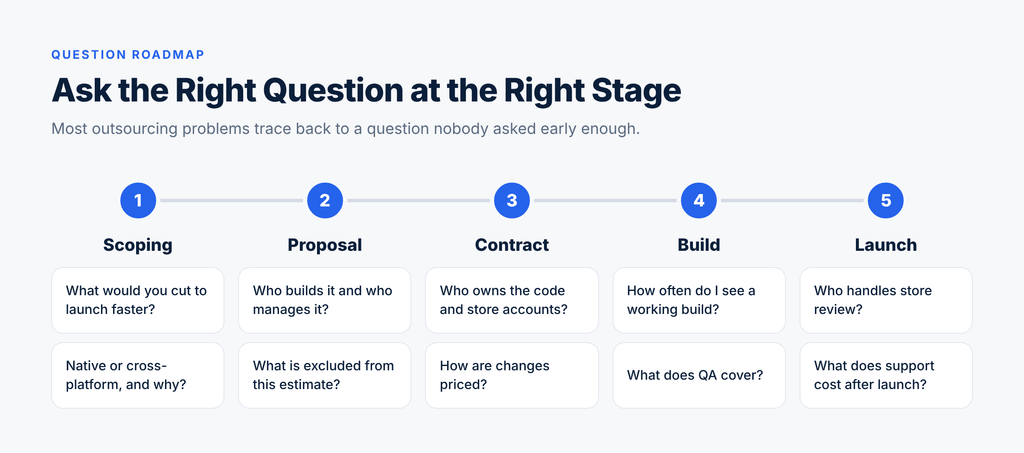
This guide walks through the questions worth asking at each stage, from scoping to post-launch support, along with what a good answer sounds like. The roadmap below works as a quick reference. The sections after it give the detail.
Start With What the App Has to Prove
Before you talk to any vendor, decide what job version one has to do. Are you validating demand with real users, winning a pilot customer, or extending an existing business onto mobile? Each goal points to a different scope, and a clear goal makes every later question easier to answer.
Write it down in a single sentence. “Let 50 customers book and pay for a service from their phone” is a scope. “Build the Uber of dog grooming” is a wish.
Then test your shortlist with one question: “What would you cut from this scope to launch faster?” A good team will name specific features and explain why they can wait. A weak one will agree to build everything, which usually means a bigger quote and a later launch. Your first release should be the smallest product that proves the idea, and the best partners know how to protect that.
Native vs Cross-Platform Decisions Get Made Earlier Than Founders Expect
Many founders assume the technology choice happens once the build starts. In practice it gets locked in during the first scoping call, when a vendor sketches an estimate around whichever approach they prefer. By the time a proposal lands in your inbox, the budget, timeline and hiring plan already assume it.
The two options work like this. A native app is built separately for each platform, usually in Swift for iOS and Kotlin for Android, which gives you two codebases. A cross-platform app uses a framework such as Flutter or React Native, so one codebase serves both app stores.
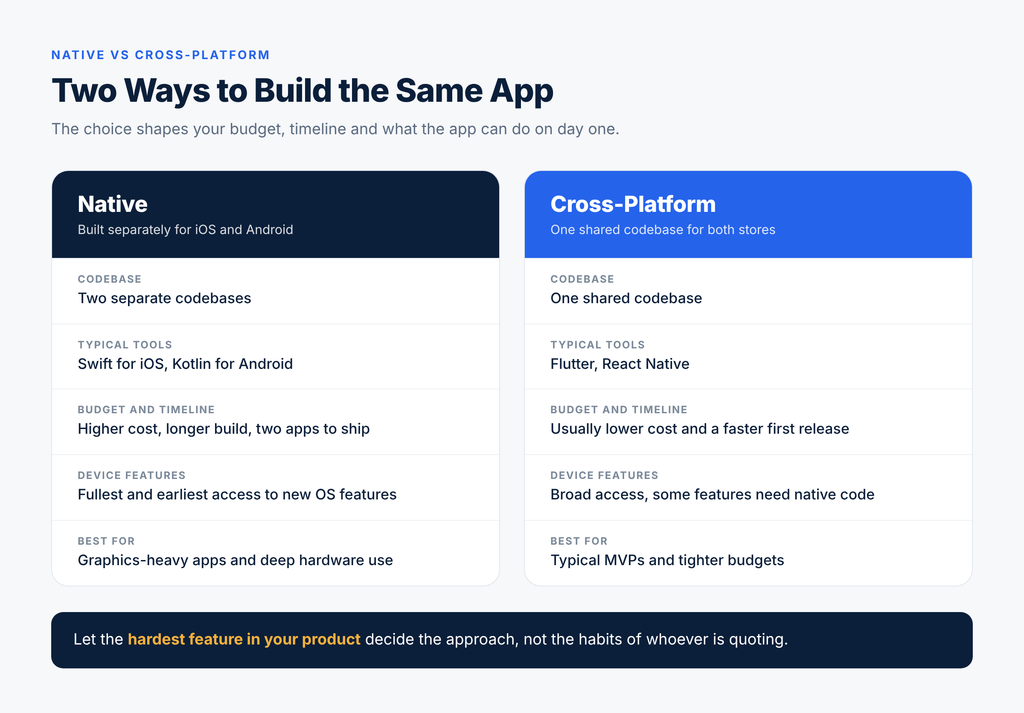
The choice reaches well beyond code. It shapes your budget, because two builds usually cost more than one. It shapes your timeline, because a shared codebase often reaches both stores faster. It affects performance and device access, since native gets the fullest and earliest access to new operating system features. It also affects hiring later, because the people who can maintain your app depend on what it is built with.
Native tends to make sense for graphics-heavy products, apps that lean on deep hardware features, and products where raw performance is the selling point. Cross-platform tends to suit typical first versions, such as marketplaces, booking tools, content apps and internal business apps, where speed to market and budget matter most.
What founders often miss is who is making the call. A good sign is when mobile app developers explain why they would pick one approach for your product instead of defaulting to whatever they build most. If every project they describe uses the same stack, the recommendation may reflect their habits more than your needs.
Ask two questions here. First, “Which approach would you recommend for my use case, and why?” Look for an answer that points to your actual features, not a general preference. Second, “What would it cost to switch later?” Moving from cross-platform to native after launch is possible but rarely cheap, and you should hear a straight answer before you commit.
Ask Who Will Actually Build It
The person who sells you the project is rarely the person who builds it. Many agencies have a polished sales team and a delivery team you never meet until the contract is signed.
Ask to speak with the lead developer, not only the account manager. Then work through a few basics:
- Is the team dedicated to your project, or shared across several clients?
- Is any of the work subcontracted to other companies?
- Can they show you similar apps they have shipped, and can you speak to one of those clients?
Also settle the practical side early. Find out which time zones the team works in, how often you will get updates, and who your single point of contact is. Weekly demos of working software are a much better signal than weekly status emails. Communication gaps are one of the most common risks in the pros and cons of outsourcing, and they are easiest to fix before work begins.
Ask How They Handle Scope, Estimates and Changes
Pricing models shape behavior on both sides, so it helps to know which one you are signing. Under a fixed price, you know the cost upfront, but changes tend to get expensive and a vendor protecting its margin may cut corners. Under time and materials, you stay flexible as you learn from users, but the budget can drift without caps and regular reviews.
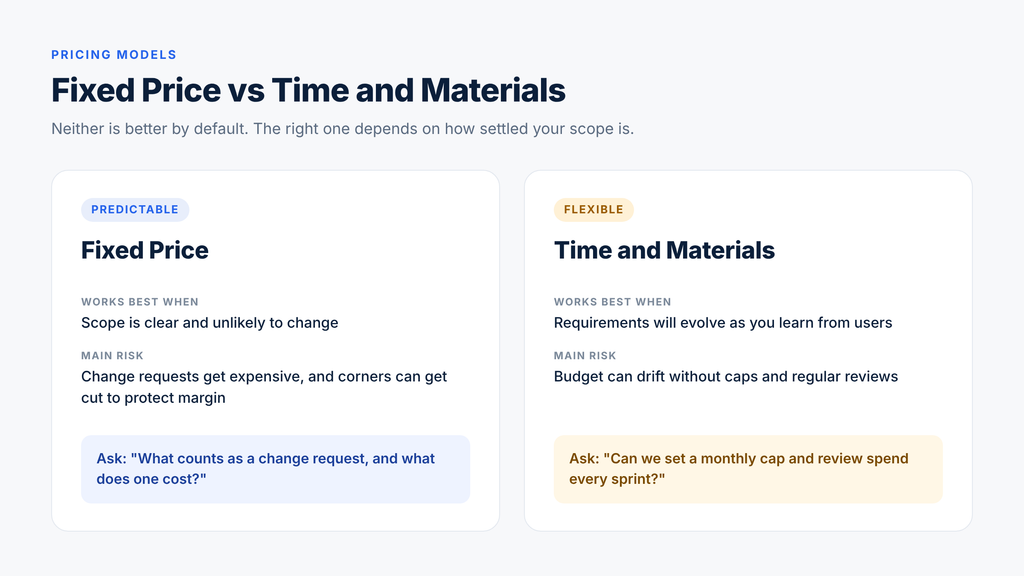
Neither model is better by default. A fixed price suits a settled scope. Time and materials suits a product that will evolve. What matters is that the vendor can explain how the model works in practice, including what happens when you change your mind midway.
Ask to see how the estimate is built. A credible estimate breaks the work into features and hours, and it states what is excluded. Design, quality assurance, backend work, an admin dashboard and project management are the items most often left out of a first quote, then added later as extras.
Finally, ask this: “What typically causes projects like mine to go over budget?” Experienced teams have a ready answer, usually unclear requirements, late changes or third-party integrations. A vendor who says their projects never go over budget is either new or not being honest.
Ask Who Owns the Code, Accounts and IP
This is the question most first-time founders forget, and the one that hurts most when the relationship ends. Your contract should state in plain language that you own the source code and all intellectual property created for the project, with ownership passing to you on payment.
Check three things before you sign:
- Code and repository access. You should have access to the source code repository during the build, not only at the end.
- Store and cloud accounts. The Apple Developer and Google Play accounts, plus any hosting and analytics accounts, should be registered under your business, not the agency’s.
- Documentation and handover. Ask what you receive if the relationship ends, including setup notes that let another team take over without starting from scratch.
An app that lives in a vendor’s accounts is an app you can be locked out of. Setting this up correctly on day one costs nothing and removes a major risk.
Ask About Testing, Launch and Store Review
Launching an app is not the same as finishing it. Ask how the team tests, which devices and operating system versions they cover, and whether testing is built into the schedule or treated as an optional extra. An app that works on the developer’s phone can still fail on older devices your customers actually use.
Then ask who handles app store submission. Both Apple and Google review apps before they go live, and rejections are common enough that you should plan for one. Find out who prepares the listing, who responds to reviewer feedback, and whether time for a resubmission is included in the schedule.
Security and privacy deserve a few direct questions too. How will user data be stored and protected? Which third-party services will touch it? If your app handles payments or personal information, the vendor should be able to explain their approach without hesitation.
Ask About Support and Ongoing Costs After Launch
The quote for the build is not the full cost of owning an app. Apple and Google release major operating system updates every year, and your app will need to keep up. Bugs will surface once real users arrive. Features you postponed will come back onto the list.
Ask what support looks like after launch. Is there a warranty period for bug fixes? Is there a maintenance retainer, and what does it cover? What are the response times if something breaks?
Also list the costs that sit outside the build quote: developer account fees, hosting, third-party services and tools. These recurring costs are easy to overlook and can add up quickly. A useful exercise is to ask for a plan for the first 90 days after launch, covering who monitors the app, who fixes issues and how new requests get prioritized.
4 Red Flags to Watch For
Some warning signs show up early, often in the first two calls. The scorecard below puts the strongest signals side by side.

Treat vague answers about who will build the product as a serious concern. The same goes for an estimate with no breakdown, pressure to sign within days, and a vendor who proposes the same solution to every client. Another quiet warning sign is a team that asks nothing about your users or goals. If they are not curious about who the app is for, they are unlikely to build something those people will use.
Better Questions Make Better Partnerships
The best outsourcing relationships start with better questions, not lower quotes. Scoping, team, pricing, ownership, launch and support are all places where a few minutes of honest conversation can save months of rework. Take this list into your next scoping call and notice how each vendor responds. The way they answer will tell you more than any portfolio.
And if you decide that a dedicated hire fits your plans better than an agency, you can hire a mobile developer through Genius and keep the whole build under your own direction.