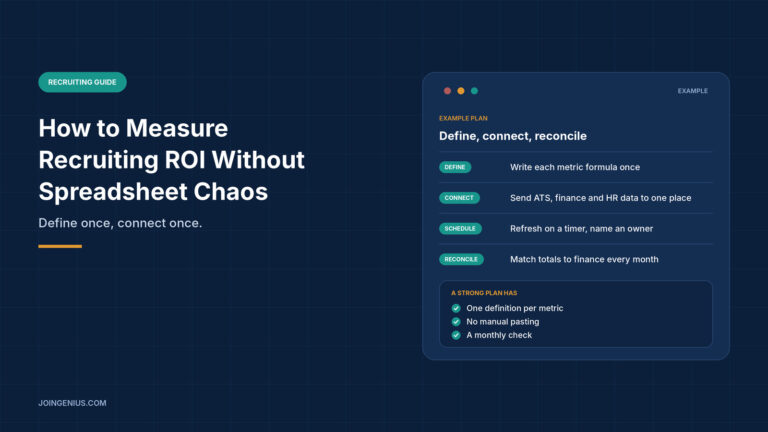
A recruiting manager sits down to build the monthly report. She exports candidates from the applicant tracking system, pastes agency invoices from finance, and adds offer details from an email thread. A formula points one row too high, the total stops matching finance, and at the next leadership meeting two reports show two different cost-per-hire figures. This is an illustration, not a case study, but most hiring teams will recognize the afternoon it describes.
This guide explains how to measure recruiting ROI without spreadsheet chaos. It covers what ROI means for hiring, why spreadsheets drift, what research says about measuring the quality of a hire, how to connect the data you already have, a four-step plan, and a table of warning signs. For the formula behind one of the main inputs, see our guide on how to calculate cost per hire.
What Recruiting ROI Actually Means
Recruiting ROI compares what hiring costs with what the hires deliver. The cost side is easier to collect: recruiter time, agency fees, job board spend, referral bonuses, and tools. The return side is harder, because it depends on how well the people you hire perform and how long they stay.
A usable set has four measures. Cost per hire shows what each hire cost. Time to fill shows how long a role stayed open. Source of hire shows which channels produced the people you kept. A quality-of-hire measure, such as first-year retention or a manager rating at 90 days, shows what you got for the money.
Decide the time window before you decide the numbers. A quarter’s hires cannot show their full return within that quarter, so report cost per hire, time to fill, and source of hire as soon as hires start, and report retention and manager ratings as they come in, tied back to the hiring period.
Standards bodies treat these definitions seriously. ISO publishes technical specifications for them. ISO/TS 30407 describes actions to take when calculating cost per hire to maintain quality and transparency, and ISO/TS 30430 covers recruitment, mobility and turnover with a formula for comparable measures.
The formulas sit behind ISO’s paywall, so this guide does not reproduce them. The principle carries over to any team: write each definition down once and use it everywhere.
Why Spreadsheet Chaos Happens
Stephen Powell, Kenneth Baker and Barry Lawson audited 50 operational spreadsheets in a 2009 paper in the Journal of Organizational and End User Computing. Under their inclusive definition, 94% contained errors, and 1.79% of cells were wrong.
The most common error type was hard-coding, meaning numbers typed into formulas, which accounted for 37.7% of error instances. Reference errors and logic errors made up most of the rest. The sample was not random, and the auditors saw only the files, not the people who built them, so the authors expect the true figures to be higher.
The spreadsheets came from consulting firms, a bank, a college, an energy company, and a state agency, not from recruiting teams. The pattern still maps cleanly onto hiring reports. Every number pasted from an ATS export or an invoice is a hard-coded value that never updates. Every manual copy invites a misaligned row. A report built from five exports has five chances per month to drift from the others.
The fix is not a better formula. It is fewer manual steps between the source and the report.
![Three evidence cards, 94 percent of 50 operational spreadsheets containing errors in Powell and colleagues, validity of .42 for structured interviews in a HumRRO summary of Sackett and colleagues and ISO technical specification 30407 on calculating cost per hire, each with its limit]](https://joingenius.com/wp-content/uploads/2026/10/body-1-recruiting-roi-evidence-1024x576.jpg)
What the Research Says About Measuring Quality of Hire
The return side of recruiting ROI depends on selection quality, and research on selection methods gives you something concrete to record. Paul Sackett, Charlene Zhang, Christopher Berry, and Filip Lievens revisited the validity of hiring methods in a 2022 Journal of Applied Psychology paper.
A HumRRO summary reports validity of .42 for structured interviews, .40 for job knowledge tests, and .33 for work sample tests. The authors report that earlier estimates were inflated by range restriction corrections, and that validity varies across settings. The figures describe general job performance across many roles, not any one company’s hires.
For measurement, the practical lesson is to store the structured scores. If every candidate is rated on the same questions and the scores sit in a data field next to the hire, you can later compare scores with retention and manager ratings. Without that field, quality of hire stays a story told in hindsight. Our guide to recruitment analytics covers the metrics themselves in more depth.
Connect the Data You Already Have Instead of Copy-Pasting It
Most teams already hold the data they need. The ATS has candidates, stages, and dates. Finance has invoices and payroll. The HR system has start dates and exits. The problem is the copying between them.
Start by listing each source and what it owns: the ATS owns stages and sources, finance owns spend, and the HR system owns hires and exits. Give every candidate and hire the same ID in each export, so records join without anyone matching names by hand. Then export each source on a fixed schedule to a single sheet or database, and keep the raw exports in their own tabs or tables with no formulas on top.
Put the calculations in a separate layer that reads from the raw data. When a number is wrong, you then know whether the source or the calculation is at fault. Better Analyst dashboards re-pull your data daily, weekly, or monthly, keep your edits through every refresh, and connect to Google Sheets, Airtable, and databases such as PostgreSQL and BigQuery. Point one at the sheet where your ATS export lands, and the recruiting ROI report updates itself instead of being rebuilt each month.
Whichever tool you use, keep definitions in one place. A short document that states how cost per hire, time to fill, and quality of hire are calculated stops two people from producing two answers. Our guide to HR report types lists templates you can build on once the data is flowing.
A Four-Step Plan to Measure Recruiting ROI
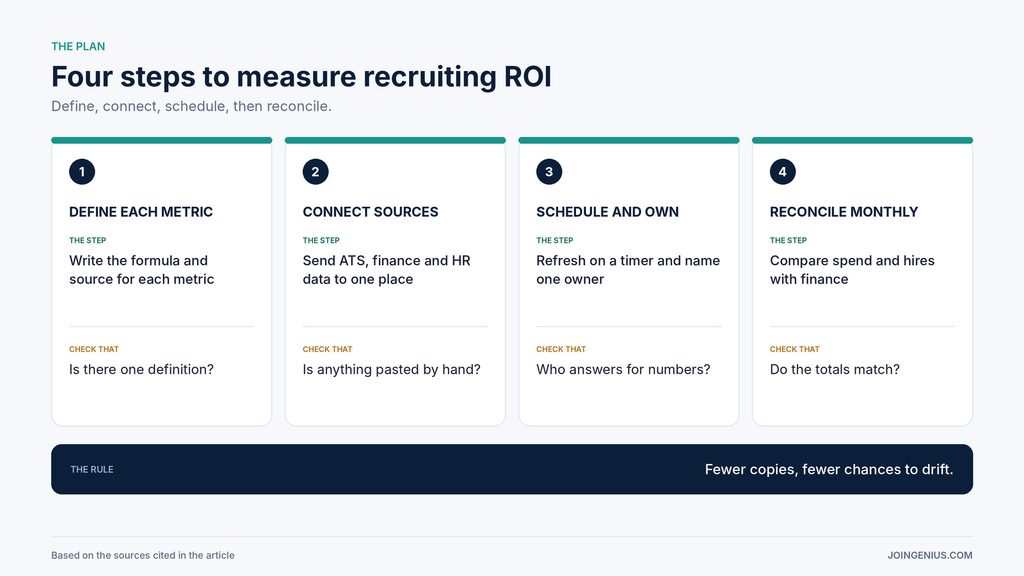
Use this four-step plan to set up reporting you can trust.
- Define each metric once. Write the formula and the data source for cost per hire, time to fill, source of hire, and quality of hire.
- Connect the sources. Send the ATS, finance, and HR exports to one place on a fixed schedule, with no manual pasting.
- Schedule the refresh and name an owner. Set the report to update daily, weekly, or monthly, and name one person who answers for the numbers.
- Reconcile monthly. Compare total hiring spend and hire counts with finance and the HR system, and investigate any gap before the report goes out.
The owner in step three matters more than it looks. When one person answers for the numbers, questions about a figure have a single place to go, and fixes happen once instead of in every copy. The last step is what keeps the other three honest. A report that matches finance is one that leadership will use, and one that does not match will be questioned until someone rebuilds it by hand.
Measure Whether It Works
Track how many hours the monthly report takes to build, how many figures differ between reports, how many days pass between month-end and the finished report, and how many questions you can answer without rebuilding anything. A good result is a report that takes minutes to review and has no open disagreements. Keep a short log of every correction you make to the data, with the date and the reason.
Repeated corrections in the same field point to a source that needs fixing, and the log shows whether the data flow is getting cleaner over time. With a small hiring volume, the numbers are noisy, so read them over a quarter and not a single month. If your team also wants to check who moves through each stage, our guide to auditing your recruiting pipeline shows how to count stages in aggregate.
Warning Signs Your Recruiting ROI Numbers Cannot Be Trusted, and What to Do About Each
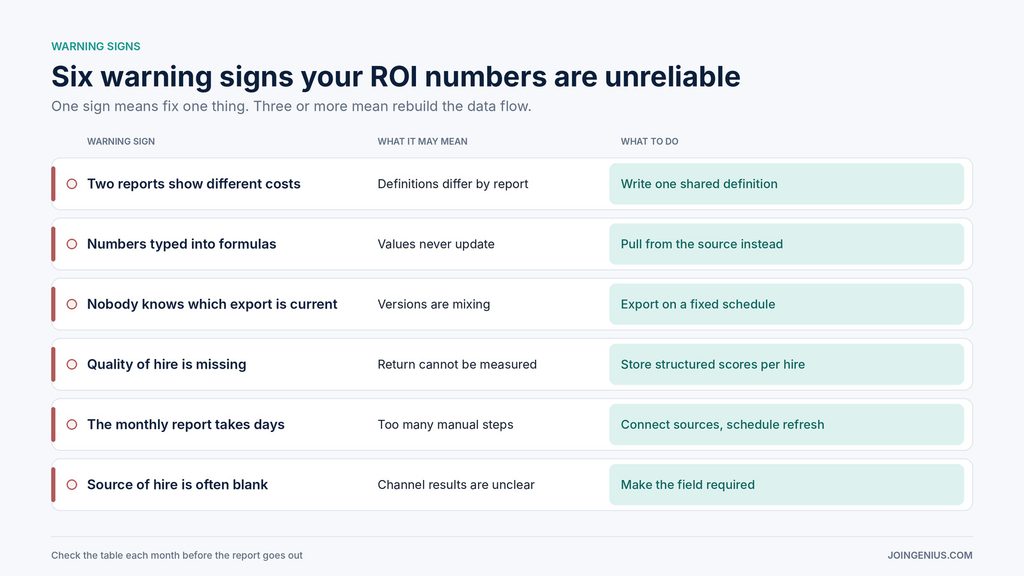
Check this table each month before the report goes out. One sign means fix one thing. Three or more mean pause and rebuild the data flow.
| Warning sign | What it may mean | What to do |
|---|---|---|
| Two reports show different costs | Definitions differ by report | Write one shared definition |
| Numbers typed into formulas | Values never update | Pull from the source instead |
| Nobody knows which export is current | Versions are mixing | Export on a fixed schedule |
| Quality of hire is missing | Return cannot be measured | Store structured scores per hire |
| The monthly report takes days | Too many manual steps | Connect sources, schedule refresh |
| Source of hire is often blank | Channel results are unclear | Make the field required |
Define Once, Connect Once, Check Monthly
Recruiting ROI is easier to measure when each definition lives in one place, each source feeds the report automatically, and someone checks the totals against finance every month. The research points the same way: spreadsheets with many manual steps tend to carry errors, and selection scores recorded at the time of hire give quality of hire something to be measured against. Define the metrics, connect the data you already have, and reconcile on a schedule. If the report matches finance and the team stops rebuilding it, you have replaced chaos with something you can check. For the wider set of measures, see our guide to talent acquisition analytics.