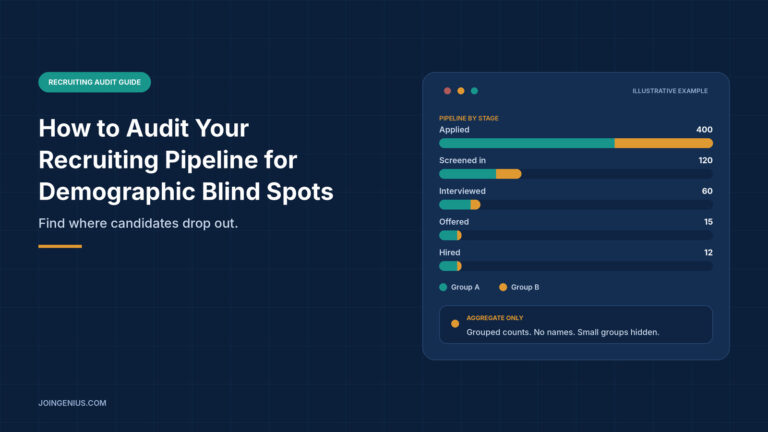
Most recruiting teams can tell you how many people they hired last quarter. Fewer can tell you who dropped out between the first application and the offer, and whether those drop-offs look the same for everyone. That gap is a demographic blind spot. It matters because a pipeline can look healthy at the top and quietly lose people at one specific stage.
An audit does not need a data science team. It needs clear stage definitions, a careful way to count, and honesty about what the data can and cannot tell you. This guide covers how to set up an audit, where the data can come from, how to read stage-by-stage results, and how to avoid the mistakes that make an audit misleading.
This guide is general information and not legal advice. Rules on collecting and using demographic data differ by country and region, so check yours with qualified counsel before you start.
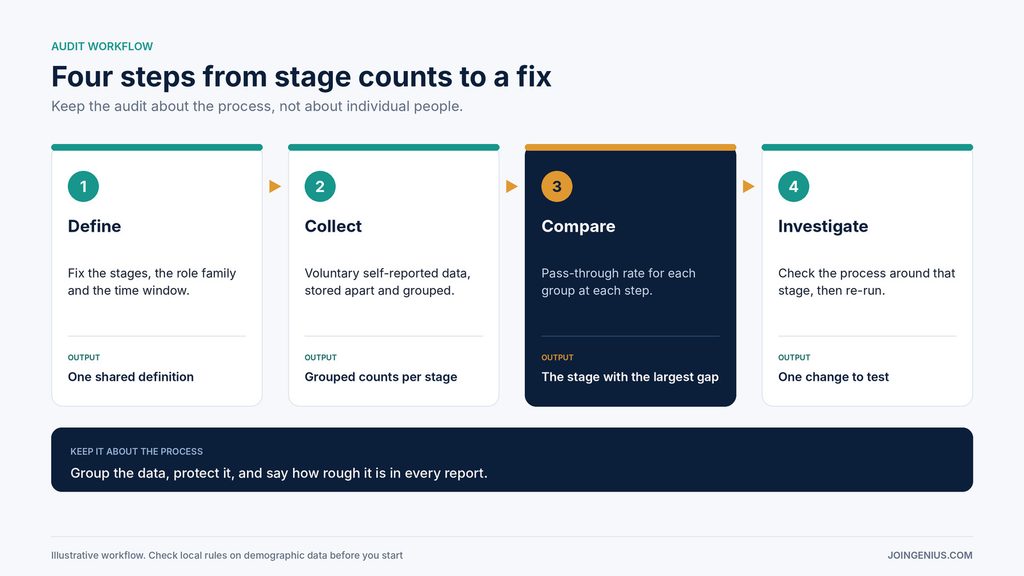
Define the Stages and the Question
Pick one role family and one time window, such as engineering roles over the last two quarters. Then define each stage so everyone counts the same way:
- Applied or sourced: a person entered the pipeline
- Screened in: they passed the first review
- Interviewed: they reached at least one live conversation
- Offered: an offer was made
- Hired: the offer was accepted
Write down what counts as a pass at each stage and who decides. Then write the question in plain words, for example: “At which stage do we lose the most candidates, and does that stage look different for different groups?” A narrow question keeps the audit from turning into a data dump that nobody acts on.
Decide up front who will see the results and how they will be reported. That choice affects how you collect the data in the first place.
Start With Data People Choose to Share
The most reliable demographic data is the kind candidates give you themselves. Offer a voluntary, clearly explained question at application. Store the answers separately from the application that reviewers see, and make “prefer not to say” a real option. Report only grouped results, and set a minimum group size below which numbers are not shown, so no individual can be identified.
Be clear with candidates about why you ask and how the data will be used. Our guide to diversity hiring covers how teams build this into their process. Whatever you collect, confirm the legal basis with counsel first.
Self-reported data has gaps. Some candidates skip the question, and older records may not have it at all. That is where teams start to look for other ways to fill in the picture, which brings up the most sensitive part of an audit.
Count Each Pipeline Stage in Aggregate, and Know What Name-Based Tools Can’t Tell You
When self-reported data is missing, some teams run a rough check on grouped numbers using name-to-gender checking. Genderize.io describes its service as returning the probability that a name is male or female, along with a count of the data points behind each result. The site says the results rest on statistical probability from a dataset of around a billion records, and that predictions reflect population statistics, not individual certainty.
That description already points to the limits, and the site states several of them itself:
- Results are binary. The service returns male or female and, as the site notes, cannot capture non-binary identities.
- Some names are ambiguous. Names used by both genders return probabilities near 50%, and some names return no prediction at all.
- Country matters. Naming conventions differ between countries, which is why the site recommends scoping by country when you know it.
- A name is not a person. A probability describes the population of people with that name, not the individual in your pipeline.

The Genderize site lists research, analytics and audience insights among its uses. It does not address hiring decisions, so the guardrails below are ours, not theirs. If you use any name-based estimate:
- Use it only on grouped counts for a whole stage, never on a single candidate.
- Never use it to sort, filter, rank or reject anyone.
- Treat the result as a rough direction and confirm it with self-reported data wherever you can.
- Leave out results with low probability or small counts instead of forcing them into a group, and report how many you excluded.
- Keep the audit team small and the data restricted.
These rules keep the audit about the process and not about people. If you cannot follow them, skip name-based estimates and work only with self-reported data.
Compare Pass-Through Between Stages
Once each stage has grouped counts, calculate the pass-through rate: the number of people who moved from one stage to the next, divided by the number who entered it. Look at the rate for each group at each step and note where the gaps are largest.
Suppose one group passes the screening stage at a noticeably lower rate than another, while the rates are close at every other stage. That points your attention to screening and not to sourcing or offers. A simple way to read it: if 100 people enter a stage and 30 move on, the pass-through rate is 30%. Do the same sum for each group at each step, then put the rates side by side. The example below uses made-up numbers to show the layout.
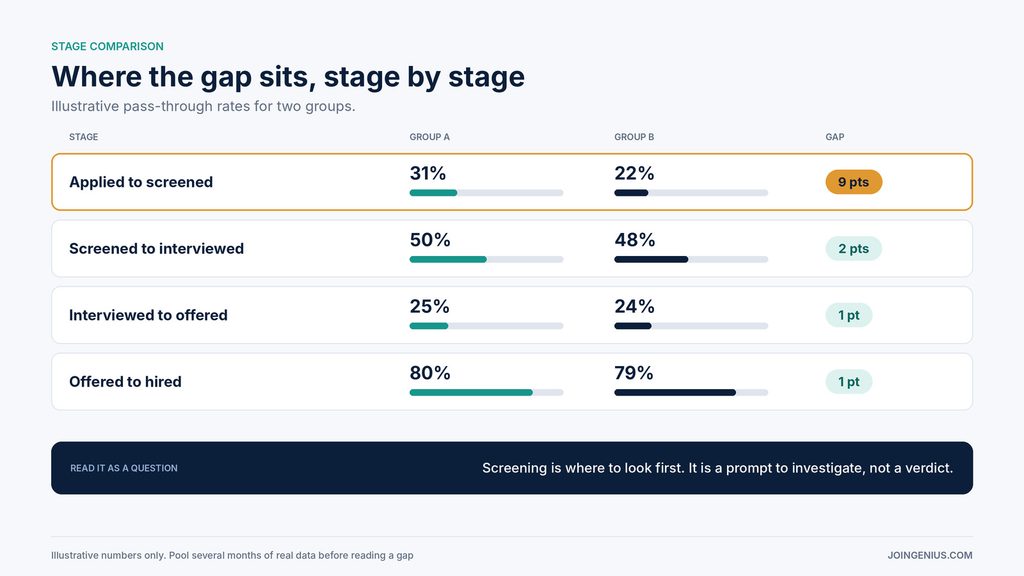
Two cautions apply. First, small numbers swing widely. A gap based on a dozen people can disappear next quarter, so pool several months or several roles before reading anything into it. Second, a gap is a question, not a verdict. It tells you where to look, not what went wrong. For more on which hiring numbers are worth tracking, see our guide to recruitment analytics.
Investigate the Cause Before You Act
When one stage stands out, check the process around it before you change anything:
- Job ads: Does the wording or the list of requirements discourage some people from applying?
- Sourcing channels: Are you drawing from the same few places every time?
- Screening criteria: Are they tied to the job, written down and applied the same way?
- Interview format: Do all candidates get the same questions and the same scoring guide?
- Reviewer judgment: Do different reviewers score the same candidate very differently?
Reviewer judgment deserves special care. Our guide to interviewer bias explains how first impressions and similarity skew decisions, and why structured scoring helps. Change one thing at a time, then run the audit again so you can tell whether it worked. Share what you find with the hiring managers involved, in plain language and with the caveats attached. People are far more willing to change a step when they have seen the numbers and understand how rough they are.
Warning Signs Your Pipeline Audit Is Misleading You, and What to Do About Each
An audit can fail quietly. It can produce neat charts that point you in the wrong direction. These signs show where that is happening, and each has a specific fix. One sign is a prompt to fix one thing. Several together mean pause the conclusions and repair the data first.

A Practical First Step
Choose one role family and one time window, ideally one with enough volume to produce meaningful counts. Define the five stages, collect voluntary self-reported data going forward, and count each stage in groups. Calculate the pass-through rates, pick the stage with the largest gap, and investigate that one process step before touching anything else.
Then repeat the audit next quarter. A single audit shows you where to look. Repeating it shows you whether your changes made a difference, and it turns a one-off exercise into a habit. Keep the focus on the process, keep the data grouped and protected, and be honest in every report about what the numbers can and cannot tell you. That honesty is what makes the results credible to the people who have to act on them.