WhatsApp booking is the quiet shift that has activity providers ditching web forms this year. Every yoga studio, kayak tour, and escape room that moved booking into the chat last quarter saw the same pattern: more completed bookings, fewer no-shows, and a customer who never had to open a browser to pay.
Below we cover why web forms are losing in 2026, what the chat flow actually looks like, how to set it up without losing control of the data, who owns it, and the signals that tell you whether to roll it out across every location. Start with the website redesign that won’t drive sales pattern.
Why Web Forms Are Losing In 2026
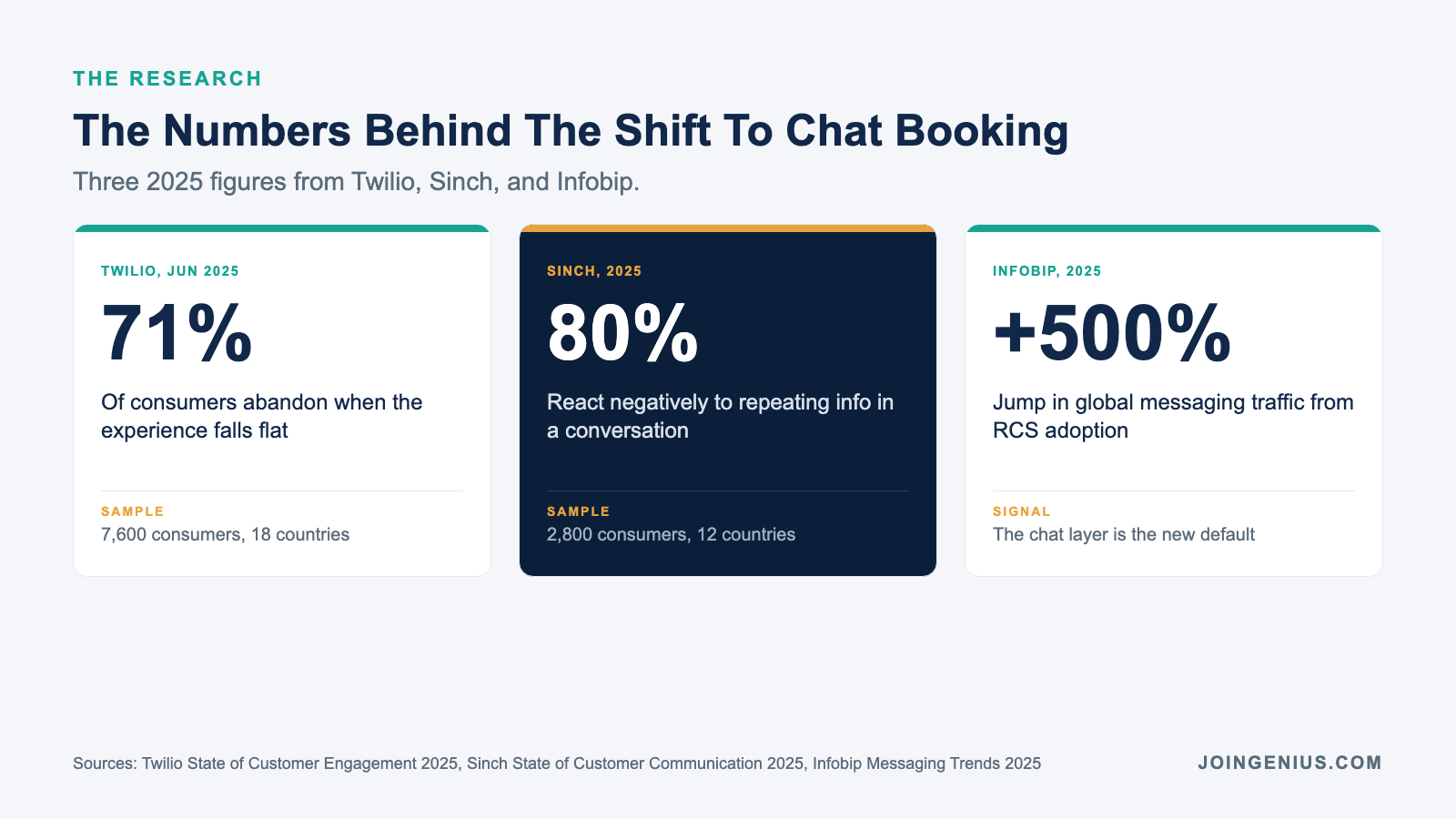
The web booking form was designed for a browser session that no longer happens. Customers now discover an activity on Instagram or TikTok, open DMs or messaging apps, and expect to complete the booking without a context switch. Three 2025 reports measured the same shift in different research traditions.
The Abandonment Gap Keeps Growing
Twilio’s State of Customer Engagement Report 2025, based on more than 7,600 consumers and 600+ business leaders across 18 countries, found 71% of consumers abandon purchases when the experience falls flat, and 88% are more likely to buy when engagement is personalized in real time. Only 44% of brands say they execute at that level.
Repeating Information Is A Silent Killer
Sinch’s State of Customer Communication 2025, drawn from 2,800 consumers across 12 countries and 1,600 business leaders, found 80% of consumers have a negative reaction when asked to repeat information during a support conversation. A web form that re-asks name, phone, and preference is the same friction in a different wrapper.
The Chat Channel Is Consolidating
Infobip’s Messaging Trends Report 2025 noted a 500% increase in global traffic tied to Apple’s RCS adoption. The signal is not RCS specifically; it is that the chat layer is now where the customer already is. WhatsApp belongs to the same consolidation on the activity provider side of the market.
What The WhatsApp Booking Flow Looks Like
A good WhatsApp booking flow does not look like a chat version of a web form. It looks like a short conversation that happens to end in a confirmed slot. The customer should feel like they are texting the studio, not filling out a questionnaire inside a chat window.
Discovery And First Message
Discovery usually happens on social. The customer sees a reel for a surf lesson, taps the WhatsApp button in the bio, and sends a one-line message: “do you have anything Saturday morning.”
The job of the booking flow starts there. Any step that forces them to click out at this point is a leak. The first reply must stay in the chat.
Taking Bookings Inside The Chat
Once the first message arrives, the experience has to answer the three questions the customer actually has: is there a slot, how much, and how do I pay. Booking platforms like Baluu’s AI booking assistant can connect to a business’s WhatsApp number, so customers check availability, book a session and reschedule without leaving the chat.
Payment, Reminders, And Rescheduling
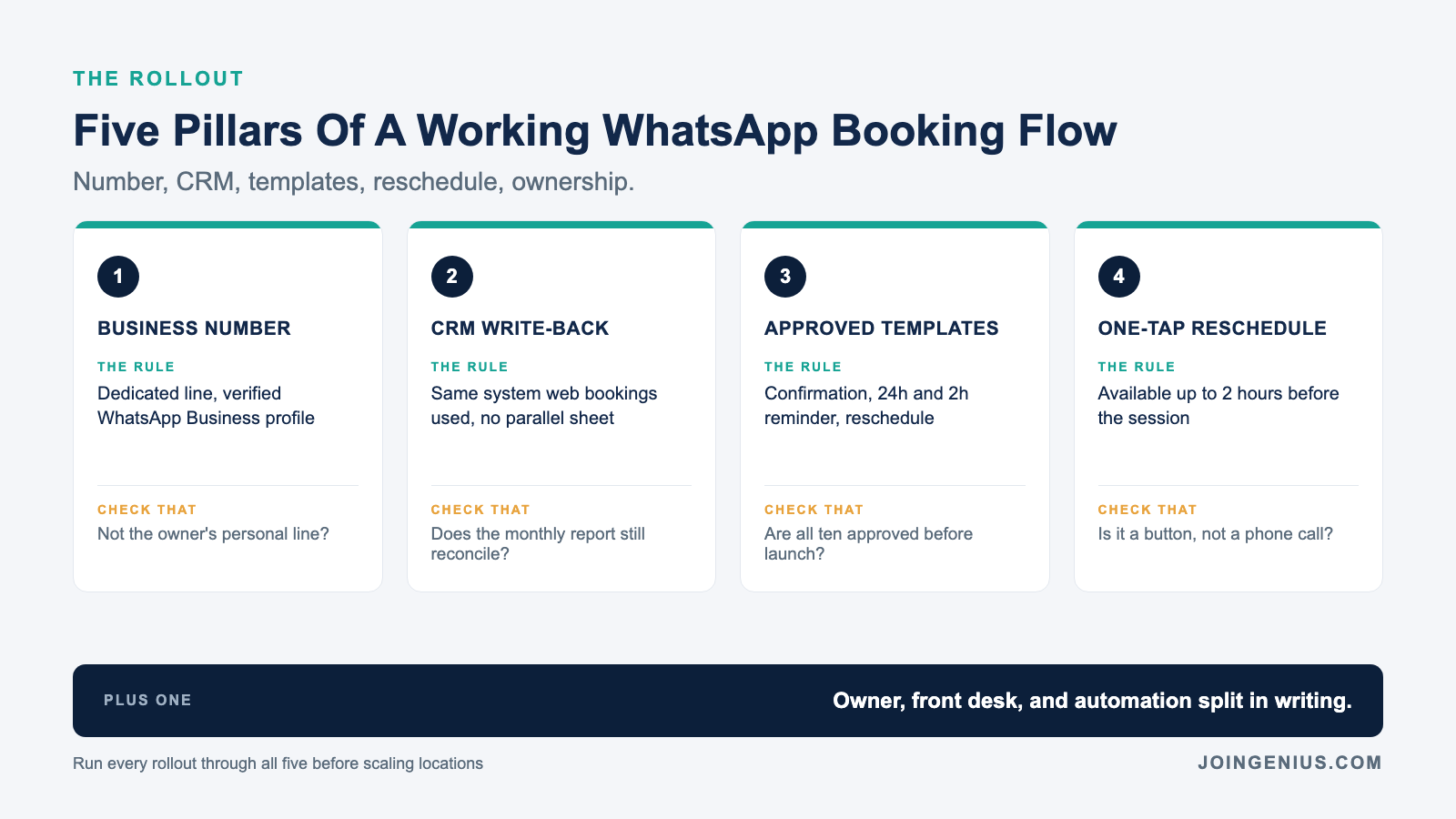
Payment belongs in the same thread as the confirmation. A payment link that opens a standalone browser tab is a smaller leak than a full form, but still a leak. Reminders go in the thread too, scheduled 24 hours before the session and 2 hours before, with a one-tap reschedule button. The reschedule flow matters more than most operators realise.
Setting Up WhatsApp Booking Without Losing Control Of The Data
The move to chat is not a move away from systems. The bookings still need to land in a calendar the business can read, with the customer record flowing into the same CRM that holds the email list. The setup choices below are what separates a clean rollout from a shadow spreadsheet six months later.
The Phone Number And Verified Business Profile
Use a dedicated business number, not the owner’s personal line. Register a verified WhatsApp Business profile with the business name, address, opening hours, and a short description. The verified badge is a small trust signal that reduces the question “is this really you” in the first message, and it keeps personal and business messages separate from day one.
Data Flow Into The CRM Or Spreadsheet
Every booking taken in the chat must write to the same place every web booking wrote before. Customer name, phone, session type, time, amount paid, source.
If the chat flow creates a parallel record that nobody reconciles, the monthly revenue number stops matching the calendar number fast. See how automated onboarding notifications handle the same handoff problem for a template.
Templates That Stay Compliant
WhatsApp Business has templates and rules about how businesses can initiate a conversation. The booking confirmation, reminder, and reschedule prompt all need approved templates. Build these before launch, not after a message gets blocked. A short library of ten templates covers the full activity provider flow for most operators.
The table below is the setup checklist for the first two weeks. Any row still open on day fifteen is a signal to pause the rollout and finish it before scaling.
| Setup Step | What To Configure | Common Failure Mode |
|---|---|---|
| Business number | Dedicated line, verified WhatsApp Business profile | Owner’s personal number, no verification |
| CRM write-back | Bookings sync to the same system web bookings used | Chat creates a parallel spreadsheet nobody owns |
| Payment link | Opens a hosted page, returns to the chat on success | Standalone tab with no confirmation back in chat |
| Reminder cadence | 24-hour and 2-hour templates, approved in advance | Reminders sent as one-off messages, flagged as spam |
| Reschedule button | One-tap, available up to 2 hours before the session | Reschedule asks the customer to call, kills retention |
Who Owns WhatsApp Booking Inside The Business
The move to chat changes who inside the business owns the booking channel. A web form was owned by whoever owned the website, usually a freelancer. A WhatsApp booking flow belongs closer to operations and customer service, and the ownership question has to be answered before the first message gets routed.
The In-House Owner
For most small activity providers, the owner is the front-desk lead or the studio manager, not the marketing contractor.
They see the bookings arrive and the reschedules come in, and they are the first to notice when a template is confusing or a reminder is firing at the wrong hour. The same ownership pattern is covered for the staffing side in retaining booking coordinators and schedulers.
When An Agency Or Freelancer Fits
An agency or specialist freelancer fits for the setup work: number verification, template approvals, CRM wiring, and the first thirty days of iteration. After that, the flow belongs to the operator who hears the customer’s actual questions. Any agency that wants to own the chat for twelve months is a yellow flag.
Dividing Work Between Owner And Front Desk
The split that works is simple: the owner approves the templates and reviews the weekly report, the front desk handles the live questions, and the automated flow handles everything else.
If the front desk is answering more than five bookings a day by hand, a template is missing. If the owner is approving a new template every week, the flow is still in setup mode.
Signals A WhatsApp Booking Rollout Is Working (Or Not)
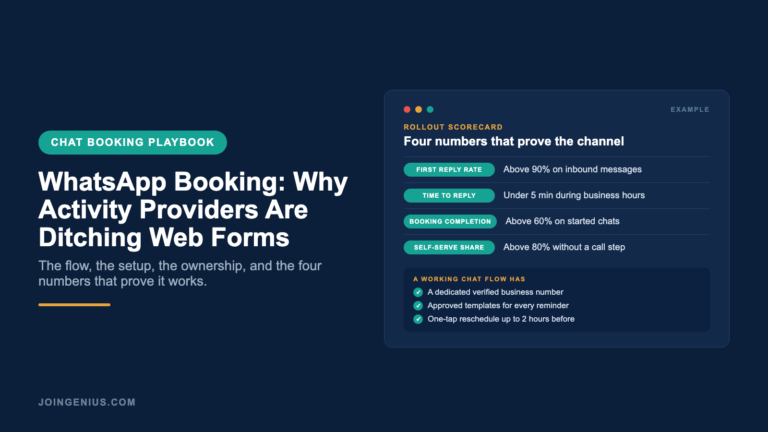
Most activity providers launch WhatsApp booking without a measurement plan, then argue about whether it is working six weeks in. The four numbers below answer that argument. The teams that track them see a working rollout within thirty days.
Leading Indicators Through 30 Days
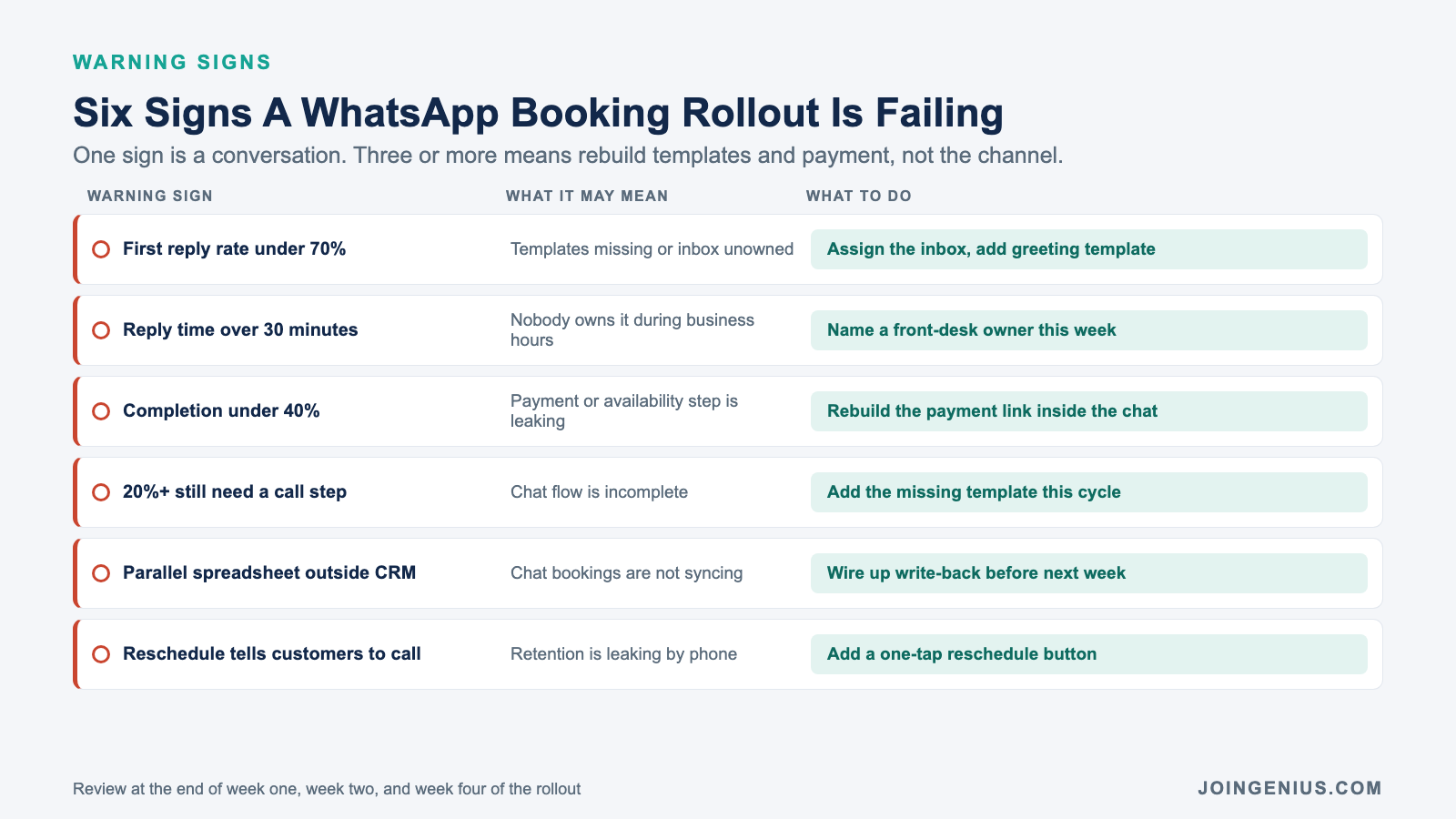
Reply rate on first inbound message above 90%, median time to first reply under five minutes during business hours, booking completion rate on started chats above 60%, and share of bookings completed without a call or email step above 80%. Any three red at day 30 means the flow has a friction point, not a volume problem.
Lagging Indicators Through 90 Days
No-show rate down versus the same period last year, average booking value up (because customers add on more easily in chat), reschedule rate up (because the chat makes it cheap), and cancellation rate down. These are the long signals that the rollout actually changed the business, not that it just added a channel.
Warning Signs The Rollout Is Broken
If the leading numbers above have been flat for two weeks, the warning signs below are almost certainly present at the same time. One sign is a conversation with the front desk. Three or more means rebuilding the flow, usually starting with the templates and the payment step rather than the channel itself.
Conclusion
WhatsApp booking wins against the web form because the customer is already in the chat, already has context, and never needs to open a browser to pay. A dedicated business number, a connected booking platform, approved templates, and four measured numbers turn a chat inbox into the highest-converting booking channel most activity providers have ever had.
For more on building a modern customer channel, see our full marketing and operations guides.