
Most agencies don’t struggle to find an AI writing tool anymore.
There are too many of them.
The real problem comes after the first draft.
Who checked the facts? Did anyone look at the search results before deciding what the article should cover? Is the piece actually saying something useful, or is it just another version of the same content already ranking? And perhaps the biggest question for an agency: does it sound like the client, or does it sound like every other AI-written article on the internet?
This gets even harder when an agency has multiple writers working across several accounts.
That’s why I don’t think a good content operation should be built around one AI writer.
Different parts of the job need different tools. Research is different from writing. Fact-checking is different from editing. SEO optimization is different from creating the first draft.
A practical agency workflow looks something like this:
Research → Planning → Writing → Fact-checking → Editing → Originality checks → SEO optimization → Final review → Publishing
AI can make several of those steps faster. But handing the whole process over to AI is where things usually start going wrong.
What Is an AI Content Stack?
An AI content stack is simply a group of tools that help with different parts of the content process, from research and planning to writing, editing, fact-checking and SEO.
For an agency, the goal isn’t to collect ten different subscriptions just because they have AI features.
The goal is to build a process that your team can actually repeat.
For example, an SEO strategist might use Ahrefs to understand the search opportunity, Semrush for additional research and planning, Perplexity to investigate current information, and ChatGPT to help with an outline or rough draft.
The article can then go through GPTinf as part of the quality-control process, receive a proper human edit, and finally be checked in Surfer or Clearscope.
There is some overlap between these tools. That’s normal.
What matters is knowing which tool solves which problem—and when you don’t need the tool at all.
10+ AI Content Tools Agencies Should Consider in 2026
| Tool | What It’s Mainly Used For | Where It Fits |
| Ahrefs | Keyword, competitor and content research | Research |
| Semrush | Content planning and SEO | Planning |
| ChatGPT | Ideation, outlining and drafting | Writing |
| Perplexity | Web research and source discovery | Fact-checking |
| GPTinf | Humanizing, AI detection and plagiarism checks | Editing / Quality checks |
| Humanize AI Pro | Rewriting and humanizing, with an explaining detector | Editing |
| UndetectableAI.pro | Free rewriting, detection and plagiarism checks | Editing / Quality checks |
| Grammarly | Grammar, clarity and writing improvement | Editing |
| Surfer | SEO and AI-search optimization | Optimization |
| Clearscope | Topic coverage and content relevance | Final optimization |
1. Ahrefs
Best for: SEO research and finding content opportunities
I’d start with Ahrefs because content shouldn’t begin with writing.
Before a writer opens a blank document, someone needs to answer a fairly basic question: why are we creating this page in the first place?
Ahrefs is useful for looking at keywords, competitors, backlinks, ranking pages and content gaps. It can give an SEO team a much clearer picture of what is happening around a topic and where to build backlink opportunities.
But here’s where experience matters.
If the pages ranking for a keyword are all 2,500 words long, that doesn’t automatically mean your article needs to be 3,000 words.
Maybe those pages are unnecessarily long. Maybe they’re missing the question users actually care about. Maybe the search intent has changed.
Ahrefs gives you the data. Someone still needs to interpret it.
For agencies, that’s especially important because the same keyword can require a completely different approach depending on the client.
Best agency use: Give strategists enough data to build a useful content brief instead of making writers guess what the search engine wants.
2. Semrush
Best for: Content planning and broader SEO workflows
Ahrefs and Semrush overlap quite a bit. In many cases, an agency doesn’t need both.
If your team already has a strong workflow around Ahrefs, buying Semrush just because it has AI features probably isn’t going to transform your content operation.
Where Semrush becomes useful is when you want a broader SEO and content workflow covering research, topic planning, briefs, optimization and AI-search visibility.
For a larger content team, having that process in one place can make things easier to manage across multiple client accounts.
Still, I wouldn’t let software write the brief for the strategist.
A tool can identify keywords and related topics. It doesn’t necessarily understand why your client should approach the topic differently from five competitors.
Best agency use: Standardize research and planning without removing the strategist from the process.
3. ChatGPT
Best for: Brainstorming, outlining, drafting and rewriting
ChatGPT has probably changed content production more than any other tool on this list.
But I think agencies sometimes use it for the wrong job.
Its biggest value isn’t necessarily producing the finished article. It’s helping a writer move from “I have an idea” to “I have something I can work with.”
You can use it to brainstorm angles, challenge an outline, organize research notes, simplify a technical explanation or rewrite a section that isn’t working.
That’s very different from giving it a keyword and publishing whatever it produces.
Imagine an agency is writing about cybersecurity. The strategist has already researched the topic, the client has provided technical information and the writer has gathered several useful sources.
That’s where ChatGPT becomes genuinely helpful. It can help organize all that information into a workable structure.
The expertise isn’t coming from the AI. It’s coming from the information and people behind the article.
Best agency use: Think of ChatGPT as an assistant sitting beside the writer—not the person replacing the writer.
4. Perplexity
Best for: Researching current information and finding sources
Perplexity has a slightly different role from ChatGPT.
When I need to investigate something on the web quickly, find sources or check what has changed recently, Perplexity can save a lot of time.
And that can be valuable for agency content.
A surprisingly large amount of bad content comes from small factual errors. A company’s pricing changed. A product feature was removed. A statistic was copied from an outdated report. A page that used to be accurate hasn’t been updated in two years.
Perplexity can help you find the information faster.
But don’t treat its answer as the source.
Open the source it cites and read it.
For important statistics, financial information, product specifications, company details or recent developments, the original source should always get the final say.
5. GPTinf
Best for: Humanizing, detecting and plagiarism-checking a draft in one place
GPTinf tries to cover several steps of the quality stage at once.
It bundles a humanizer, an AI detector and a plagiarism checker, so a writer can rework an awkward passage, see how it reads, and check for copied text without opening three tabs.
For an agency juggling several accounts, that consolidation is the appeal.
The humanizer restructures whole sentences rather than swapping a few synonyms, and the detector runs automatically after each pass, so an editor gets a quick signal on where a section still reads flat.
The usual caveat applies. A detector score is a signal, not a verdict, and reworking a paragraph will not add expertise that was never there.
I would use it to tidy genuinely awkward sections and to flag where to look, then let an editor make the call.
There is a free tier with no account, which makes it easy to test on a real draft before deciding whether it earns a place in the stack.
6. Humanize AI Pro
Best for: Reworking formal or academic drafts that read stiff, with a detector that explains itself
Humanize AI sits in the same editing corner as the other rewriting tools, but its angle is register.
Instead of loosening everything into a casual tone, it keeps a formal or academic voice while reworking the rhythm, which matters for client work that has to stay professional.
The part I find more useful than the rewrite is the detector. It does not just hand back a percentage; it explains, sentence by sentence, why a passage reads as human or AI, pointing at things like sentence length and punctuation variety.
For an editor, that is a place to look, not a verdict to act on.
The same honesty applies here as anywhere. If a paragraph has nothing to say, smoothing the wording will not fix it.
I would reach for this when a draft is already solid and a few sections read robotic, not as a way to rescue generic content.
There is a free tier with no account, so it is easy to run a real paragraph through before committing.
7. UndetectableAI.pro
Best for: A free rewrite-and-check pass in one place, no signup
UndetectableAI bundles a humanizer, an AI detector and a plagiarism checker, and the whole thing is free with no account.
The appeal is simply that the loop is free and in one place: rework a rough passage, run it through the detector to see how it reads, check it for copied text, and move on.
For a small team testing whether a humanizer belongs in the workflow at all, that is a low-risk way to find out.
My caution from the earlier rewriting tools still stands. Rewriting is not editing, and a smoother sentence is not a more accurate one.
It is fine for tidying awkward passages that are already useful; it will not turn generic copy into expert content.
Because it costs nothing and needs no account, it is the easiest of these to trial before deciding it deserves a permanent spot.
8. Grammarly
Best for: Grammar, clarity and everyday editing
Grammarly isn’t the most exciting tool here.
It’s still useful.
Editors read the same article several times, and eventually it’s easy to miss a typo or awkward sentence. Grammarly can catch some of those small problems and suggest improvements to grammar, clarity and tone.
The mistake is accepting every suggestion.
Sometimes a client deliberately uses a particular phrase. Sometimes a technical term looks unusual but is completely correct. Sometimes a short sentence is short because the writer wants it that way.
Good editing isn’t about making every sentence look like it passed through software.
It’s about knowing what actually needs fixing.
9. Surfer
Best for: SEO and AI-search optimization
I prefer using Surfer after the article has been written.
Starting with an SEO content score and trying to write the article around that score can lead to some pretty awkward content.
You end up adding phrases because a tool says they’re missing rather than because the reader needs them.
Instead, write the article properly first.
Then use Surfer to look for gaps.
Are important topics missing? Is there something competitors are covering that your article completely ignored? Are there reasonable optimization opportunities?
Those are useful questions.
A score isn’t the goal.
A useful page is the goal.
If adding another keyword makes a paragraph worse, don’t add it just to make the score go up.
10. Clearscope
Best for: Topic coverage and content relevance
Clearscope fits into a similar part of the workflow, but I see it mainly as a useful second check on topic coverage.
Even a well-researched article can miss something obvious.
Perhaps you’ve explained the main topic but forgot a common question. Maybe competitors consistently cover a related subject that your draft doesn’t mention at all.
Clearscope can help identify those gaps.
Again, though, don’t force every suggested term into the article.
If a word doesn’t belong naturally, leave it out.
SEO should help the content—not make the content worse.
How These Tools Fit Into a Real Agency Workflow
Instead of thinking about ten separate tools, it helps to think about the actual work your team has to do.
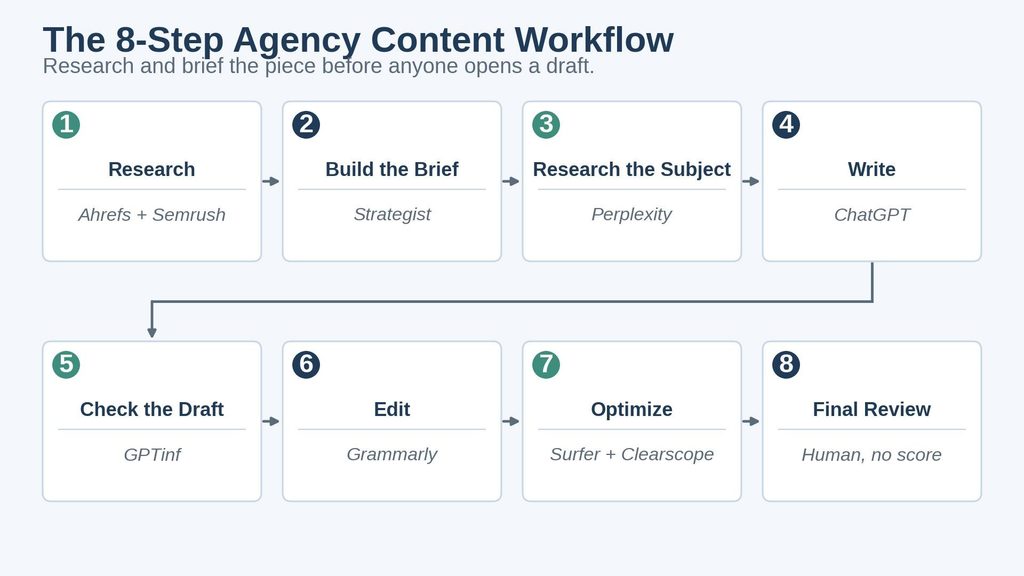
1. Start with research
Use Ahrefs to understand the search opportunity. Semrush can provide additional keyword, topic and competitor research.
But don’t stop at the keyword.
Ask:
What is the person searching for actually trying to accomplish?
That’s a much better starting point than simply asking which keyword you want to rank for.
2. Build the brief
The strategist should decide the audience, angle, structure, key questions, sources, internal links and important information the writer needs.
This is one of the places where AI-heavy workflows often fall apart.
They skip the thinking and jump straight into generation.
A good brief makes the writing much easier.
3. Research the subject
Use Perplexity to find current information and potential sources.
Then open those sources.
Don’t blindly copy whatever an AI search tool tells you.
4. Write
This is where ChatGPT can help with brainstorming, outlines and rough drafts.
But the writer should still decide what the article is actually trying to say.
The writer also needs to bring in client-specific information, examples, opinions and research that make the article different from generic content.
5. Check the draft
GPTinf and GPTZero can provide AI-detection signals.
GPTinf can also help with plagiarism and fact-checking workflows.
Treat these as quality-control tools, not a school exam where the article either passes or fails.
6. Edit
Now comes the part that shouldn’t be skipped: actual editing.
Grammarly can help with grammar and clarity. UndetectableAI.pro can occasionally help rework awkward AI-assisted passages.
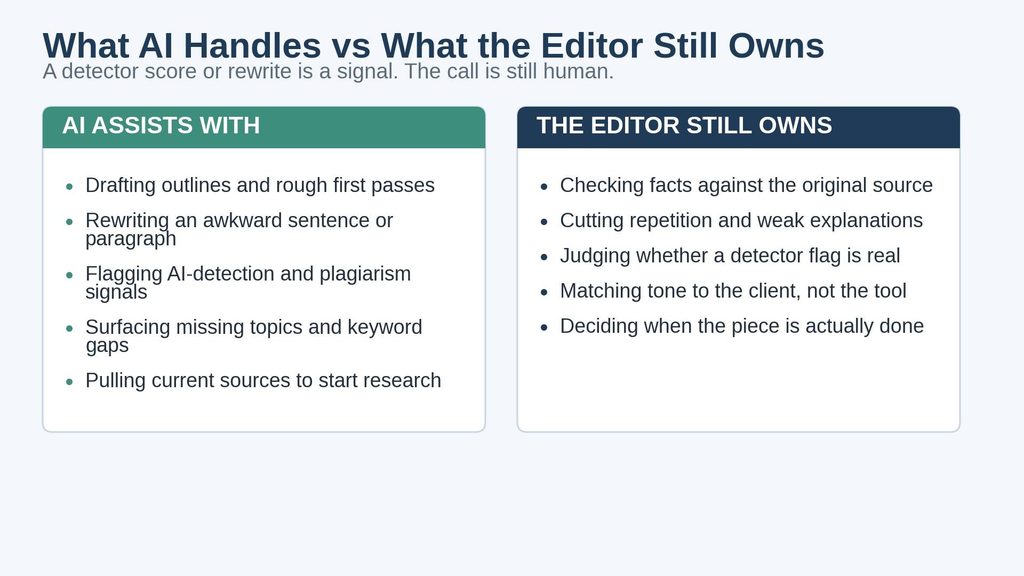
But the editor needs to do the real work.
Check the facts.
Remove repetition.
Fix weak explanations.
Cut unnecessary sentences.
Make sure the tone fits the client.
Sometimes the best edit is deleting an entire paragraph.
7. Optimize
Once the article is good, bring in Surfer and Clearscope.
Look for missing topics and reasonable SEO improvements.
Don’t destroy a good paragraph just because a tool wants another keyword.
8. Final review
Before publishing, someone should read the article without looking at an SEO score.
Ask:
Would I actually find this useful if I were the customer?
Does it answer the main question?
Are the claims supportable?
Does it offer something competitors don’t?
Does it sound like the company publishing it?
If the answer is no, the article isn’t finished.
Which AI Content Tool Should Agencies Choose?
If you want the quick version:
For SEO research: Ahrefs
For broader SEO and content planning: Semrush
For writing assistance: ChatGPT
For web research and source discovery: Perplexity
For AI detection, plagiarism and fact checking: GPTinf
For dedicated AI detection: UndetectableAI.pro
For rewriting AI-assisted content: Humanize AI Pro
For grammar and everyday editing: Grammarly
For SEO and AI-search optimization: Surfer
For topic coverage: Clearscope
That doesn’t mean an agency needs all ten.
A five-person agency with a strong process may get much more value from five tools than from ten subscriptions that nobody is using properly.
I’d start with a simpler question:
Where is our content process currently breaking down?
Are writers struggling to find topics?
Is research taking too long?
Are editors spending hours fixing the same mistakes?
Is content missing important topics?
Is the team struggling to maintain consistency across clients?
Find that problem first.
Then choose the tool that actually solves it.
Key Takeaways
- A good AI content stack gives different tools different jobs.
- Ahrefs and Semrush help teams understand what content is worth creating.
- ChatGPT works best when writers give it real information, research and direction.
- Perplexity is useful for finding current information, but important claims should still be checked against original sources.
- AI detectors such as GPTinf should be treated as signals, not proof of authorship.
- Rewriting tools can improve awkward passages, but they can’t replace expertise or proper editing.
- Grammarly is useful for everyday editing, but its suggestions shouldn’t automatically be accepted.
- Surfer and Clearscope can reveal SEO and topic gaps without needing to dictate the article.
- The final decision about whether content is accurate, useful and ready to publish should remain with a human.
Conclusion
AI has made producing a first draft much faster.
For agencies, that’s a good thing.
There’s no real reason to pretend otherwise.
But the first draft was never the hardest part of producing good content.
The harder work is deciding what is actually worth writing, understanding the audience, finding information you can trust, adding something useful that competitors haven’t already said, and knowing when the article is genuinely ready to publish.
That’s why I would build an agency’s content stack around the workflow, not around one AI writing tool.
Use Ahrefs and Semrush to understand the opportunity. Use Perplexity when you need to investigate current information. Use ChatGPT to help with ideas, structure and drafting. Use GPTinf where AI-detection or originality checks make sense. Use Grammarly during editing and UndetectableAI.pro selectively when rewriting genuinely helps. Then use Surfer and Clearscope to catch SEO and topic gaps.
And after all of that, have a person read the article.
Not a detector.
Not an SEO score.
A person.
The workflow shouldn’t be:
AI → Publish
It should be:
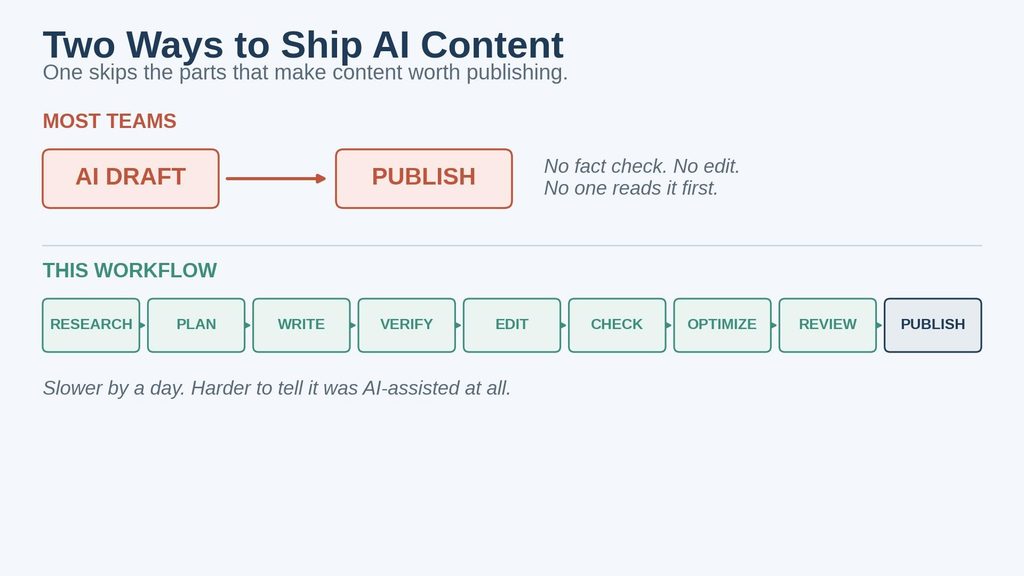
The tools can make that process faster.
The thinking still belongs to people.