
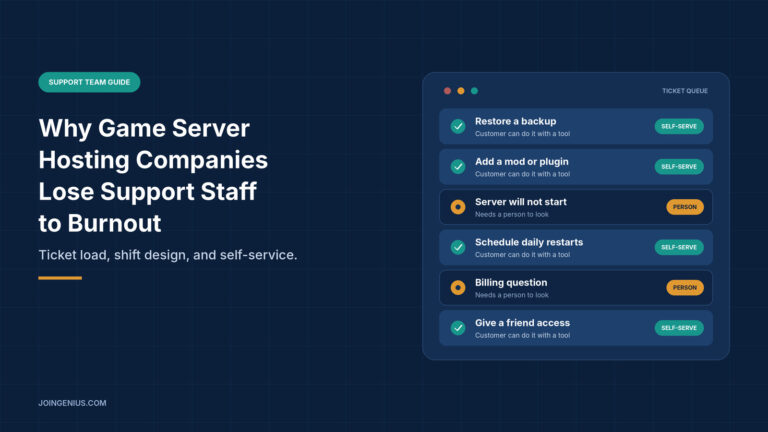
A server goes down on a Friday night. Within minutes the tickets arrive, the Discord channel fills up and every message comes from someone who was in the middle of a match. The person on support did not cause the outage, but they absorb the frustration anyway. Do that often enough and good people leave.
Game server hosting is a hard place to work in support. The hours are long, the audience is passionate and the same questions come back every week. If you are already seeing the early signs of low morale on your team, it helps to know where the pressure comes from before you try to fix it.
This guide covers why support staff burn out at hosting companies, how to find out which tickets are wearing your team down, how self-service tools can take the repetitive ones away, and how to share the load. It ends with a table of warning signs and what to do about each.
Why Game Server Support Wears People Down
Burnout rarely comes from one bad shift. It builds from a few pressures that never let up.
First, demand is uneven. Game launches, updates, wipes and mod changes send queues up within hours, and players are online at every time of day. Second, the problems are urgent. A server that is down means a community waiting and an owner who may lose players, so the tone of tickets is often tense. Third, the work repeats. Many tickets ask the same handful of things, such as how to restore a backup, add a mod or give a friend access. Fourth, teams are small, so a few people cover nights, weekends and every holiday.
None of these is unusual on its own. Together they leave staff feeling that the queue never ends and that nobody else can cover for them. That feeling, more than the volume itself, is what makes people quit.
Find Out Which Tickets Repeat
Before you change anything, find out what your team actually spends its time on. Guessing leads to fixes that feel good and change little.
Export a month of tickets and tag each one by what it needed. Most fall into three groups: tickets a customer could have solved with the right tool, tickets that need a person, and tickets that need an engineer. The first group is often larger than managers expect, and it is the easiest to shrink.
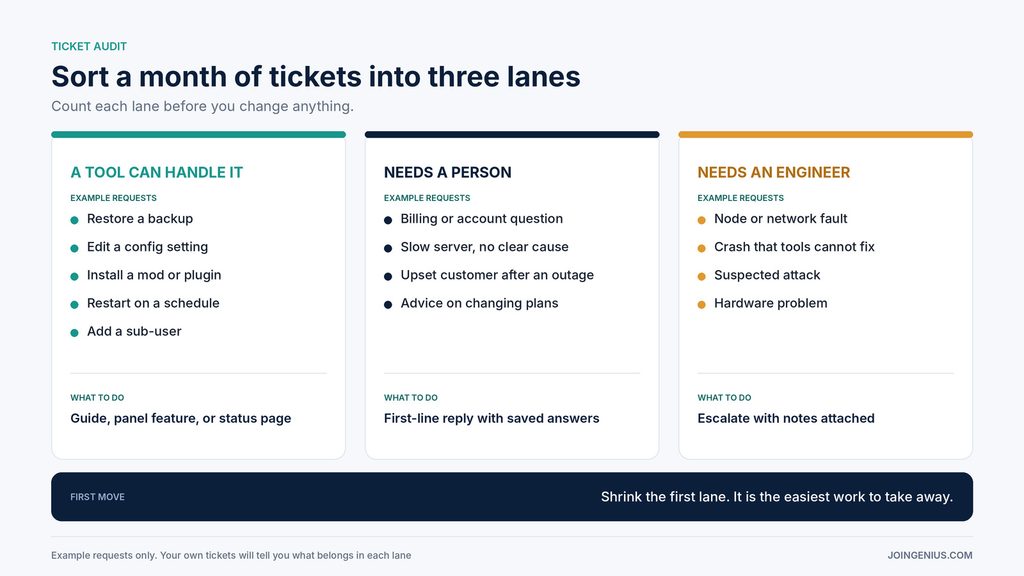
Count the tickets in each group, then list the five most common subjects. That short list is your starting point. If three of the five are routine tasks like restoring a backup or editing a setting, you have found the work that is wearing people down, and you have found the first thing to remove from their plate.
Self-Service Tools Take the Repetitive Tickets Off Your Support Team’s Plate
Many of the requests that fill a support queue are things a customer could do alone if the tools were within reach. A good game server control panel is one example. Pine Hosting’s site lists a file manager, FTP access, backups, scheduling, sub-user management and installers for workshop content and plugins. The page lists these only by name, so the details are worth checking, but the idea is sound. Each task a player can finish without opening a ticket is one fewer interruption for your team, and the people who handle the remaining tickets get more time for the harder problems.
Here is how common requests map to the kind of panel feature that can take them over.
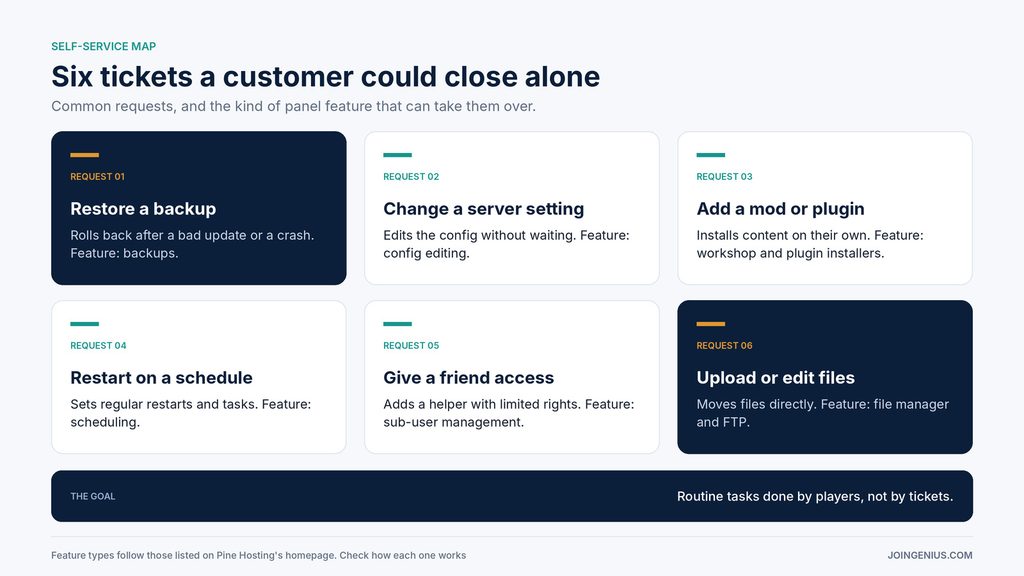
Two cautions apply. First, a panel does not replace a support team. It changes what the team spends its time on. Pine’s site also lists 24/7 support through Discord and an email form, which is a reminder that people stay in the loop. Second, a tool only helps if it covers what your customers actually ask for. Before you rely on any platform, check its feature list against your own top five tickets.
Reliability matters here too, because fewer incidents means fewer tense tickets. Pine lists 99.99% uptime and links to a network status page. Those are the company’s own claims, so treat them as a starting point and look at the status page history yourself.
Build Self-Service Players Will Actually Use
A tool nobody can find does not reduce tickets. A few small habits make the difference.
Name things the way players do. “Restore a backup” is clearer than a technical term for the same action. Write short guides, with screenshots or a video, for each of your top five tickets, and link them from your ticket form and from your automatic reply. Keep a status page visible so that players can check for an outage before they write in.
Always leave a clear path to a human. People who feel trapped by self-service get angrier, and angry tickets are the hardest ones for staff to handle. Then review the numbers each month. If a ticket type still arrives often, the guide or the tool needs work.
Make the Workload Visible
Burnout hides in uneven workloads. One or two people usually carry the most, and nobody notices until one of them resigns.
A few simple numbers show where the load sits: tickets per person, how many arrive outside normal hours, how many are repeat contacts, and how long hard cases stay open. The goal is to see where work piles up, not to watch people. This guide to tracking remote employee productivity without micromanaging makes the same point for distributed teams, and it applies well to support. Look at the numbers together each week, and ask what would make the next week lighter.
Design Shifts So Nobody Is Always On
Even with good tools, some tickets need a person, and some incidents hit at the worst time. Design the process so that no single person carries them alone.
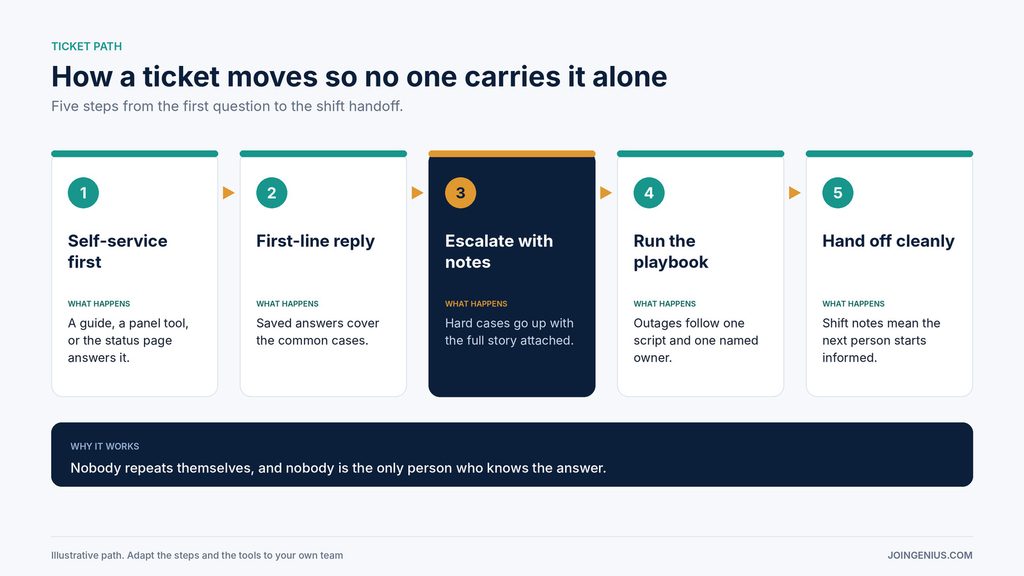
The path in the image works as a simple model. Self-service answers what it can. A first-line reply, built on saved answers, handles the common cases. Hard cases move up with the full story attached, so nobody asks the customer to repeat themselves. Outages follow one written playbook with one named owner. At the end of each shift, a short handoff note means the next person starts informed.
Pair that with fair scheduling. Rotate nights and weekends instead of leaving them to the same people. Set clear off hours, and protect them. After a heavy incident week, give the people who carried it some recovery time.
Warning Signs of Support Burnout, and What to Do About Each
Some patterns show up before people quit. The table below pairs each warning sign with what it may mean and a practical next step.
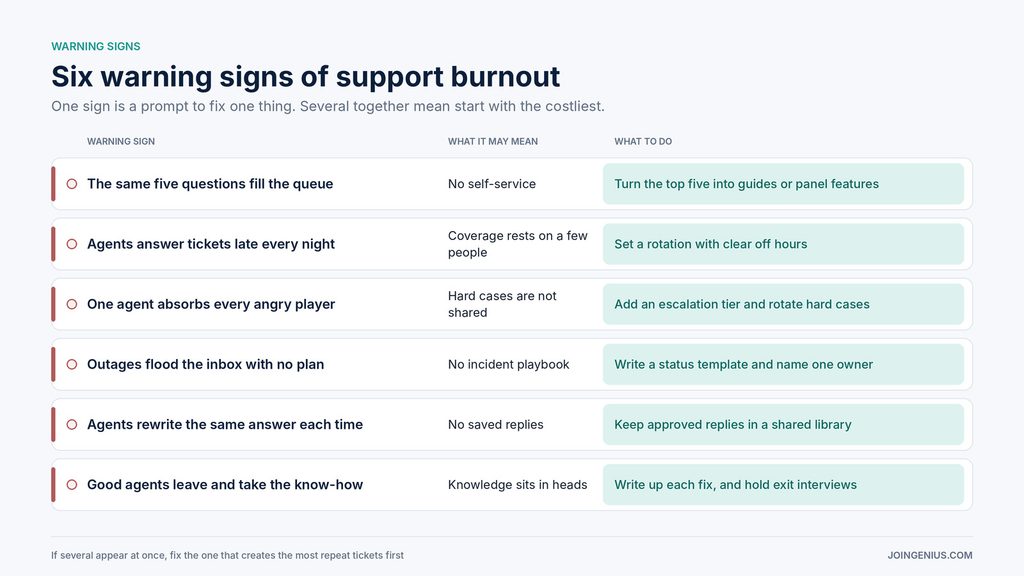
One sign is a prompt to fix one thing. If you see several at once, start with the one that creates the most repeat tickets, because fixing it frees up time for everything else.
Start With One Month of Ticket Data
You do not need a big program to begin. Export last month’s tickets, sort them into the three groups, pick the three most common repeat subjects and fix those first, whether that means a guide, a panel feature or a saved reply. Then check the queue again a month later.
Once the load is under control, recognition matters too. These employee incentive program ideas include low-cost ways to show support staff that their work is noticed. Teams that feel seen, and that are not buried in the same ticket every day, are far more likely to stay.