
A strong candidate joins the video call. The camera angle is a little too low, the audio echoes, and the first answer wanders for two minutes without a point. When asked about working remotely, they say, “I’m very self-motivated.” The interviewer nods politely and moves on. Nothing about this candidate was weak on paper. The interview simply did not show what they could do.
Remote interviews test the same things in-person interviews do, plus a few extra. The interviewer is also quietly asking whether you can communicate clearly through a screen, manage your own time, and work without someone checking on you. Employers care about this because remote employee productivity depends on output and self-management, not on being watched. Most candidates prepare for the first set of questions and ignore the second.
This guide covers what candidates most often get wrong, how to set up before the call, how to practice, how to build answers around real stories, and how to follow up well.
Why Remote Interviews Feel Different
In a room, small things help you. You can read the interviewer’s face, notice when an answer is landing, and fill the silence naturally. On a call, those cues are thinner. A delay on the line makes pauses feel longer. A flat screen hides body language. It is easy to talk too long because nobody can tell when to stop you.
Technology also becomes part of the interview. If your connection drops or your audio is poor, the interviewer does not just lose a few words. They form an impression of how you handle problems. A calm recovery can help you. A flustered one can hurt.
The interviewer is also sizing up how you would work day to day. Remote roles depend on written clarity, reliability, and initiative. Everything you do on the call, from how you join to how you answer, counts as evidence.
What Candidates Actually Get Wrong
Most remote interview mistakes are not dramatic. They are small, repeatable habits that add up.

Generic answers come first. Candidates give answers that could belong to anyone, such as “I’m a team player” or “I work hard.” Interviewers hear this constantly, and it tells them nothing. Specific examples are far more memorable.
Stories without results are the next problem. Many candidates describe what they did but never say what happened. An answer that ends with “and then we moved on” leaves the interviewer guessing whether it worked.
Memorized scripts backfire. A rehearsed answer often sounds flat, and it falls apart when the interviewer asks a follow-up. Preparing points and stories works better than learning sentences by heart.
Missing remote examples are common too. Candidates say they can work independently but offer no evidence. A short example of a project you managed without close supervision is worth more than any claim.
Not asking questions is another miss. When the interviewer asks, “Do you have any questions for us?” and the answer is “No, I think you covered everything,” it signals low interest.
Finally, many candidates close weakly. They trail off or say a vague thank you, instead of restating why they are a good fit.
Set Up Your Space and Tech Before the Call
Technical problems are the easiest mistakes to prevent. Spend twenty minutes the day before checking everything, so that nothing about the setup distracts from your answers.
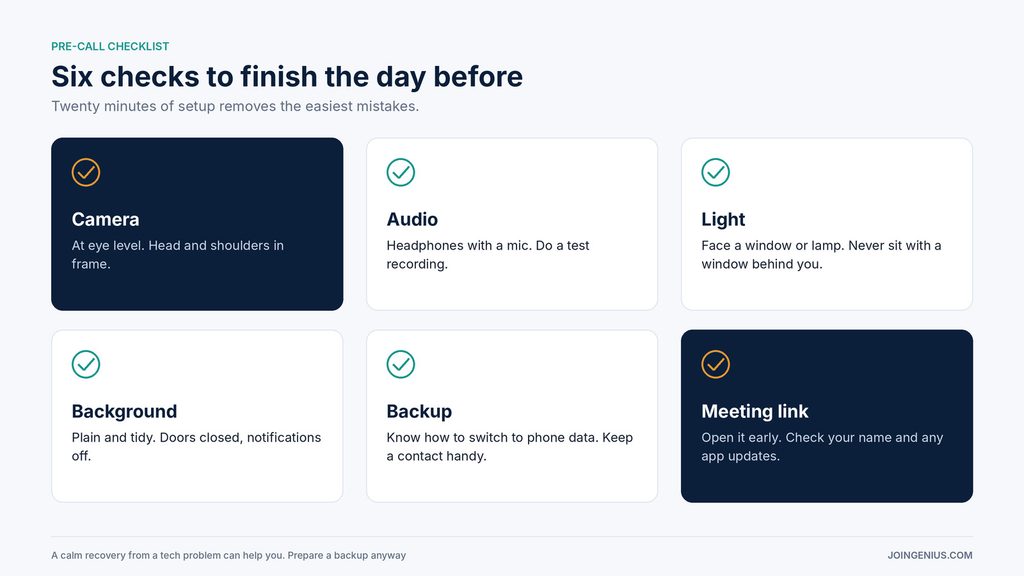
Start with your camera. Place it at eye level so you are looking straight ahead, not up or down. Sit far enough back that the interviewer sees your head and shoulders.
Check your audio. Use headphones with a microphone if you can, and do a test recording to hear how you sound. Echo and background noise are more distracting than they seem.
Think about light. Face a window or a lamp so your face is lit from the front. A bright window behind you will turn you into a silhouette.
Tidy your background. A plain wall or a simple, neat space is enough. Close doors, silence notifications, and tell the people around you when the call will happen.
Have a backup. Know how you would switch to your phone’s data connection if your internet fails, and keep the interviewer’s phone number or email handy in case you need to reconnect.
Finally, open the meeting link early. Join a few minutes before the start time to make sure the app works, your name displays correctly, and you are not stuck on an update screen.
AI-Generated Practice Questions Beat Guessing What They’ll Ask
Many candidates prepare by guessing. They search for a list of common questions, read the answers once, and hope the interview resembles it. The problem is that generic lists are not tied to the role you are applying for.
Using an AI interview prep tool that generates questions tailored to your position and gives feedback on your answers, tone and delivery beats guessing what the interviewer will ask.
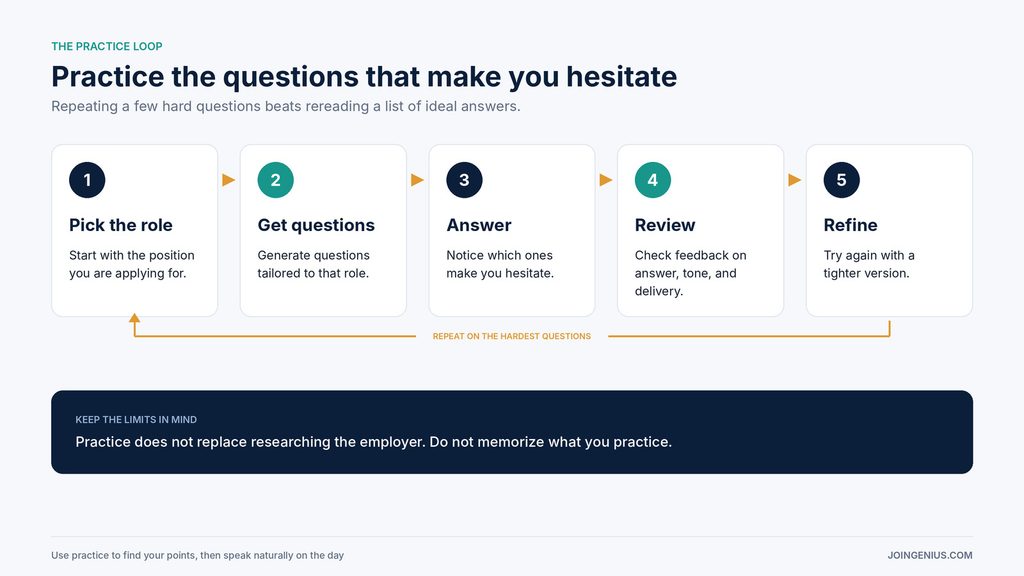
The value is in the loop. Start by choosing the role you are applying for. Look at the questions the tool generates and notice which ones make you hesitate, because those are your gaps. Answer them, review the feedback on how you sounded and what you said, and then try again with a tighter version. Repeating this several times on the questions that felt hardest does far more for you than rereading a list of ideal answers.
Pay attention to delivery as well as content. Feedback on tone and pace is especially useful for remote interviews, where your voice carries much of the impression you make.
Keep the limits in mind. A practice tool helps you rehearse questions, but it does not know the company. You still need to research the employer, read the job description closely, and prepare your own stories. And do not memorize the answers you practice. Use the practice to find your points, then speak naturally on the day.
If you are reading a posting and are not sure what the job involves day to day, this article on why technical hiring fails when job descriptions hide the reality shows what vague postings often leave out, and it suggests questions worth asking the interviewer.
Build Answers Around Real Stories
Strong interview answers are built on stories, not statements. Prepare four to six real examples from your work or studies that you can adapt to different questions.
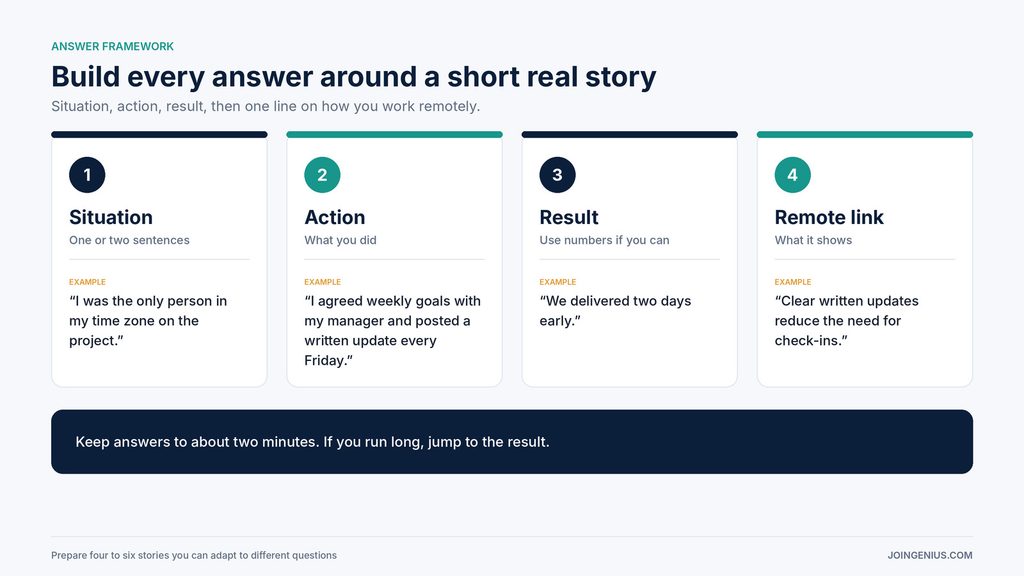
Use a simple structure. Begin with the situation, in one or two sentences. Describe what you did, focusing on your own actions. State the result, using numbers if you can. Then add one line about what it shows about how you work, especially in a remote setting.
For example, instead of “I’m good at managing my time,” you might say, “On my last project, I was the only person in my time zone. I agreed on weekly goals with my manager, posted a short written update every Friday, and delivered the project two days early. It showed me how much clear updates reduce the need for check-ins.”
Keep answers to about two minutes. If you notice yourself going longer, wrap up with the result. A shorter answer invites a follow-up question, which is a good sign.
Show You Can Work Remotely
Employers hiring for remote roles are trying to answer one question: will this person do good work without supervision? Give them evidence in three areas.
For written communication, mention a time when a clear message or document saved the team time. For self-management, describe how you plan your week, handle competing priorities, and keep work moving when no one is checking in. For tools, name the platforms you use for chat, project tracking, and video calls, and show that you can pick up new ones quickly.
It also helps to understand how the employer is moving you through the process. This guide to the hiring pipeline explains the stages most companies use, which can help you anticipate what comes next and prepare for each step.
After the Call: Follow Up Well
A short follow-up can make a difference. Send a thank-you message within twenty-four hours. Keep it brief and mention one specific point from the conversation, such as a project the team described or a challenge they mentioned. If there was something you wish you had explained better, add one or two sentences clarifying it.
Prepare for Fewer Surprises, Not a Perfect Script
The goal of preparation is not to sound flawless. It is to remove the avoidable surprises, so your real strengths come through. Test your setup, practice the questions that make you hesitate, and bring real stories with results.
A practical first step is a seven-day plan for your next interview. Spend two days researching the company and role, two days practicing questions, one day building your stories, one day testing your tech and preparing questions to ask, and the last day resting. If you are interviewing with a fast-moving smaller company, this guide to hiring for startups shows how these employers tend to hire, which can help you prepare for a faster and less formal process.