
95% of surveyed B2B teams already use AI or machine translation, yet 20.4% reported quality incidents or regressions after rolling it out. The gap comes from treating every string alike, when an internal chat note and a checkout page carry very different risk. This post gives your global teams a machine translation playbook: where it works, a 3-tier risk sort, 5 rules for human review, and a 30-day rollout.
What Machine Translation Handles Well and Where It Breaks
Machine translation is software that converts text between languages without a person writing the output, and neural machine translation plus large language models now power most of it. Speed and cost explain the adoption: teams in the same survey report 73.0% faster releases and 53.9% lower costs.
Failures cluster around context. In setups that rely on the model alone, 58.6% of respondents saw missing context and 55.9% saw inconsistent quality.

AI translation speeds releases and cuts costs, but model-only setups fail on context and consistency. Source: Crowdin, 2026.
Hallucinations add a second risk. On a benchmark built to expose failures, 17 large language models hallucinated translations at rates of 33% to nearly 60% across 11 language pairs, depending on the model. Idioms fare poorly too, since a February 2026 test of 7 models across 20 languages found they frequently left idioms untranslated.
📊 By the Numbers
75.7% of teams call human proofreading or language quality assurance mandatory for AI translation, and under 1% accept minimal or no quality controls.
So the real question is how much human review each type of text deserves.
3 Risk Tiers That Decide How Much Human Review Machine Translation Needs
Sort every text by what a mistake would cost you, and let that cost set the review level. Tier 1 covers low-risk internal text, tier 2 covers help and support content, and tier 3 covers anything a customer, a regulator, or a judge reads.
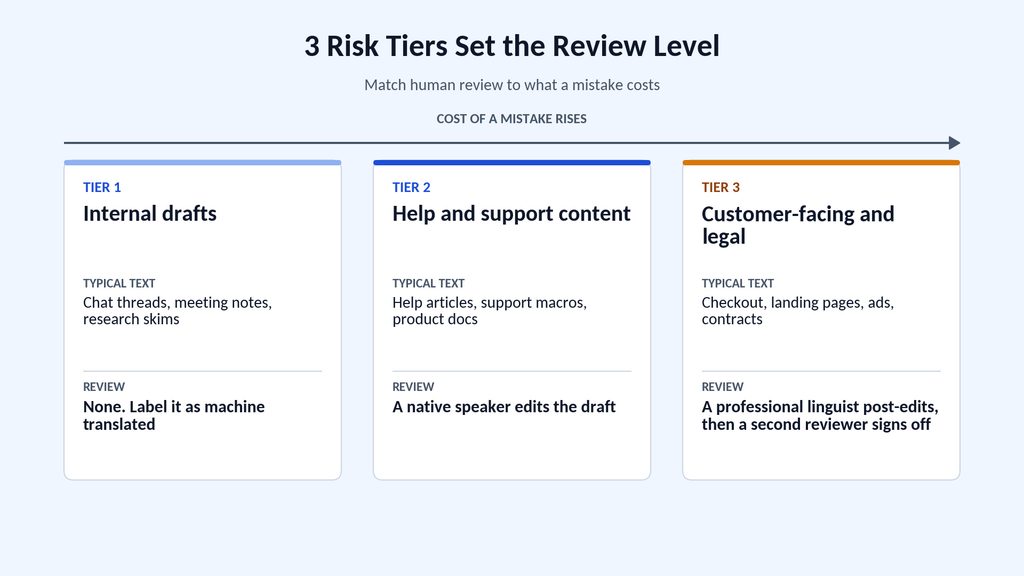
3 risk tiers set the review level, from raw machine output for internal drafts to a full linguist pass for customer-facing and legal text.
- Tier 1, internal drafts: chat threads, meeting notes, and research skims in another language. Raw output works here because a wrong word costs a clarifying question.
- Tier 2, help and support content: help articles, support macros, and product docs get machine output plus a native-speaking teammate who edits for terminology and tone.
- Tier 3, customer-facing and legal text: checkout flows, landing pages, ads, and contracts need a professional linguist to post-edit the draft, or a human translation from scratch.
Teams spread across countries lean on tier 1 all day, and that works until someone quietly pastes a tier 1 draft into a tier 3 channel. Label raw output as machine translated so nobody promotes it by accident. My rule of thumb for borderline text: if a customer could screenshot it, it’s tier 3.
Tier 3 is where the risk lives, so it gets its own section.
Machine Translation Still Needs a Human Pass for Anything Customer-Facing
Fluent output hides its errors, so raw machine translation is risky on any page a buyer reads. A wrong unit or an untranslated idiom sits inside a smooth sentence, and nobody flags it until a customer does.

Raw machine translation, post-edited machine translation, and human translation trade speed against review depth. Illustrative comparison.
Post-editing is the standard fix. A linguist corrects the machine draft against the source text, and ISO 18587 sets out the post-editing process and the competencies a post-editor needs.
A useful human pass checks 6 things:
- Numbers, currencies, units, and dates against the source
- Product names and glossary terms
- Brand voice and formality, such as the choice between formal and informal address
- Idioms, jokes, and slogans, which literal output tends to flatten
- Legal claims, guarantees, and pricing language
- Text length in buttons and menus
Web content adds layers that plain text doesn’t have: CMS pages, SEO copy, images with text baked in, and PDFs. Providers of website localization services that hold ISO 17100:2015 certification build a second pass into every project, since the standard requires a second qualified linguist to revise each translation. One such provider suggests 3 translators and 2 reviewers per language on non-urgent work.
⚠️ Common Mistake
Publishing raw output because it reads well. Fluency and accuracy are separate measures, and a dropped word or a wrong unit reads as smoothly as a correct sentence. Route every tier 3 page through a native reviewer before it goes live.
A tier policy only holds if the team applies the same controls every time, so put them in writing.
5 Rules That Keep Machine Translation Output Safe to Publish
Survey data shows which controls teams treat as essential, and these 5 rules follow that list.
1. Build a Glossary So Machine Translation Stops Renaming Your Product
79.6% of teams call glossary enforcement essential. Start with the 20 terms that appear most on your site, including product names, plan names, feature labels, and legal terms that must never change.
For each term, record the approved translation and a do-not-translate flag, and lock brand and product names on day 1. Add a short style guide for each language that covers formality and punctuation.
2. Reuse Approved Translations With a Translation Memory
73.0% call translation memory essential. It stores every reviewed sentence pair, so a returning phrase pulls the approved translation and skips a fresh machine translation guess.
Turn it on before the first project and feed it every page a reviewer signs off.
3. Keep Contracts and Sensitive Data Out of Public Translation Tools
80.9% of teams keep PII and user data away from AI translation, 78.3% hold back legal and contractual text, and 64.5% hold back security content.
Write a 1-page tool policy that names the approved tools and the content types banned from them. When you staff a support desk through business process outsourcing, put that policy in the onboarding checklist, because an agent under time pressure will paste a customer message into whatever tool is open, whether that’s the free version of Google Translate or DeepL.
4. Run Automated QA Checks Before a Human Sees the Text
68.4% call automated QA checks essential. Set them to flag numbers or placeholders that don’t match the source, missing glossary terms, broken markup, and strings that overflow their UI element.
Mechanical checks clear the noise, so reviewers spend their time on meaning and tone.
5. Give Every Tier a Named Reviewer and a Definition of Done
A rule without an owner drifts. Assign each tier a reviewer and a finish line, then track translation quality against both in your translation workflow.
| Tier | Reviewer | Done when |
| Tier 1, internal drafts | None | The text is labeled as machine translated |
| Tier 2, help and support content | Native-speaking teammate | Glossary terms and tone are checked |
| Tier 3, customer-facing and legal | Professional linguist plus a second reviewer | Revision is complete and sign-off is logged |
💡 Pro Tip
Put the tier in the file name or CMS field, such as T3-checkout-de, so everyone sees the required review level before they open the file. It costs nothing and stops a tier 1 machine translation draft from drifting into a tier 3 channel.
With the rules set, a 4-week rollout is enough to put them to work.
Your 30-Day Machine Translation Rollout for Global Teams
4 weeks covers the setup, a pilot, and the first measurement if you keep the scope tight. Each week has an action, a benchmark for done, and the trap that most often derails it.

A 30-day rollout gives every week 1 action and 1 finish line.
Week 1: Audit and Tier Every Content Type
List every content type you send to another language, with or without machine translation, from help articles to checkout copy, and assign each a tier and an owner.
Benchmark for week 1: every content type has a tier and an owner.
Common trap: filing a temporary page under tier 1 while customers can still reach it.
Week 2: Set Up the Glossary, Translation Memory, and Tool Policy
Approve your first 20 glossary terms, switch on translation memory, and publish the 1-page tool policy.
Benchmark for week 2: the glossary and tool policy are signed off.
Common trap: letting each team pick its own tool.
Week 3: Pilot Tiers 1 and 2 and Post-Edit 1 Tier 3 Page
Run tier 1 and tier 2 content through the workflow, then send 1 tier 3 page through full post-editing to set a baseline. Log how much the reviewer changed, because that number sets the review level for every batch after it.
Benchmark for week 3: the tier 3 page is live and its edit rate is logged.
Common trap: skipping automated QA on the pilot.
Week 4: Measure and Expand
Review the 5 metrics below and choose the next content batch.
Benchmark for week 4: a dashboard is live and the next batch is approved.
Common trap: adding more languages before the edit rate settles.
The metrics below tell you when the workflow is ready to grow.
5 Metrics That Show Your Machine Translation Workflow Is Working
Track these 5 metrics by tier and language, and review them monthly.
1. Reviewer Edit Rate Shows How Much Human Work the Draft Needs
Measure the share of machine-translated segments a reviewer changes. A falling rate after you add a glossary and translation memory means the guardrails work.
2. Quality Incidents Show Whether Errors Reach Customers
Count language errors that customers or staff report after publishing. 20.4% of teams in the survey logged incidents or regressions, so treat 0 as the bar for tier 3.
3. Turnaround Time by Tier Shows Where Review Slows You Down
Track the hours from approved source text to live page for each tier. Tier 3 will run slowest, and the gap tells you whether reviewers need more capacity.
4. Cost Per 1,000 Words Shows Whether the Workflow Saves Money
Compare the cost per 1,000 words for raw machine output, post-editing, and human translation. Use the comparison to decide which tier 2 content can move up or down a tier.
5. Conversion Rate and Support Tickets by Language Show the Business Impact
Compare conversion rate and language-related tickets in each market against your source-language baseline. A localized page that converts well below baseline points to a gap in review. Read the metric by market before you blame the translation, since pricing and payment options move conversion too.
📌 Key Takeaway
Reviewer edit rate and quality incidents decide when the workflow is ready to grow. Expand to a new language only after both hold steady for a full month on tier 3 content.
Why Machine Translation Works Best With a Human Pass
Machine translation earns its place in every workflow when the review level matches the risk. Sort your content into tiers first, then put a linguist on anything a customer reads. The same discipline applies when you hire through offshore outsourcing and your team works across languages and time zones.