
The meeting goes well. Everyone agrees on the plan, the call ends, and the team moves on to the next thing. A week later, two people remember the decision differently, a third has no idea they were supposed to follow up, and nobody can say who was meant to send the update.
A recording does not fix this on its own. Nobody has time to watch an hour of video to find a single decision. What teams need is a record that is easy to read, easy to act on, and easy to find later.
This guide shows how AI transcription helps with that. It covers what to look for in a tool, how to turn transcripts into action items people finish, and how to store everything so it can be searched. If you are looking for a first place to start with AI process automation, meeting follow-up is one of the easiest wins.
Why Manual Meeting Notes Keep Failing Teams
Manual note-taking has problems that no amount of good intentions solves.
The first is attention. The person taking notes cannot listen fully and type at the same time, so they miss nuance or fall behind. Often the most useful contributor in the room ends up as the scribe and contributes the least.
The second is consistency. Notes vary by person, live in private documents, and follow no shared format. One person writes full sentences, another writes fragments only they can read.
The third is accountability. Even good notes often skip the details that matter most: who agreed to do what, and by when. Without those, a meeting produces discussion but not progress.
The fourth is loss. Side comments, quick agreements, and half-formed decisions rarely make it onto the page, yet they often shape what happens next.
There is also a hidden cost. When a decision is unclear, people spend time in follow-up messages asking what was agreed, and sometimes redo work because two people understood the plan differently. Add up those small delays across a team and a week of meetings, and the lost hours are real.
What to Look For in AI Transcription for Meetings
Not all transcription tools serve teams equally well. A plain wall of text is better than nothing, but it still leaves someone to do the sorting. When you compare options, look at five things.
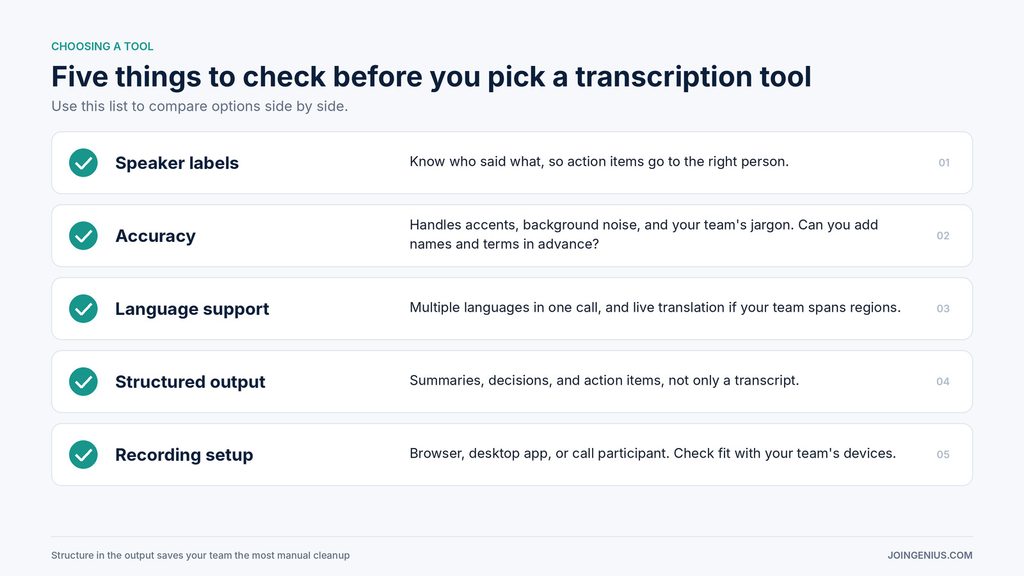
Speaker labels come first. Knowing who said what is the difference between a useful record and a confusing one, especially when assigning action items.
Accuracy comes second, including how well the tool handles accents, background noise, and the jargon your team uses daily. Tools that let you add names and specialist terms before a session usually produce cleaner results.
Language support matters if your team spans regions. Some tools handle several languages in a single call, and some offer live translation.
Output format is the fourth point. Look for summaries, decisions, and action items, not only a transcript. The more structure the tool provides, the less manual cleanup your team does.
Finally, check how and where recording happens. Some tools run in the browser, some run as desktop apps, and some join the call as a participant. Each has trade-offs for your team’s setup, devices, and comfort level.
Nobody Should Have to Take Notes Manually Once the Call Is Recorded
If the call is already being recorded, there is little reason for anyone to type notes by hand. The person who would have been the scribe can run the discussion, ask better questions, and stay present for the whole conversation.
The workflow is simple. Record the call, get a transcript with speaker labels, and receive a recap that separates decisions from action items. An AI meeting assistant such as WhisperAI captures audio from a browser-based call, produces a live transcript with speaker labels, and hands the team a recap with decisions and action items, so nobody has to type while someone else is talking.

A few features make this more useful in practice. Bookmarking key moments during the call helps the recap focus on what mattered, so a long meeting does not drown the three decisions that count. Questions asked during the meeting, such as “what did we decide about the launch date?”, can be answered without scrolling back through the transcript.
Multilingual teams benefit too. When people speak different languages, live translation removes a real barrier and keeps everyone in the same conversation. For background on how this kind of tool works, see this guide to machine translation.
There are limits worth stating plainly. AI output can misattribute a speaker, mishear a name, or miss context that was obvious to the people in the room. Treat the recap as a strong first draft. Someone should skim it, correct anything wrong, and then share it. That takes minutes, and it is far quicker than writing notes from scratch.
Turning Transcripts Into Action Items People Actually Complete
A recap only helps if it leads to action. The difference between a list people ignore and a list people finish usually comes down to clarity.
Every action item needs an owner, a deadline, and a clear definition of done. “Look into pricing” is a wish. “Priya sends the revised pricing table to the team by Friday” is a task.

Keep decisions, action items, and open questions in separate lists. When they blur together, people lose track of what has been settled and what still needs an answer.
Speed matters too. Send the recap within an hour while the meeting is fresh, and invite corrections before the list is final. Late recaps get skimmed. Early ones get acted on.
Close the loop at the start of the next meeting. Open with a two-minute review of last week’s action items: what is done, what is blocked, and what has moved. That short habit signals that action items matter, and it gives people a natural reason to finish them before the next call.
Finally, send action items to the tools your team already uses. If everyone lives in a task manager, put the tasks there instead of asking people to check a new place. A good set of executive assistant tools can help move tasks, reminders, and follow-ups into one workflow without extra effort.
Making Meeting Records Searchable
A transcript only becomes useful later if people can find it. Searchability depends less on the transcript itself and more on how your team names, tags, and stores what comes out of it.
Start with consistent meeting titles. A simple pattern such as date, project, and meeting type, for example “2026-10-07 Website Relaunch Weekly,” makes every record easy to scan and sort.
Add project tags so related meetings can be pulled together. When someone asks what was decided about a launch three weeks ago, a tag takes them straight to the right recap.
Store recaps in one shared location, such as a team folder or a database, instead of scattering them across inboxes and personal drives. A single home means a single place to search.
Finally, keep a running decision log. Each entry should state the decision, the date, and a link back to the meeting where it was made. Over time, that log becomes the quickest answer to the question “why did we do it this way?”
It also pays to onboard new teammates with it. A new hire who can read the last quarter of decisions in one place gets up to speed far faster than one who has to ask around, and the team spends less time repeating context that is already written down.
Privacy, Consent, and Trust
Recording meetings carries responsibilities. Handle them well and people stay comfortable. Handle them poorly and the practice loses trust fast.
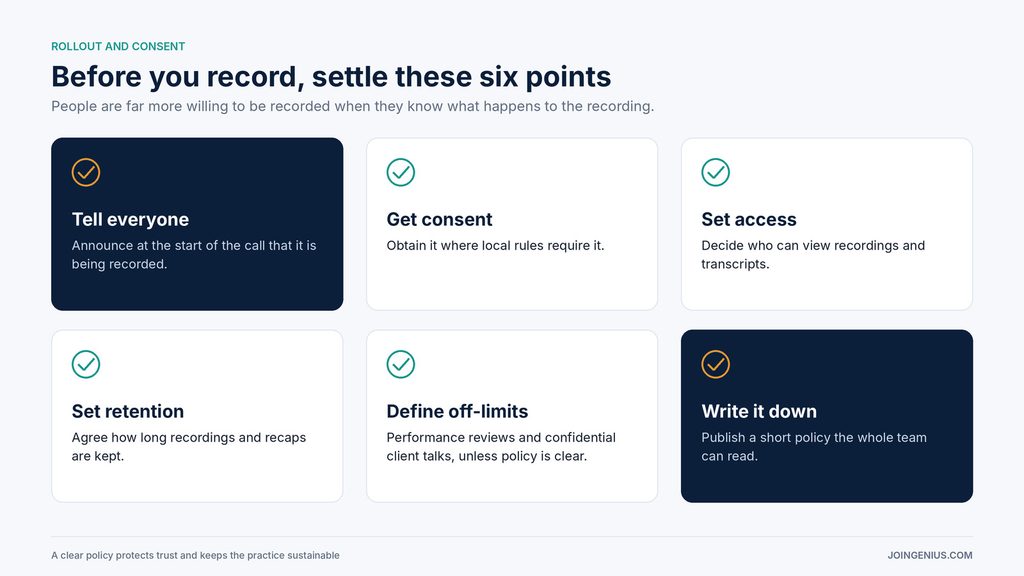
Tell participants when a call is being recorded, and get consent where local rules require it. Decide who can access recordings and transcripts, and how long you will keep them. Be cautious with sensitive conversations, such as performance reviews or confidential client discussions, and agree in advance on when recording is off limits.
Write these decisions down as a short policy. People are far more willing to be recorded when they know what happens to the recording.
Start With One Meeting
AI transcription works best when the process around it is simple: record the call, get the transcript, extract clear action items, and store everything where the team can find it. None of that needs a big rollout.
A practical first step is to pilot the workflow on one recurring weekly meeting. Use a consistent title, send the recap within an hour, and check after a month whether tasks are getting done faster. If they are, expand from there. Teams that follow up reliably tend to get more out of every hour they spend together, which is a quiet but real boost to remote employee productivity.