A founder launches with a logo made in ten minutes. The website uses one shade of blue, the pitch deck uses another, and the invoice template uses a third. The product is solid, but the business looks like three different companies. Customers do not point this out. They simply trust it a little less.
The fix is smaller than most founders expect. A brand kit is a short list of decisions, and you can make them yourself with free or low-cost tools if you take them in the right order. If you want the thinking behind those decisions, this guide to brand strategy explains how strategy differs from visual identity.
This guide covers what a brand kit includes, how to settle your positioning first, how to choose a logo, colors and fonts, how to write a voice guide, how to turn it all into templates, and how to tell when it is time for outside help.
What a Brand Kit Actually Includes
A brand kit is the set of rules that makes everything you publish look and sound like it comes from one company. It does not need to be a long document.
At a minimum it has five parts. First, your logo, with a few versions for different uses. Second, a color palette. Third, your fonts. Fourth, a short voice guide describing how you write. Fifth, a handful of templates for the things you make most often.
Most early-stage founders do not need more than that. A one-page kit that you actually use beats a polished brand book that nobody opens.
It also helps to think of the kit as a tool for saving time. Every time you start a new graphic or write a new page, the kit answers the small questions for you: which logo, which color, which font, how formal. Fewer questions mean faster work and fewer inconsistencies.
Start With Positioning, Not Visuals
The most common mistake is picking colors first. Colors express a decision you have not yet made. Spend an hour on positioning before you open any design tool.

Answer four questions in plain language. Who is this for? Be specific, because “small businesses” is too broad to guide any decision. What do you promise them? Write one sentence. Which three words describe how the brand should feel? And what are you not? A brand that is “friendly but not childish” or “premium but not stuffy” is easier to design than one that is just “good.”
Those three words become your filter. When you are choosing a font or a shade, ask which option fits the words. If you cannot tell, the words are probably too vague.
Here is a quick example. Suppose you sell bookkeeping software to freelancers. Your promise might be “tax time without the dread,” and your three words might be calm, clear and friendly. That already rules out loud neon colors, dense jargon and a cold corporate tone. A few lines of positioning have narrowed hundreds of design choices.
A Name That Sounds Clever to You Might Score Poorly With Actual Customers
A name you have lived with for weeks stops sounding strange to you. Customers meet it cold. They have to say it, spell it, remember it and type it into a search bar, and a name that felt clever in your head can fail at any of those steps.
Start with a quick human test. Say the name out loud to five people who have never heard it, then ask them to write it down. If most spell it differently, or ask you to repeat it, that is a warning sign. Also ask what kind of company they think it belongs to. If their guesses are far from what you actually do, the name may be sending the wrong message.
Then check the practical side before you commit to a logo and a domain. A name validation tool such as NameRobot’s NameScore can speed this up. According to its page, it checks a name for availability across domains, trademarks, social media and app stores, and looks at how the name sounds and what associations it may trigger. It then gives an overall score so you can compare a shortlist, with the report arriving in a dashboard and as a PDF within a few minutes.
Be realistic about what it is. It is a paid, automated tool, and the page does not explain how the score is calculated or exactly which registries it searches. Treat the report as one input alongside your own customer test, not as a legal opinion. If you plan to register the name as a trademark, ask a trademark attorney before you spend money on branding built around it.
Settle the name first, then build the visuals. Colors, fonts and a logo are much easier to change than a name your customers already know.
Choose Your Logo, Colors and Fonts
Keep the visual choices small. Fewer choices make a brand look more consistent, and they make it easier for you to stay consistent over time.
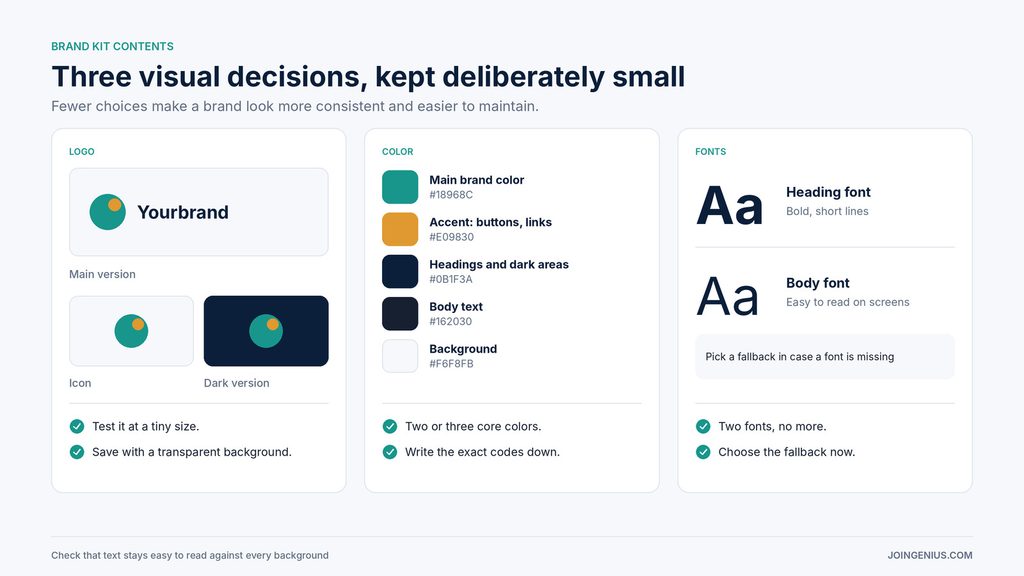
For the logo, aim for one main version plus a simple icon or stacked version for small spaces, such as social profile pictures. Test it at a very small size. If you cannot read it as a tiny square, simplify it. Save it with a transparent background, and keep a light and a dark version.
For color, choose two or three core colors and a few neutrals. Give each one a role, such as main brand color, accent for buttons and links, and background. Write down the exact color codes so you never have to guess. Check that your text colors are easy to read against your backgrounds, especially for body text and buttons.
For fonts, choose two: one for headings and one for body text. Pick families that are easy to read on screens, and make sure they are available in the tools you use every day. If a font is not available on a platform, choose a fallback now instead of discovering the problem the day you publish.
Write a Short Voice Guide
How you write is part of the brand. A brand with a consistent look but an inconsistent voice still feels scattered.
Keep this part short. Choose three tone traits, such as direct, warm and practical. List a few words you like to use and a few you avoid. Then write one sample sentence that sounds exactly right, so that you, or anyone helping you, can compare against it. Use it for emails, product pages, social posts and support replies.
A useful test is to read a recent message aloud and ask whether a customer could tell it came from you without seeing your name. If the answer is no, the voice guide needs more detail, and the sample sentence is usually the first thing to sharpen.
Turn the Kit Into Templates With DIY Tools
A kit only works if it is easy to use. Templates remove the need to remember the rules every time.
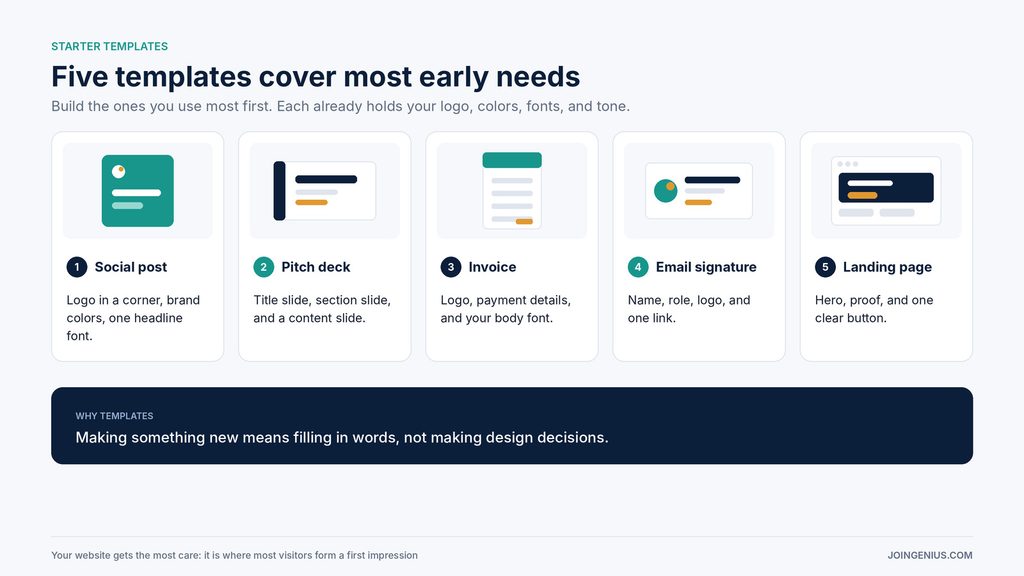
Build the ones you use most first. A social post template, a pitch deck, an invoice, an email signature and a simple landing page cover most early needs. Each should already contain your logo, colors, fonts and tone, so that creating something new means filling in words instead of making design decisions.
Your website deserves the most care, since it is where most visitors form their first impression. This guide to landing page best practices covers the layout and copy choices that help a page convert, and it pairs well with a consistent kit.
Document It on One Page
Put everything in one place: logo files, color codes, font names, the three brand words and the voice guide. A single shared document or slide is enough.
This page is what lets a freelancer, a new hire or a printer get your brand right without asking you. It also protects you from drift, which is what happens when each new piece is made from memory and slowly moves away from the last one.
At Some Point You Outgrow the DIY Tools and Need an Actual Agency
DIY tools are a good way to start. They are not always a good place to stay. Founders usually feel the limit in one of a few ways.
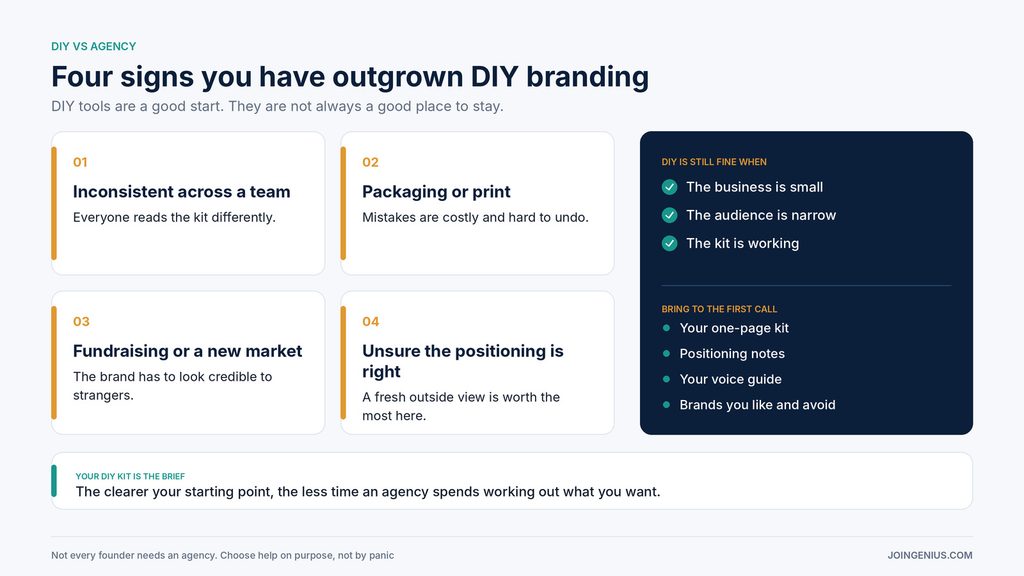
The brand looks inconsistent across a growing team, because everyone interprets the kit differently. You are preparing packaging or printed materials, where mistakes are costly and hard to undo. You are fundraising or entering a new market, and the brand needs to look credible to people who do not know you. Or the kit exists, but you cannot tell whether the positioning behind it is right. A fresh outside view is worth the most at exactly that point.
When you reach the point of needing a branding agency, look for one that covers brand strategy, visual identity, brand voice and brand assets, which are the areas Rubix Studios lists on its branding page.
Those four areas map closely to the kit you have already built, which is useful. Your one-page kit, positioning notes and voice guide are effectively a brief. Bring them to the first conversation, along with examples of brands you admire and brands you want to avoid looking like. The clearer your starting point, the less time an agency has to spend working out what you want.
Ask to see work that is similar in scope to yours, and ask what you will receive at the end, whether that is a logo only, a style guide, or a full set of assets. Be clear on who owns the files.
Not every founder needs an agency. If your business is small, your audience is narrow and your kit is working, you may be fine for a long time. The point is to recognize the signs, so that you choose outside help on purpose instead of by panic.
Red Flags in Your Own Brand Kit
Look for these warning signs. You have several versions of the logo and no one knows which is current. Your colors exist only as screenshots, with no written codes. Your tone changes from channel to channel. Or you rebuild the same template each time. Any one of them is a sign that the kit needs tightening before you add anything new.
Make the Decisions in Order
A brand kit is not a design project to finish and forget. It is a set of decisions you make in order, write down, and revisit as the business grows. Positioning first, then visuals, then voice, then templates, then one page to hold it together.
A practical first step is to spend an hour this week writing down your audience, your promise and your three brand words. Everything else gets easier after that. As your content grows, this guide to brand content strategy shows how to turn a consistent brand into a consistent content plan.