A custom order comes in on Monday afternoon. You check the file, start the print before bed, and go to sleep feeling good about the week. At 7 a.m. you walk into the workshop and find a tangle of plastic where a finished part should be. The customer is expecting an update, the next order is waiting, and you have lost a night of print time.
Most small sellers who print to order know this moment. The good news is that you do not need an operations manager to avoid it. You need a simple, repeatable workflow that you follow the same way every time, plus a few habits that let you see problems early. If you are still choosing the software around your store, this guide to an ecommerce tool stack is a useful starting point.
This guide covers why custom orders are hard to manage, how to build an order-to-ship workflow, what to collect at checkout, how to plan your print queue, how to keep an eye on prints from anywhere, and how to check quality before shipping.
Why Custom Orders Strain a Small Seller
Standard products are predictable. You print the same file, on the same settings, and you know how long it takes. Custom orders break that rhythm in several ways.
Every order is a little different. One customer sends a file, another sends a sketch, and a third sends a single sentence. Each one needs checking before you can print anything. Some files have thin walls or impossible overhangs, and finding that out after the print has started wastes time and material.
Timing is also harder to predict. A custom part may take six hours or thirty, and a failed print can double that. When you are the only person involved, a single failure can push every other order back by a day.
Then there is communication. Customers who paid for something made just for them want updates, and without a system each reply pulls you away from the printers.
None of this means custom work is a bad idea. It means the work needs structure.
Build a Simple Order-to-Ship Workflow
The most useful thing you can do is write down the path every order takes. It does not have to be fancy. A one-page checklist is enough, as long as you use it every time.

A workable version has nine steps. First, intake: the order arrives with all the details you need. Second, a file check, where you open the model and look for problems. Third, approval, where the customer confirms what you are about to make. Fourth, the queue, where the job gets a slot. Fifth, the print itself. Sixth, post-processing, such as removing supports and sanding. Seventh, a quality check. Eighth, packing. Ninth, shipping, with tracking sent to the customer.
Two of these steps save the most trouble. The approval step catches misunderstandings before you spend hours printing the wrong thing. The quality check stops flawed parts from reaching customers, which is far cheaper than a refund and a reprint.
Write each step as a short instruction, and keep the list where you work. When you eventually bring in help, the list is what lets them do the job without you standing nearby.
Collect Everything You Need at Checkout
Most delays in custom work start with missing information. Fixing that at checkout is cheaper than chasing customers by email.
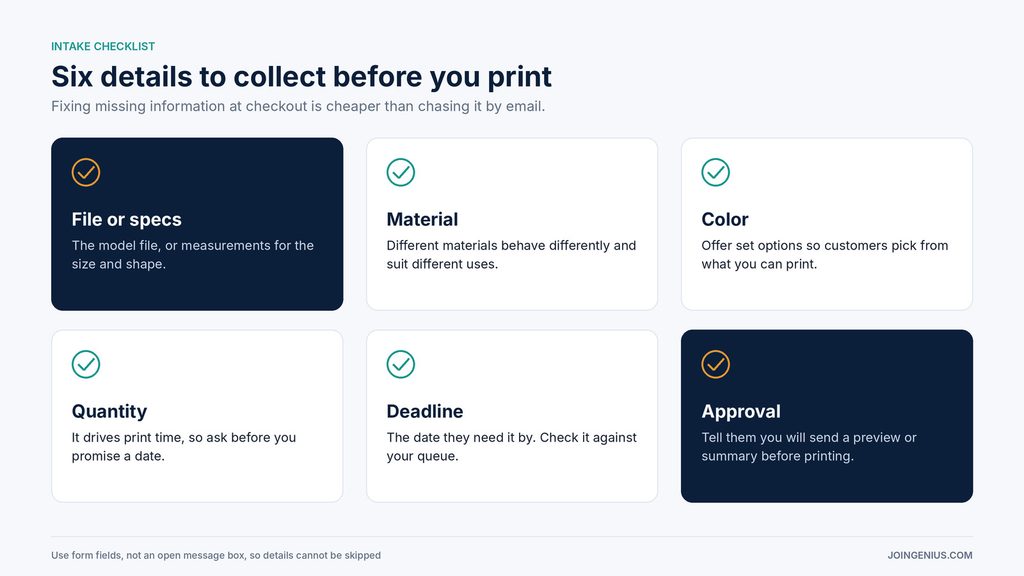
Ask for the model file or clear specifications. If the customer is describing a size or shape, ask for measurements. Ask which material they want, since different materials behave differently and may suit different uses. Ask for the color, the quantity, and the date they need it by. Finally, tell them you will send a preview or summary for approval before printing begins.
Use form fields or product options, not an open message box, so that customers cannot skip the details. Give examples next to each field, such as accepted file types or how to measure.
Do not start printing until the intake is complete. One clarifying email at the start is much less costly than a wasted print.
Plan Your Print Queue and Capacity
Once orders are coming in steadily, the next question is how many you can promise. Many small sellers set delivery dates by instinct, then scramble when a few jobs overlap.

Start by working out how many hours your printers can realistically run each week. Do not count every hour on the clock. Subtract time for loading, cleaning, maintenance, and the days you are away. Then book your jobs against that number, and keep a buffer, perhaps a fifth or more of your hours, for reprints and rush work. A schedule with no slack breaks the first time something goes wrong.
Group similar jobs where you can. Printing several parts in the same material and color back to back saves changeovers. Put long prints overnight and short ones during the day.
Be honest in the lead times you quote. Customers usually accept a longer lead time more readily than a missed deadline.
As order volume grows, simple automation can take some of the repetitive work off your plate. This guide to AI process automation shows how to choose the first workflows to automate, which might include order confirmations and status updates.
Checking on Orders From Your Phone Instead of Walking to the Workshop
The riskiest part of the process is the print itself, because it often runs for hours while you are doing something else. Checking in person means interrupting your day or losing your evening.
With remote printer monitoring such as OctoEverywhere, you can watch a live webcam view, get print notifications and check progress from a mobile app instead of walking to the workshop.
For a one-person shop, this changes how a day runs. You can start a print, go and pack another order, and glance at the webcam from your phone to confirm the first layers went down properly. If you run more than one printer, a multi-printer dashboard puts the status of all of them in one place, which saves you from walking from machine to machine.
OctoEverywhere also lists AI-based print failure detection among its features. A failed print caught in the first hour costs far less than one found the next morning, so catching problems early protects both your material and your delivery dates.
There are a few practical points to check before you depend on it. OctoEverywhere supports OctoPrint, Klipper, Elegoo, Bambu Lab, PrusaLink and other printers, but setup differs by printer. Some setups need a Raspberry Pi or another companion device, and some companion options need that computer to stay on. Read the setup steps for your specific printer before you plan your workflow around it.
It is also worth being clear about what monitoring does and does not do. It helps you notice trouble earlier and spend less time standing in the workshop. It does not replace checking the finished part. You still need your quality check before anything is packed.
Quality Check and Packing Before You Ship
A part that looks fine on the plate can have problems you only see in your hand. Take two minutes with every part before it goes into a box.

Check the dimensions against the order, especially for parts that must fit something else. Look at the surface for stringing, rough patches, or leftover support marks. Test the fit if the part connects to another piece. Choose packaging that holds the part still, using padding where it is fragile. Finally, double-check the shipping label against the order before sealing the box.
Photograph each part before you pack it. A quick photo gives you a record if a customer later says a part arrived damaged or wrong.
Keep Customers Informed Without Extra Work
Custom buyers do not mind waiting, but they do mind silence. Decide in advance on three or four moments when you will send a short message: order approved, printing started, shipped with tracking. Write each message once as a template and reuse it.
The photo you took before packing makes a good addition to the shipping message. Customers who feel informed are also more likely to come back, and this guide to customer retention covers simple ways to turn a one-time custom order into a repeat customer.
Red Flags in Your Own Process
Watch for these signs that your process needs work. You have no written steps, so every order is handled from memory. You have no spare print time, so one failure delays everything. You only check your printers in person, so problems are found hours after they start. Fixing any one of these will reduce stress more than buying another printer.
Start With One Written Page
A small seller does not need a department to fulfill custom orders well. A clear workflow, complete information at checkout, a realistic schedule, and an early view of what is happening on the printers cover most of what an ops team would do.
A practical first step is to write your order-to-ship steps on a single page this week, then add one monitoring check to your routine so you are not finding out about failures by walking in the next morning. Once the steps are on paper, you can decide which of them to hand to a helper. If you reach the point where handing off larger parts of fulfillment makes sense, this list of business process outsourcing companies shows what outside providers offer and how to compare them.