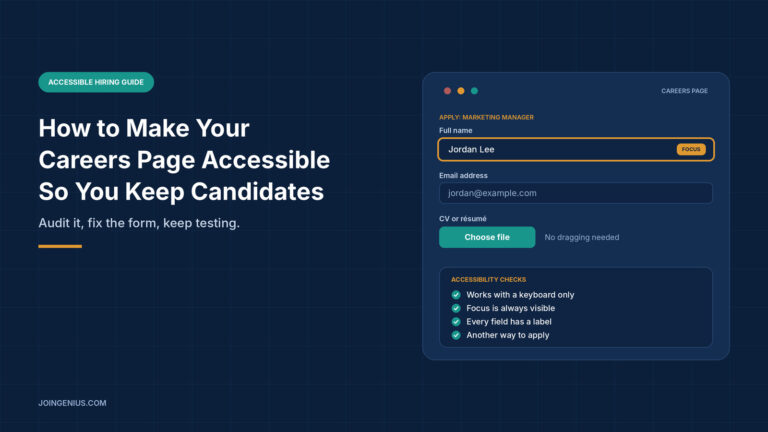
A careers page can lose candidates before anyone reads a CV. If a button does not work with a screen reader, a form cannot be completed with a keyboard or a file upload is out of reach, the person who wanted to apply simply leaves. You never see them in your numbers, so the problem rarely gets fixed.
This guide explains where candidates tend to get stuck, how to audit a careers page against the Web Content Accessibility Guidelines (WCAG), which parts of an application form to fix first, and how to keep the page accessible after launch. It ends with a table of warning signs to check regularly. It is general information, not legal advice, and the rules on hiring and accessibility differ by country.
Where Candidates Get Stuck
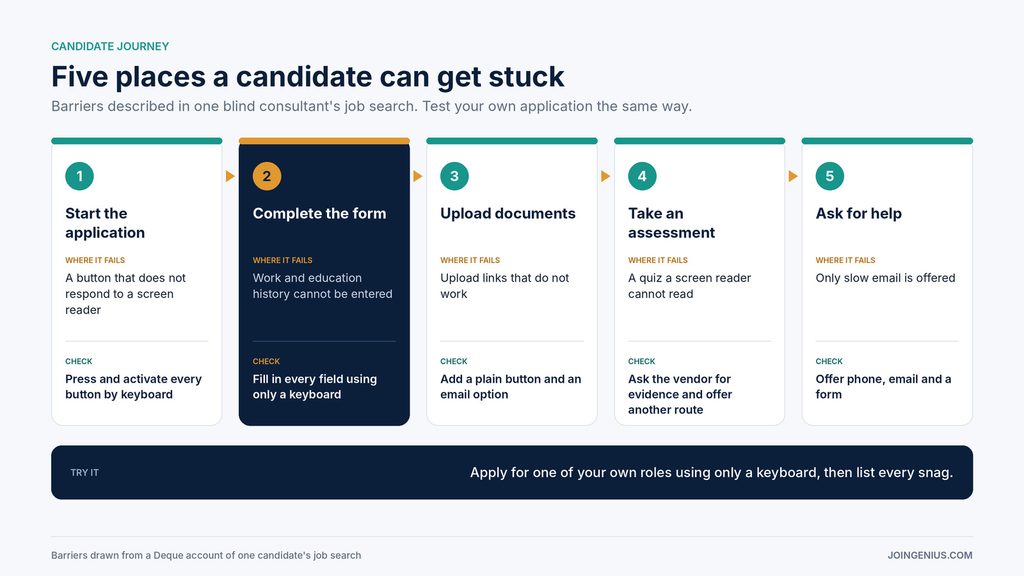
Accessibility problems on careers pages are usually practical and specific. Deque, an accessibility software company, published an account by one of its blind consultants describing his own job applications. A form blocked him from entering his work and education history. A button to start a pre-interview assessment did not work when he tried to activate it. A culture-fit quiz was completely unreadable to his screen reader. Links to upload a résumé and cover letter did not work either, so he chose not to apply. When he tried to report problems, the only route offered was email, and replies were slow.
Notice how ordinary these steps are. Starting, typing, uploading and asking for help are the basics of any application, and if one of them fails, the whole application fails, however strong the rest of the page looks.
None of these failures require bad intent. They come from forms, tools and pages that were never tested with assistive technology. Walk through your own application from start to finish and note where a candidate could be blocked.
Audit the Careers Page Against WCAG Before You Send Candidates to It
The most reliable starting point is a WCAG audit. WCAG is the international standard from the W3C for making web content more accessible to people with disabilities. It is organised around four principles: content must be perceivable, operable, understandable and robust. Each success criterion sits at level A, AA or AAA. The latest version is WCAG 2.2, published on 5 October 2023 and updated on 12 December 2024, and the W3C encourages people to use the latest version.
Bowler Hat, a UK web agency, offers audits that assess a site against WCAG 2.2 and produce an action plan. Its page does not say how the testing is carried out, so ask any provider how they test before you commission one. A thorough audit usually combines several layers:
- Automated checks: quick scans that catch some common issues across many pages
- Keyboard testing: moving through the page without a mouse to find traps, missing focus and a confusing order
- Screen reader testing: listening to how controls and content are announced
- Testing with disabled users: finding barriers no checklist predicts
Automated tools cannot judge whether an experience makes sense, so the manual layers matter. Audit the whole journey, not only the careers landing page, because the application form and any assessment tool are often hosted elsewhere.

Fix the Application Form First
For most careers pages, the application form is where candidates are lost, so it deserves the first round of fixes. WCAG 2.2 added nine new success criteria and removed one. Six of them bear directly on forms and sign-in steps, and the W3C summarises each in plain language:
- Redundant Entry (level A): do not ask for the same information twice in the same session
- Target Size, Minimum (AA): pointer targets should be at least 24 by 24 CSS pixels, or have enough spacing around them
- Focus Not Obscured, Minimum (AA): when an item gets keyboard focus, it should be at least partially visible
- Dragging Movements (AA): for any action that involves dragging, provide a simple pointer alternative
- Accessible Authentication, Minimum (AA): do not make people solve, recall or transcribe something to log in
- Consistent Help (A): put help in the same place when it appears on multiple pages
On a careers page, that means carrying details between steps, making buttons easy to hit, checking that a sticky cookie banner does not cover a field, replacing drag-to-upload with a button, allowing paste and password managers on candidate accounts, and keeping the help link in one position. Clear labels, readable error messages and enough time to complete each step help just as much. The older basics still matter too. Give every field a visible label rather than relying on placeholder text, describe errors in words next to the field they relate to, mark required fields clearly and let people review their answers before submitting. Ask only for what you need at the first stage, because every extra field is another chance to get stuck.
Once the form works, a candidate-friendly remote interview process carries the same thinking into the next stage.

Offer a Way Out of the Online Form
Even a well-built form will not suit everyone. Offer an alternative route and say so on the page. Publish the steps in your hiring process, explain how to request adjustments and what information you will need, and provide more than one contact option, such as phone, email and a form. Say so in the job advert as well as on the application page, so candidates do not have to hunt for it.
Then make sure the people who answer know what to do: a request for an adjustment should reach someone who can act on it quickly, and the candidate should not be asked to justify it at length. A published hiring process flowchart can help candidates, particularly anxious or neurodivergent ones, know what to expect.
There is a legal angle in the UK. A law firm’s commentary on an employment appeal tribunal case, AECOM v Mallon, explains that a blanket online application process disadvantaged an applicant with dyspraxia and that the employer should have telephoned him to understand the difficulty. The case relates to the Equality Act 2010 and its duty to consider reasonable adjustments for job applicants. Rules differ elsewhere, so speak to a qualified adviser about your own obligations.
Check Your Hiring Tools and Keep Testing
Many careers pages rely on third-party tools for applications, assessments and scheduling. Ask each vendor for an accessibility statement, and try their tools yourself with a keyboard and a screen reader. If a vendor cannot show you evidence, treat that as a risk. Deque’s account recommends exactly this kind of vetting, along with testing job postings and applications with people who have disabilities.
Accessibility is not a one-off project. Every redesign, new form or plugin can bring problems back, so test after each change and add a short accessibility check to your release process. Set a simple routine: test the application with a keyboard each quarter, recheck after each release, and keep a log of issues with an owner and a date. Small repeated checks are easier to keep up than a large clean-up. Pair it with a review of the wider process, such as your approach to diversity hiring and the risk of interviewer bias, because an accessible page only helps if the later stages are fair too.
Warning Signs Your Careers Page Is Turning Candidates Away, and What to Do About Each
Check this table every quarter and after any redesign. One sign means fix one thing. Three or more mean the page needs a full audit before you invest in more advertising.

Make Accessibility Part of How You Hire
An accessible careers page is a practical advantage, because it keeps qualified candidates in the process. Walk through your own application, audit the whole journey against WCAG, fix the form first, offer another way in and keep testing. Start with one real application attempt using only a keyboard, and let what you find set the order of the work.