It is two days before launch. The announcement email is half written in one document. The landing page copy is in a chat thread. Someone said they would update the pricing, but no one remembers who. A designer is waiting for a sign-off that was requested in a message nobody has seen. Everything is moving, and nothing is visible in one place.
This is how most launches go wrong. The product is usually fine. What fails is the coordination around it. A launch has dozens of small tasks that depend on each other, and when they live in different places, things slip. The fix is not a bigger tool or a longer meeting. It is a simple structure: a fixed date, a few workstreams, one owner per task and one shared board. If you are still shaping the commercial plan behind the launch, this guide to sales strategy is a useful companion.
This guide covers why launches slip, how to plan backward from a date, how to split the work into streams, how to use kanban-style lists, how to assign owners, and how to run a final check before launch day.
Why Launches Slip
Launches rarely fail because of one big mistake. They slip because of small gaps that nobody notices until it is too late.
Hidden dependencies are the most common cause. The email cannot go out until the page is live, and the page cannot go live until the pricing is final, but nobody wrote that order down. Tasks without owners come next. When a job belongs to “the team,” it belongs to no one. Undated approvals also cause delays. A request that sits in someone’s inbox for three days can quietly push everything behind it. Finally, assets arrive late. Images, copy and product details are needed by several people at once, and each one waits on the same missing file.
All four problems share a root cause: the plan is not visible. The rest of this guide is about making it visible.
Start With the Launch Date and Work Backward
Pick the launch date first, and treat it as fixed unless something serious changes. Then work backward, placing milestones at points before and after launch.
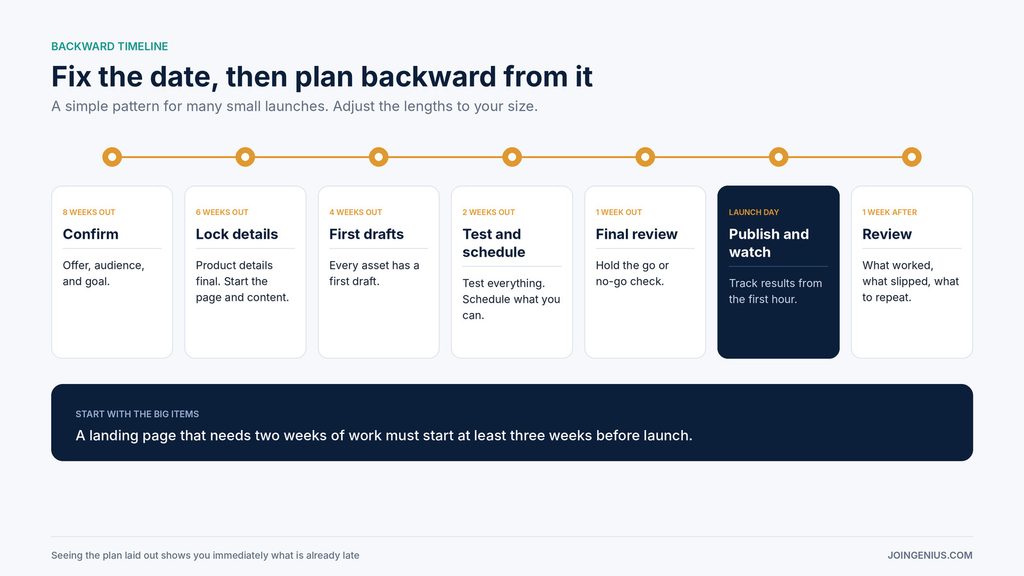
A simple pattern works for many small launches. Eight weeks out, confirm the offer, the audience and the goal. Six weeks out, lock the product details and begin the page and content. Four weeks out, finish a first draft of every asset. Two weeks out, test everything and schedule what can be scheduled. One week out, hold a final review. On launch day, publish and watch. One week after, review what happened.
Adjust the lengths to suit your size. A small digital product might need four weeks, not eight. The principle holds either way: every task should have a place on a timeline that ends at a date you chose.
Work backward from big items first. If the landing page needs two weeks of work and a review, then it must start at least three weeks before launch. Seeing it laid out like this shows you immediately what is already late.
Break the Launch Into Workstreams
A launch looks overwhelming as one long list. It becomes manageable when you split it into workstreams, each with a clear definition of done.
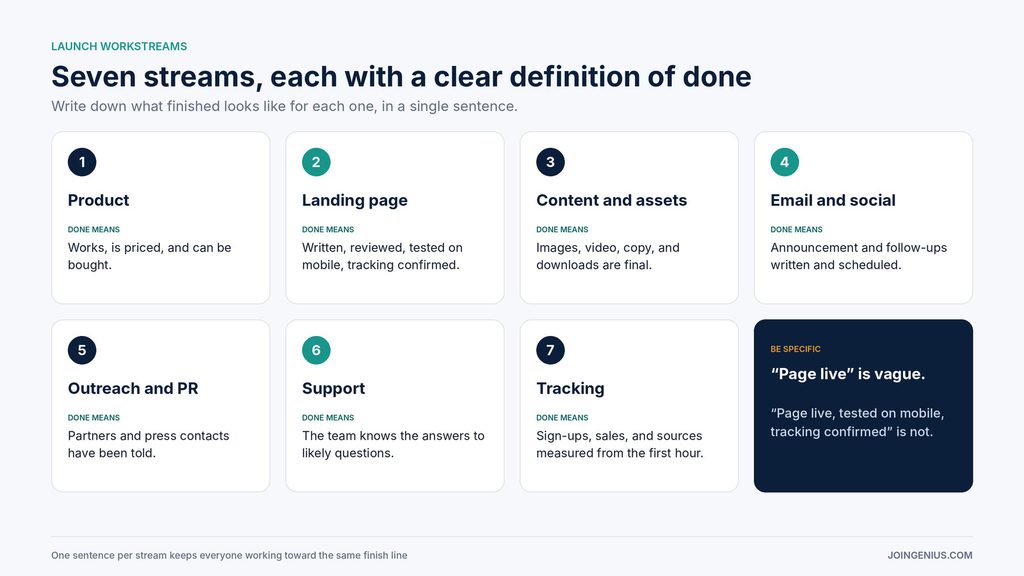
Seven streams cover most launches. Product readiness means the product works, is priced and can be bought. The landing page means the page is written, reviewed and tested on mobile. Content and assets cover images, video, copy and any downloads. Email and social cover the announcement and follow-ups, written and scheduled. Outreach and PR cover the people you will tell, from partners to journalists. Support means the team knows the answers to likely questions. Tracking means you can measure sign-ups, sales and sources from the first hour.
For the page, small details matter. This guide to landing page best practices covers the design, copy and testing choices that affect how many visitors convert, and it helps you define what “done” means for that stream.
Write down what finished looks like for each workstream, in one sentence. “Page live” is vague. “Page live, tested on mobile, tracking code confirmed” is not.
Kanban-Style Lists Work Fine Without a Full Project Management Suite
Many teams assume a launch needs heavy software. For a small team, it usually does not. A board with a few lists is enough to show what is waiting, what is moving and what is finished.
A basic set of lists might be Backlog, In progress, Waiting and Done. Each task is a card. Cards move left to right as work advances, and anything stuck in Waiting needs a nudge. You can see the state of the whole launch at a glance.
A visual planning canvas such as Kinopio lets you group cards into lists, which its site describes as ideal for Kanban-style project management, so you can track launch tasks without setting up a full project management suite.

Kinopio’s site lists other features that suit launch planning. You can group related items in boxes, such as one box per workstream. You can draw connections between cards to show that one task depends on another. Cards can be assigned to people and given due dates, and spaces support real-time collaboration, so several people can work on the same board.
Be honest about the trade-offs. A freeform canvas is flexible, but flexibility needs some discipline. Agree on the lists, the naming and who moves cards before you start, or the board will drift into clutter. A larger team that needs detailed reporting, time tracking or approval workflows may still be better served by a dedicated project management tool. The goal is a single place that everyone actually uses, and the simplest option that achieves that is usually the right one.
Give Every Task One Owner and One Date
A card without an owner and a date is a wish. Before a task goes on the board, name one person responsible, and set a due date. Add one line describing what done looks like.
One owner does not mean one person does all the work. It means one person answers for it. If a task needs input from three people, the owner gathers it. This removes the question of who is chasing whom.
Review dates, too. When a due date moves twice, ask why. Often it signals a hidden dependency or a task that is larger than it looked.
Run a Go or No-Go Check Before Launch Day
A week before launch, hold a short review that asks one question: are we ready? A checklist makes the answer concrete.

Check six things. Does the product work and can customers buy it? Is the page live in preview, tested on a phone and a laptop? Are the emails and posts written and scheduled? Is support briefed on likely questions? Is tracking working, so you can see results from the first hour? And is there a fallback plan if something breaks, including who decides to pause?
If any answer is no, name the owner and the fix, and decide whether the date can hold. Doing this a week early leaves time to act. Doing it on launch morning leaves only panic.
Review After Launch
The work does not end when you publish. One week later, hold a short review. What went as planned? What slipped and why? What would you do differently? Write down the answers while they are fresh, and keep them with your board. The next launch will start with a head start.
Keep One Board and One Date
A launch is a lot of moving parts, but it does not need a complicated system. Fix a date, plan backward, split the work into streams, give each task an owner and a due date, and keep everything on one board that the whole team can see.
A practical first step is to list every launch task you can think of and give each one an owner and a date. Once the launch is out, keep the momentum going. This guide to PR strategy shows how to turn a launch into ongoing coverage.