Every outsourced support team has the same recurring problem. A new client signs, a new batch of agents starts, and everyone has to learn a fresh set of rules, tools and tone before the first real customer contact. When turnover is high, that cycle begins again before the last one has finished.
The slow part is rarely the training session itself. It is what comes after: the weeks when a new agent knows the basics but still hesitates, searches shared drives and asks a team lead what to do next. The gap between “trained” and “confident” is what ramp time measures, and it is where knowledge tools can help.
This guide covers why onboarding drags on outsourced teams, how structured knowledge changes the picture, where to keep people in control, and how to measure whether any of it works.
Why Onboarding Takes So Long on Outsourced Support Teams
Outsourced agents face a harder learning job than most in-house hires. They often support more than one client, and each client has its own policies, escalation paths and brand voice. A mistake that would be minor internally can turn into a contract conversation.
Three things tend to stretch the learning curve:
- Knowledge lives in too many places. Process documents, chat threads, spreadsheets and old emails each hold part of the answer, and nobody is sure which one is current.
- Documents are written to be complete, not to be used. A forty-page procedure covers every case, but an agent in the middle of a live contact needs the next step, not the whole manual.
- Updates reach people unevenly. When a client changes a policy, some agents hear about it in a briefing and others find out when a customer corrects them.
Turnover makes all three worse. Every time an experienced agent leaves, some of the unwritten knowledge leaves with them, and the next hire has to rebuild it from the same scattered sources. Teams that rely on shadowing alone find that new agents learn each other’s habits along with the process, including the shortcuts that no longer match what the client wants.
None of these is a training failure. They are knowledge delivery failures, which is why adding more classroom days rarely fixes them. The fix is to change how the answer reaches the agent at the moment they need it.
Decision Trees Replace a Stack of Your Static SOP Documents
A static SOP asks the agent to read, remember and interpret. A growing number of support teams are replacing that with guided decision trees, where each screen asks one question or gives one instruction and the answer decides what comes next. Knowmax describes its version as interactive, step-by-step workflows that guide people through processes such as troubleshooting, compliance checks and onboarding.
The difference is where the thinking happens. In a document, the agent works out which section applies. In a tree, the path does that work, so a newer agent can follow the same steps an experienced one would.
Take a refund request as an example. In an SOP, the agent finds the refund section, checks the order date, looks up the policy exception list and decides whether to escalate. In a tree, the first screen asks for the order date, the next asks whether the item was damaged, and the last one either shows the approved wording or hands the contact to a team lead. The agent still uses judgment, but only at the points where judgment is actually needed.

According to the Knowmax page, the approach includes three capabilities worth knowing about:
- AI conversion. Its Max AI tool can turn existing SOPs or troubleshooting guides into interactive decision trees. The company says this saves hours of manual workflow creation.
- No-code editing. Business users can build and update trees without developers, which matters when a client changes a policy on a Tuesday afternoon.
- Usage analytics. Teams can see how flows are used and spot bottlenecks, usage trends and performance gaps, which shows where agents get stuck.
These are vendor claims, and results depend on the quality of the content behind them. A badly written SOP converted into a tree is still a badly written process, only faster to click through. Have a team lead walk through every tree before agents rely on it.
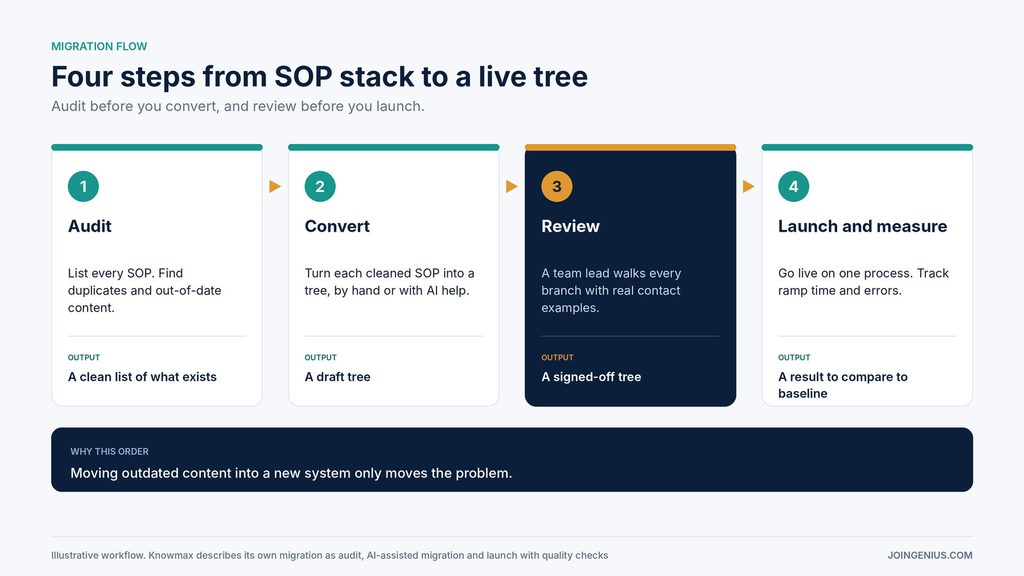
Migration deserves the same care. Knowmax describes a three-step approach: a content audit, AI-assisted migration, then a launch with quality checks. Whatever tool you use, that order is sound. Audit first, because moving outdated content into a new system only moves the problem.
Keep a Human in the Loop Where It Counts
Not every question needs the same level of control. Knowmax’s page describes three modes, and the split is a useful way to think about any AI knowledge tool:
- Fully automated answers, for quick, low-risk questions such as FAQs and password resets, with no human involved.
- Decision trees with manual oversight, where every step is pre-defined and human checkpoints support accuracy and compliance. Knowmax positions this mode for regulated industries.
- Conversational AI with a human in the loop, for moderate complexity where an agent gets guided steps and occasional human validation.

For an outsourced team, the practical rule is to match the mode to the cost of a wrong answer. Password resets can run light. Billing disputes, refunds and anything with legal or compliance weight should follow fixed paths with a person confirming the key steps. Agree these boundaries with each client in writing, because the client carries the brand risk.
This is also where broader planning pays off. Our overview of AI process automation covers how to decide which steps to automate and which to leave with people.
Measure Ramp Time Before You Change Anything
Knowmax’s page cites figures from its customers of about 40% fewer support team errors and about 40% shorter time to proficiency. The page does not explain how those were measured, so treat them as the vendor’s claims and not as a benchmark for your team. The useful takeaway is the metric itself: time to proficiency.
Define it before you start. A workable version is the number of working days from a new agent’s first live contact until they handle an agreed mix of contact types within quality and handle time targets. Then record:
- Baseline ramp time for your last two or three cohorts
- Errors or QA failures per new agent in the first 30 days
- Escalations to team leads per new agent in the first 30 days
- How often agents leave the tree or document to ask someone for help
A training matrix helps here. It shows which agents are cleared for which contact types, so you can track ramp progress by skill instead of by time served. Compare the first cohort using the new tooling against your baseline, on one client process, before you expand.
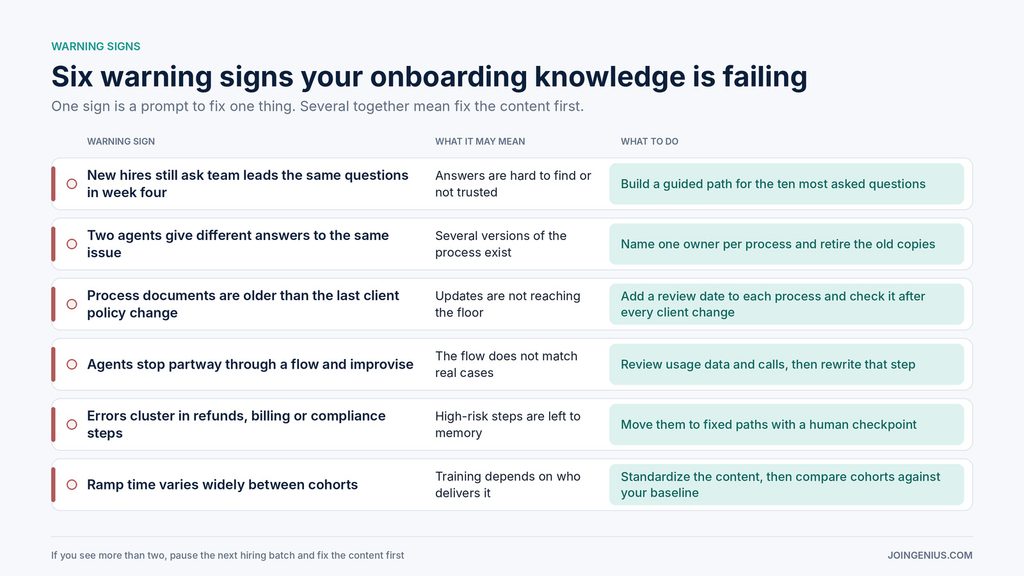
Warning Signs Your Onboarding Knowledge Is Failing, and What to Do About Each
Tools do not fix onboarding on their own. These signs show where the knowledge is failing, and each one has a specific next move. One sign is a prompt to fix one thing. Several together mean you should pause the next hiring batch and fix the content first.
A Practical First Step
Pick one client and one process with high volume and a clear right answer, such as order status or an account change. Audit the existing SOP, convert it into a guided tree, have a team lead test it, and run one new-hire cohort through it while the old method stays available for comparison. Measure ramp time and errors against your baseline.
If it works, expand process by process. If it does not, the audit usually shows why: the underlying process was unclear, or the tree did not match real contacts. Both are worth knowing before you roll anything out across clients.
If you are still deciding who should handle your support in the first place, our list of customer service outsourcing companies is a good place to compare options.