A company starts with three drivers and a dispatcher who knows every street. Orders arrive by phone and chat, and the dispatcher keeps the day’s plan in a spreadsheet and in their head. It works. Then volume doubles, a second dispatcher joins and a driver is out sick. Suddenly two people are assigning the same order, customers are calling to ask where their delivery is, and nobody can say how much a delivery actually costs.
The usual next thought is to build a custom system. That is rarely the first thing a growing company should do. Most delivery operations need the same core tools: dispatch, driver apps, tracking and proof of delivery. These already exist. If you are weighing a custom build, this guide to software development outsourcing explains what working with an outside team involves, which helps you judge the cost and effort honestly.
This guide covers why in-house delivery gets harder as you grow, what a delivery process needs, why customers now expect a tracking link, how to decide between building and buying, what to ask vendors and how to roll out in stages. It ends with a table of warning signs and what to do about each.
Why In-House Delivery Gets Harder as You Grow
Small delivery operations run on people. A dispatcher remembers which driver is nearby, which customer needs a call first and which address is hard to find. That knowledge does not scale.
Three things tend to break first. Information scatters across phone calls, chat threads and spreadsheets, so no one has the full picture. Customers have no way to see what is happening, so they call. And decisions that depend on one person stop working the moment that person is busy or away.
None of this means the team is doing a poor job. It means the process has outgrown the tools.
What a Delivery Process Actually Needs
Strip away the details and every delivery operation does the same six jobs: take the order, assign and route it, track the driver, prove the delivery, handle exceptions and invoice or collect payment.

Each job works well enough alone at small scale. The trouble starts when they pile up. Orders come in through different channels. The dispatcher assigns work from memory and a map. Customers and staff keep asking for updates. Proof of delivery sits as photos on drivers’ phones. Failed attempts and delays get lost in chat threads. And cash and invoices are matched by hand at the end of the week.
The fix is not six separate tools. It is one shared record of each order, from the moment it arrives to the moment it is paid.
Customers Expect a Tracking Link Now, Not Just a Phone Call
A customer who orders from their phone expects to follow the order the same way. “Where is my delivery?” calls pull dispatchers away from planning, and every call is a sign the customer was left guessing. A tracking link answers the question before anyone asks it. Clear updates also build trust, which supports repeat orders, and this guide to customer retention strategies covers why that matters.

Delivery management software such as Onro includes this out of the box. Its page lists a white-label tracking page and real-time tracking, plus notifications by in-app message, SMS, email and WhatsApp. It also lists a dispatcher panel, a driver app, proof of delivery and automatic assignment of orders to drivers, so the tracking link comes from the same system your team uses to run deliveries.
Be realistic. The page is written for courier companies, so check that its workflows, such as direct or scheduled delivery, match how your team delivers. It does not say whether the product is hosted or self-installed, and it does not list uptime guarantees or onboarding timelines. Its usage numbers and ratings are the company’s own claims. The page offers a trial that can be extended, so test it with your real orders before you commit.
Whatever tool you choose, a good tracking flow sends five messages: the order is confirmed with an expected window, a driver is assigned, the driver is on the way with a live link, the driver is arriving soon, and the order is delivered with proof. Each one answers a question the customer would otherwise phone in.
Build, Buy or Mix: How to Decide
Building custom software feels like the safe choice because it promises a perfect fit. In practice it brings costs people underestimate: a driver app on more than one phone platform, constant maintenance, security and a long wait before anyone benefits.

Build custom when your delivery process is truly unusual, you have developers who will keep maintaining it, or delivery itself is your product. Watch for ongoing upkeep and the time before launch.
Buy when your workflows are standard, such as dispatch, tracking and proof of delivery, and you want to start sooner with a small team. Watch for how well the product fits your process, the limits the vendor sets and how easily you can export your data.
Mix when you buy the core and connect it to your own systems, such as your store or accounting tools, through integrations. Watch for the upkeep of those connections.
A useful rule of thumb: buy what every delivery team needs, and build only what makes your delivery different.
What to Ask Before You Choose a Platform
A demo shows the best case. Questions show the real one. Ask every vendor the same set and compare the answers.
Ask how the product is hosted and who is responsible for uptime. Ask which delivery workflows it supports and whether they match yours, such as single stops, multiple stops or scheduled deliveries. Ask how the driver app works and on which phones. Ask which systems it connects to and whether there is an API. Ask how you can change branding, languages and zones. Ask what happens to your data if you leave, and how you can export it. And ask how pricing changes as your delivery volume grows.
Test with your own orders, including an awkward one, such as a failed attempt or a change of address. A platform that handles a clean example proves little.
Roll It Out in Stages
A new system does not have to replace everything at once. Start with a pilot: one area, one group of drivers or one type of delivery. Train the drivers first, because they decide whether it works. Run the old and new processes side by side for a short time, and fix the gaps before you widen the rollout.
Agree on a few measures before you start, such as how many “where is my order” calls you get, how long assignments take and how often proof of delivery is missing. Those numbers tell you whether the change is helping.
Warning Signs in Your Delivery Setup, and What to Do About Each
Some signs show up early. The table below pairs each warning sign with what it may mean and a practical next step.
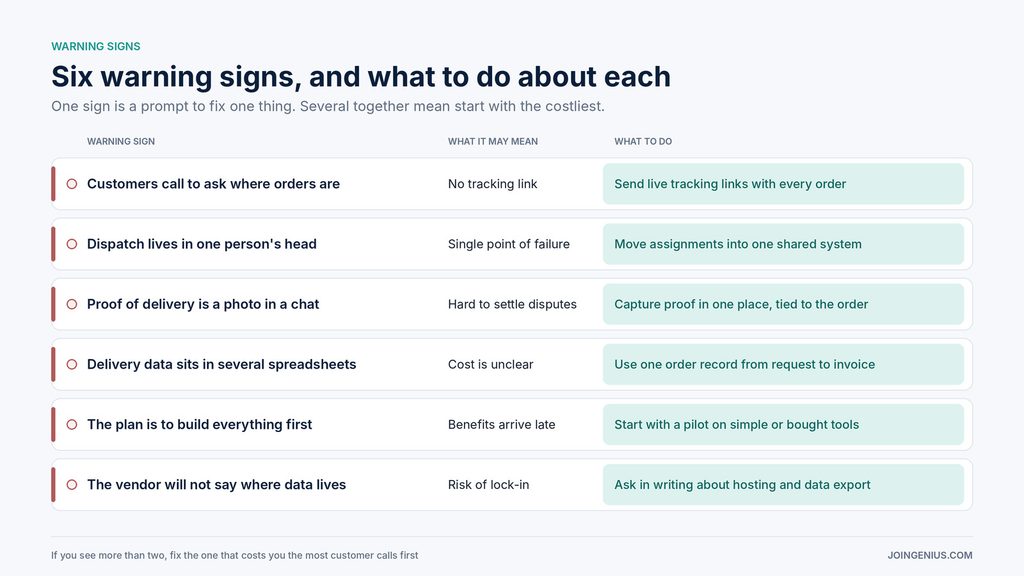
One sign does not mean the setup is broken. Several together usually do. If you see more than two, fix the one that costs you the most customer calls first.
Start Small, Keep One Record
Growing companies do not need to build a delivery system from scratch. They need one shared record of each order, a tracking link customers can trust and a clear view of which parts to buy and which to build. Start with a pilot, measure the calls you save and widen from there.
A practical first step is to list your six delivery jobs and mark where each one breaks today. Once deliveries run smoothly, look at what else can be automated. This guide to AI process automation covers choosing workflows, picking tools and rolling out in stages.