A remote engineer’s last day usually follows a checklist: disable the email account, remove the person from the repository, collect any equipment. The checklist rarely asks the harder question, which is what the person could reach through keys and tokens that do not depend on their account. Those credentials sit in CI settings, cloud consoles, local environment files and chat history, and they keep working after the person is gone.
This guide explains how to audit environment secrets when remote engineers leave. It covers why removing an account is not enough, where secrets hide, how to map what a leaver could reach, how to rotate it, how to prove the work was done and a table of warning signs. We found no study that measures secret exposure after engineers leave, so the evidence here is general and the link to leavers is our reasoning. It is general information, not security advice, and the right controls depend on your stack.
Why Removing the Account Is Not Enough
The NHI Mgmt Group, a vendor that publishes an FAQ on nonhuman identities, says organisations should rotate secrets after an employee leaves when that person had exposure to automation, cloud operations or shared credentials. Its page says “off-boarding is only complete when the access path is gone, not merely undocumented.” The reasoning is simple: an API key does not know who is holding it. The FAQ is a vendor page, so we use it for the principle only.
Remote work adds wrinkles, and these are our reasoning, not research findings. Keys travel by chat more often because there is no desk to walk to. The engineer’s machine may be personal. And a last day can span several time zones, so the person who should rotate a key may be asleep when the account is removed. Our guide to contractor onboarding and API keys covers how copies get made at the start. This guide covers what to check at the end.
What the Evidence Says About Where Secrets Hide
GitGuardian’s State of Secrets Sprawl 2025 report says 2.4% of corporate Slack channels contained leaked secrets and 6.1% of Jira tickets exposed credentials, which it calls the most vulnerable collaboration tool. It rates 38% of incidents in tools such as Slack, Jira and Confluence as highly critical or urgent, against 31% in source control. The same report says 70% of the secrets leaked in 2022 remain active today. GitGuardian sells detection software, and the report gives no method for how “active” was tested or how the collaboration figures were sampled, so read them as indications.
GitHub’s changelog adds an independent fact about one kind of credential. On 5 November 2025 it said npm granular tokens with write permissions were capped at a 90-day maximum lifetime, and on 9 December 2025 it said all npm classic tokens had been permanently revoked. Some credentials now expire by design. Many others do not. Cloud keys, database passwords and third-party API keys can stay valid until someone replaces them, though it depends on the provider and we did not survey providers.
Verizon’s 2025 Data Breach Investigations Report, as summarised by Help Net Security, found a median of 94 days to remediate leaked secrets discovered in a GitHub repository. The summary gives no sample for that figure. Together, the evidence says secrets turn up in places beyond code, that many stay usable for a long time and that fixes can be slow. It does not say how many of them belonged to people who had left.

Map What the Leaver Could Reach
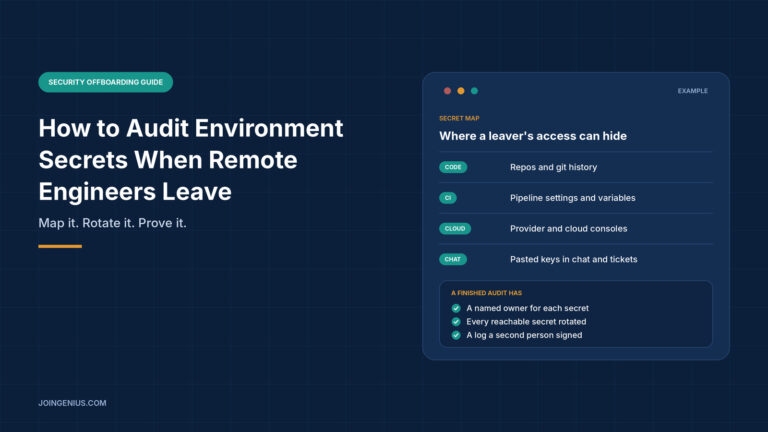
Start with a map, not a rotation. List the places a secret can live: code and git history, CI settings and variables, cloud and provider consoles, third-party dashboards, chat and ticket history, and local environment files. For each place, write down which secrets the leaver could read and who else uses them. A key used by one service is easy to replace. A key shared by five services needs a plan.
Then rank by what each secret can do. Production credentials with write access go first, read-only and test keys later. OWASP’s Secrets Management Cheat Sheet says “engineers should not have access to all secrets in the secrets management system, and the Least Privilege principle should be applied.” If your audit finds that the leaver could read nearly everything, treat that as a finding in itself.
OWASP also lists what good logging records: “Who requested a secret and for what system and role” and “When the secret was used and by whom/what.” Where your tools keep such logs, check for use after the exit date, because it can show whether a credential was used by someone it should not have been. Its page does not discuss departing staff, so applying it to leavers is our reasoning.
Rotate What the Leaver Could Reach
Rotation is the step teams skip, because by hand it is slow. Scott Motte of Dotenvx described the problem in a post dated 11 December 2025: npm’s short-lived tokens “strengthen security, but they make rotation painful,” because every 90 days or sooner you must create a fresh token, set it in your CI and make sure nothing breaks. His team publishes 64 npm packages, and he says rotating by hand across all of them was not sustainable.
The post describes a way to rotate npm tokens automatically with Dotenvx Armor, which the page’s URL calls ops. In the author’s description, you connect an npm account through a local flow, which creates a passcard, described as a connector that allows account access. Rotating returns a Rotation Token, one of what the post calls “special tokens that can change value,” like a proxy. Your pipeline keeps a fixed reference and fetches the current npm token when it runs. For the leaver case it says “Employee left who knew the old token?” Rotate it, and operations still work.
Treat that as a vendor’s claim. The post is promotional and describes the author’s own use, with no independent evaluation. The exact phrase “rotating npm tokens automatically” is our wording, since the page’s title reads “Rotate NPM Tokens with Dotenvx Armor. Automatically.” It covers one kind of token and gives the leaver scenario one line. It does not explain how passcards are secured or how to revoke them, so if a leaver had access to a tool like this, that access is one more item for the audit map.
Whatever tool you use, the order matters. Reissue the secret, update every service that depends on it, test, then revoke the old one. OWASP says “When secrets are no longer required or potentially compromised, you must securely revoke them to restrict access.” The NHI Mgmt Group warns that rotation can disrupt services, especially where legacy systems share secrets, and suggests a phased approach. Test in staging first and schedule production changes when the people who can fix a break are awake.
Prove the Rotation and Close the Gaps
An audit is finished when someone else can see it was done. Keep a rotation log with five fields: the secret’s name or purpose, its owner, when it was last used, when it was rotated and who verified it. A second person signs off, so the person who rotated is not the only one who vouches for it. Ask the leaver to confirm in writing which keys and files they still hold, and to delete them.
Then search where secrets hide beyond code. Run a secret scanner over the repository history, because a key committed once stays in history even after the file is deleted. Search chat and ticket history for pasted keys as well, since GitGuardian’s figures suggest they turn up there. Rotate whatever you find, and treat anything the leaver pasted into a shared space as exposed.

Measure Whether It Works
Track three things: the days between a person’s last day and the last rotation, the share of secrets with a named owner, and the share of leavers with a signed rotation log. A quarter with few departures proves little, so look for a trend over several. Verizon’s 94-day median is not a benchmark to meet, but a team that rotates on the last day is far inside it.
Build the secrets step into your standard exit process, next to your exit interview questions. For involuntary exits, timing matters more, and our guide on how to fire an employee covers the process around it. If nobody owns this work, the guide to hiring a DevOps engineer describes the profile.
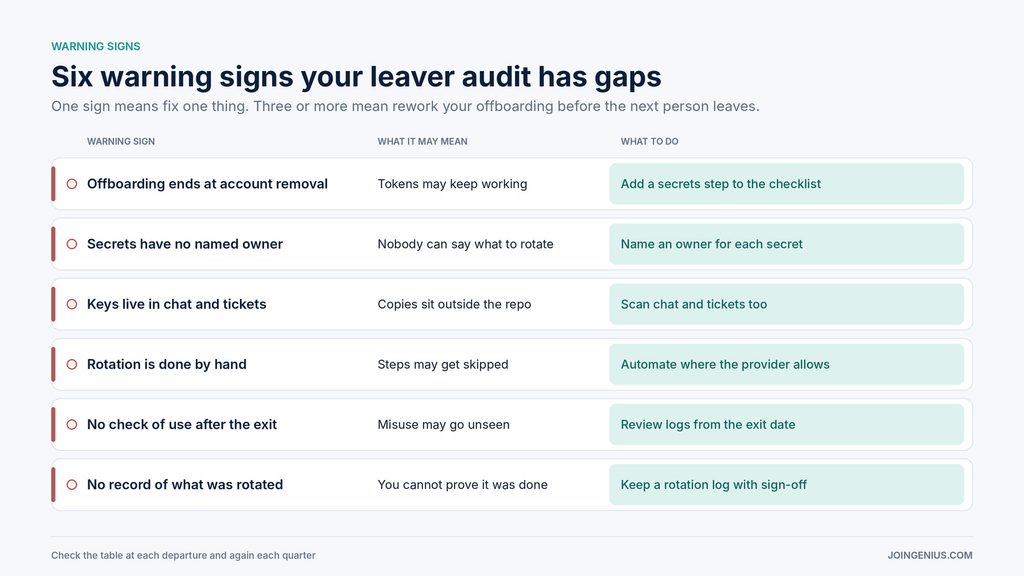
Warning Signs Your Leaver Audit Has Gaps, and What to Do About Each
Check this table at each departure and again each quarter. One sign means fix one thing. Three or more mean pause and rework your offboarding before the next person leaves.
Finish With Evidence, Not Assumptions
Removing an engineer from the repository takes a minute. Knowing which secrets they could reach, rotating them in a safe order and proving it took more care, and that is the part an audit exists for. Map the places, rank by what each secret can do, rotate and revoke, and keep a log a second person has signed. If the map, the log and the written confirmation agree, you can say the access ended with the person.