A team needs an agent that logs into a supplier portal, reads a table, and exports a file. A candidate shows a clean Playwright demo, and the team hires. Two weeks later, the script fails every few hours: a challenge page appears, the proxy drops, the login expires, and one page loads a second late. That is an illustration, not a case study, but it shows why a demo and a production job are different things.
This guide explains why browser automation engineers are hard to hire and how to test for the skill. It covers what the job involves, what makes it hard, what research says, how to run a paid test, and a table of warning signs. We found no study that ranks engineering specialties by difficulty or shows that browser automation engineers are harder to hire than others. “Hardest” is a claim we cannot prove. The case here is narrower: the job combines several hard problems at once. The advice rests on vendor documentation, a study of flaky tests, selection research, and our reasoning.
What the Job Involves
In our usage, a browser automation engineer builds and maintains scripts or agents that drive a real browser to do work on websites. The usual tools are Playwright, Puppeteer, and Selenium, and Steel, a browser infrastructure vendor, publishes connection guides for all three. That definition is ours.
The coding is the visible part. The rest is keeping the system working when sites change, networks fail, and defenses push back. Our guide to hiring DevOps engineers covers the operations side of that skill set, and our piece on niche technical candidates explains why job boards often miss people like this.
What Makes Browser Automation Hard: Anti-Bot Defenses, Proxies and Session State
Three problems stack on top of each other. These are drawn from vendor documentation, so we treat the descriptions as that vendor’s view.
Anti-bot defenses. Steel’s documentation on CAPTCHA solving lists reCAPTCHA v2 and v3, Cloudflare Turnstile, image-to-text and slider challenges as auto-solved. It says DataDome, Imperva, Amazon WAF, and FunCAPTCHA are detected but not auto-solved, and that custom in-house CAPTCHAs are not supported. It also says solving is not guaranteed and adds latency, so the code must handle failures and set sensible timeouts. The same page tells users to respect target sites’ rate limits and terms of service. Our reading is that even with a good tool, an engineer must decide what to do when a challenge cannot be solved.
Proxies. Steel’s proxy documentation says proxies are off by default, so traffic uses datacenter IPs, and that managed residential proxies rotate automatically. It calls connection errors such as tunnel failures normal and usually transient, and it recommends retrying. It also warns that narrower geographic targeting shrinks the IP pool and may lower success rates. The engineer has to choose regions, retries, and what to log.
Session state. Steel describes a session as an isolated cloud browser instance with its own state, cookies, and storage. Its build-versus-buy post adds that a saved profile does not guarantee a valid login. A script that worked yesterday can fail today because a login quietly expired.
What the Evidence Shows, and What It Does Not
No research we found measures browser automation work directly, so these sources are adjacent.
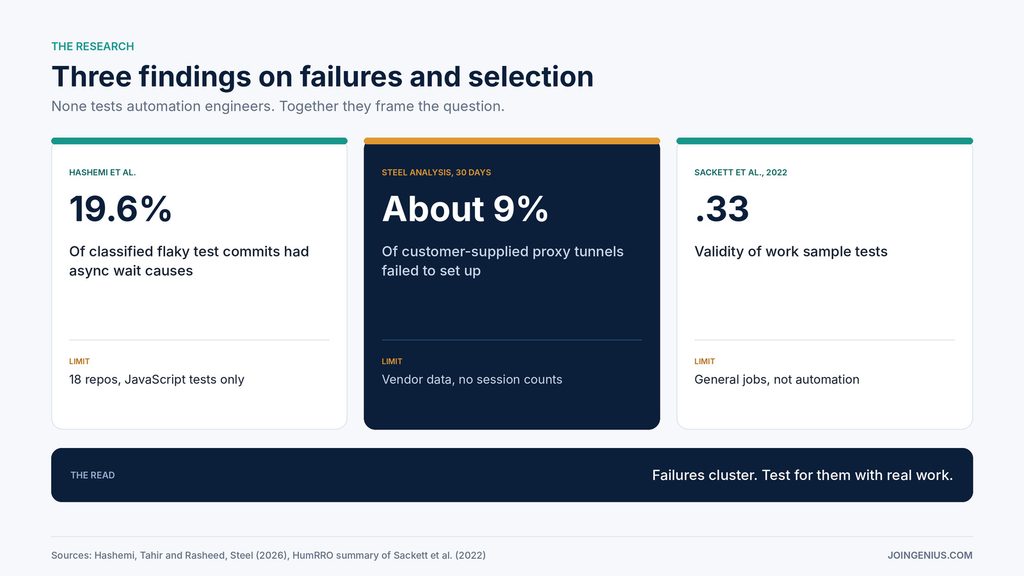
A study by Negar Hashemi, Amjed Tahir and Shawn Rasheed examined flaky tests in JavaScript projects. They analysed commits from 18 repositories among the 40 most-starred JavaScript projects on GitHub and classified 358 of them by cause. Concurrency accounted for 20.7% and async wait for 19.6%, network for 12.6% and UI for 5.9%. The authors say the keyword search may miss flaky tests with no commits, and the findings may not generalize. Flaky tests are not browser agents, though the causes (timing, concurrency, networks) overlap with what automation engineers fight.
On proxies, Steel’s own analysis reports that customer-supplied proxies failed to establish a tunnel about 9% of the time against about 0.4% for Steel-managed ones. That is a vendor’s analysis of its own service, covers 30 days of tunnel setup only, and gives no session counts. The authors also say the failure signal is ambiguous. Treat it as a hint about where failures come from, not a benchmark.
Our reasoning is that failures cluster in timing, networks, and state, and a strong candidate has met them before. That is an inference, not a finding.
Why This Makes Hiring Hard
Our reasoning is that the difficulty is in the mix. A candidate may be strong in front-end code and weak on networks, or strong on infrastructure and unfamiliar with how pages load. Resumes list tools, not the failures a person has fixed, and a standard coding interview rarely produces a login that expires halfway through. That is our view, not a finding.
The risk of a wrong hire is also uneven. A weak hire can still produce a working demo, so the gap shows up weeks later as flaky runs and unexplained failures. Our HR scorecard guide is a starting point for writing criteria before interviews, and our technical talent pipeline guide covers sourcing.
Test Candidates With a Paid Failure Test
A paid task shows what a resume hides: how someone behaves when things break. Selection research supports a shared, realistic task, with a limit. A HumRRO summary of Sackett, Zhang, Berry and Lievens (2022) reports revised validity estimates in which structured interviews were highest at .42, and work sample tests were .33.
The authors argue that earlier estimates were inflated by range restriction corrections, and they note that structured interview validity varies considerably. These figures concern job performance in general, not browser automation. They support a modest point: the same realistic task, scored the same way, beats improvising. Our interview guide covers how to structure the conversation.
To run the test, build a small site you control, not a live third-party site. Give it a login that expires after a set time, a page that loads slowly, a flaky endpoint that fails some requests, and a challenge page that cannot be solved automatically. Ask every candidate to write a script that logs in, reads a table, and exports it, within a time limit such as three hours.
Then ask for a short note on what they would log, when they would retry, and when they would stop and hand off to a person. Pay for the time, since unpaid tests ask people to work for nothing and may put off experienced candidates. That is our view, not a finding.
Write the rubric before you read any submissions. Useful criteria include how the script handles the expired login, whether retries are limited and logged, what happens at the unsolvable challenge, and whether the candidate asked what the script is allowed to access.
A Four-Step Plan to Hire a Browser Automation Engineer
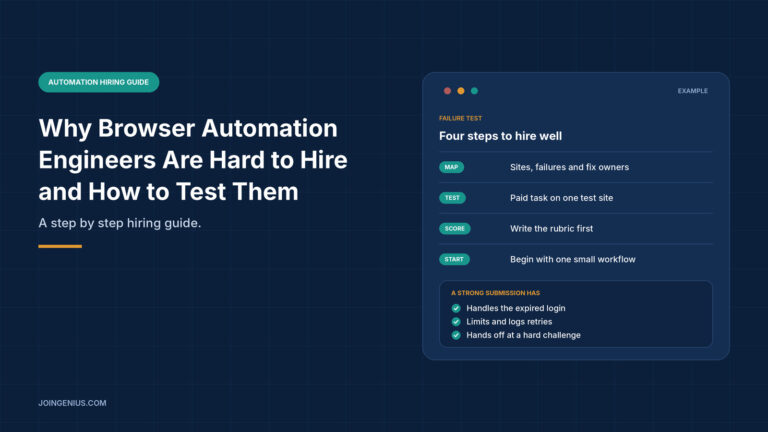
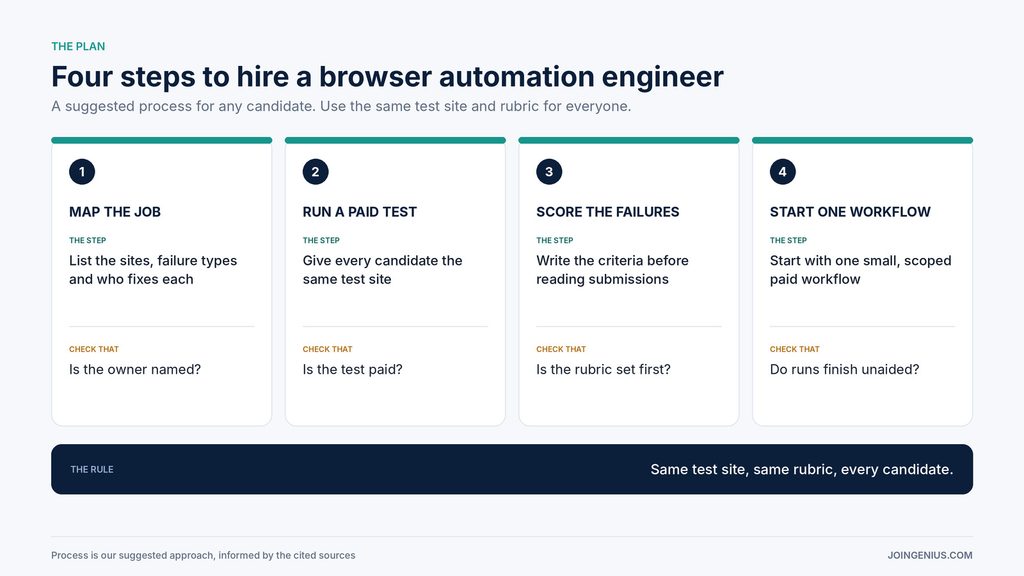
Use this four-step plan for every hire. It is our suggested process, informed by the sources above.
- Map the job. List the sites, the failure types, and who owns the fix.
- Run a paid test. Give every candidate the same test site and pay for their time.
- Score the failures. Write the criteria before you read any submissions.
- Start with one workflow. Begin with one small paid workflow before a longer commitment.
The last step matters because a test shows how someone handles planned failures, and a first real workflow shows how they handle the ones nobody predicted.
Measure Whether the Hire Works
Track how often runs finish without a person stepping in, how many failures are explained rather than mysterious, how long it takes to fix a broken run, and whether logs show what went wrong. Judge the engineer over several weeks, since one clean run proves little, and be careful about crediting the engineer for changes caused by the sites themselves. These measures are our suggestions, not findings.
Warning Signs Your Browser Automation Hire Is Risky, and What to Do About Each
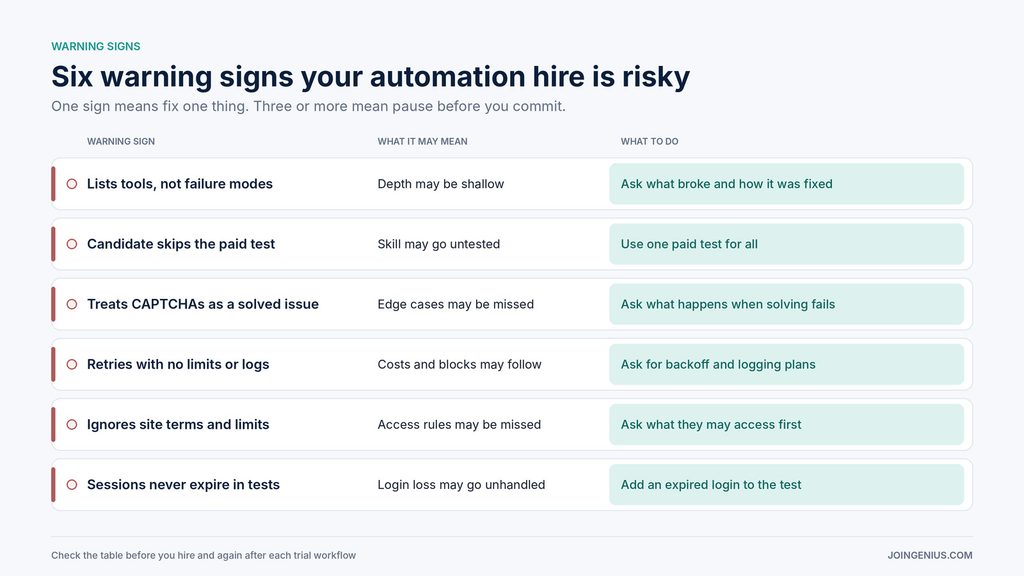
Check this table before you hire and after each trial workflow. One sign means fix one thing. Three or more mean pause before you commit.
| Warning sign | What it may mean | What to do |
|---|---|---|
| Lists tools, not failure modes | Depth may be shallow | Ask what broke and how it was fixed |
| Candidate skips the paid test | Skill may go untested | Use one paid test for all |
| Treats CAPTCHAs as a solved issue | Edge cases may be missed | Ask what happens when solving fails |
| Retries with no limits or logs | Costs and blocks may follow | Ask for backoff and logging plans |
| Ignores site terms and limits | Access rules may be missed | Ask what they may access first |
| Sessions never expire in tests | Login loss may go unhandled | Add an expired login to the test |
Hire for Failure Handling, Then Test for It
A good browser automation engineer makes a script that keeps working, or that stops safely and tells you why. Map the job first, give every candidate the same paid test, score the results against a rubric written in advance, and start with one small workflow. We found no study proving that this method picks better engineers, but each step replaces a guess with evidence. If the first workflow finishes cleanly and its failures are logged and explained, you have a better reason to keep the person than any polished demo.