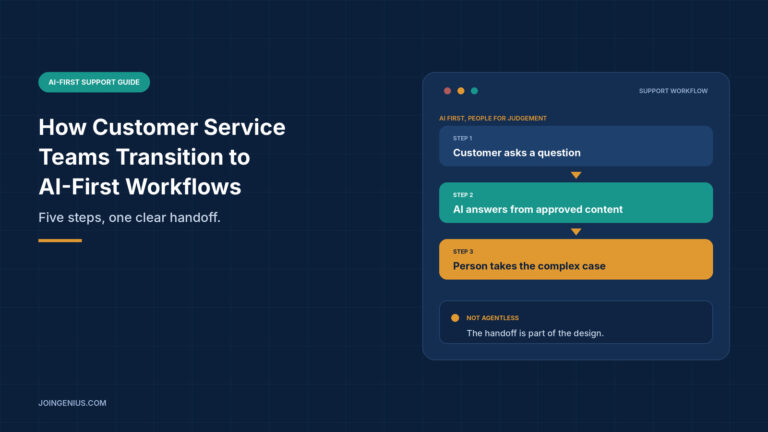
Moving to an AI-first support model sounds like a technology project. In practice it is mostly a change in how a team works. An AI-first workflow means the AI is the first responder for routine questions, and people step in for the cases that need judgement. It does not mean an agentless team.
Gartner’s December 2025 survey of 321 customer service and support leaders points the same way. Only 20% said they had reduced agent staffing because of AI, 55% reported stable staffing while handling higher customer volumes, and 42% were hiring specialized roles. The press release does not describe the survey method, so treat the figures as a signal. This guide walks through five steps for a transition that works for customers and for the team, and ends with a table of warning signs to check along the way.
Start With the Questions Customers Actually Ask
Before you choose a tool or write a single prompt, find out what your customers really ask. Pull three months of tickets and chats, group them by intent, and sort each group into one of three buckets:
- Repeatable: the answer is the same every time, such as opening hours, plan features or how to reset a password
- Needs data: the answer depends on the customer’s account or order, such as order status or appointment times
- Needs judgement: the answer involves a policy exception, an upset customer or a decision
The first bucket is where AI-first workflows start. The second needs a connection to your systems, not just documents. The third stays with people. This sorting also gives you a baseline, so you can tell later whether the change helped. Record a few starting numbers at this stage, so later comparisons are fair:
- First response time: how long a customer waits for the first useful reply
- Time to resolution: how long a typical issue stays open
- Share needing a person: how many conversations end up with an agent
- Customer satisfaction: the score you already collect, split by topic where you can If you are mapping wider automation, this overview of AI process automation shows how to pick the right tasks.
Prepare Your Knowledge Base Before You Switch the Agent On
An AI agent can only be as reliable as the content behind it. Chatwith’s guide to building an AI support knowledge base is one practical approach, and its core ideas apply whatever tool you use. Start by recording an approved answer, a source and an owner for each customer question you grouped earlier.
From there, a few habits make the content easier for an AI to use correctly:
- Write each article around one task. Lead with the answer, then give conditions, steps and exceptions.
- Use one template. A consistent structure with a question, a short answer, conditions, steps, exceptions and an escalation path makes gaps easy to spot.
- Remove contradictions first. Choose one canonical source for each rule and retire the older versions.
- Keep live data out of static articles. Order status and availability belong in connected systems, not in a policy page that goes out of date.
Before launch, test the agent with questions that have rules and exceptions, plus one question that has no answer at all. Check that it answers correctly, keeps the conditions and does not promise anything unsupported. Keep the failures as a set you can run again after every content change.

Decide Where the AI Stops and a Person Takes Over
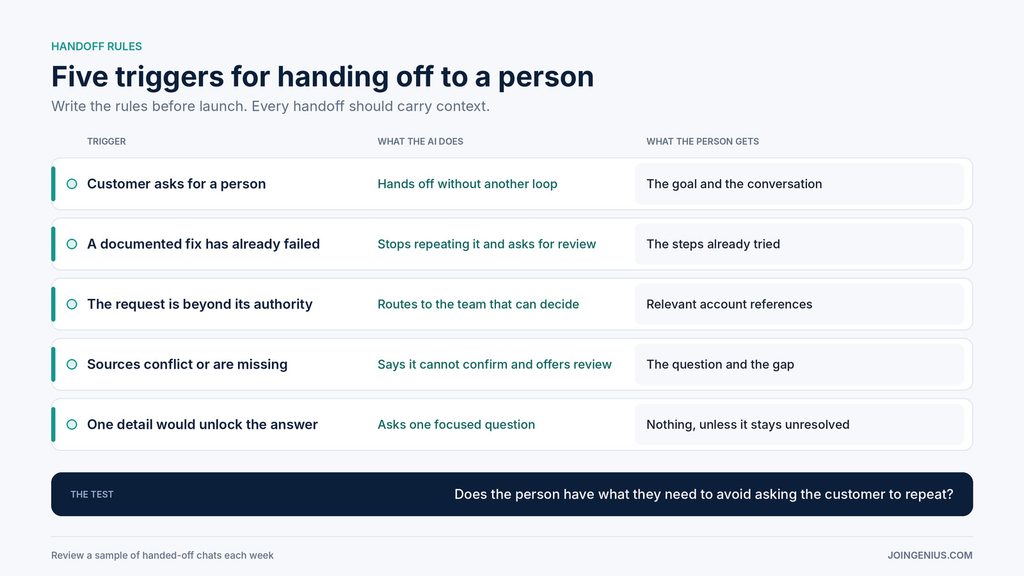
The handoff is where an AI-first workflow succeeds or fails. Customers forgive a bot that knows its limits. They do not forgive one that keeps them in a loop. Write the rules down before launch, and list separately what the AI can do from approved content and what needs a teammate.
Common triggers for a handoff include a customer asking for a person, a fix that has already failed, a request beyond what the AI is allowed to do, and answers that rest on conflicting or missing sources. When a handoff happens, the person should receive the customer’s goal, the recent conversation and the steps already tried, so the customer never has to repeat themselves. Tell the customer honestly what happens next: whether the conversation is queued, whether someone has accepted it, or whether it is outside staffed hours. Promise only response times your team can meet.
Check the mechanics too. Automated replies should stop after a handoff, the same event should not notify the team repeatedly, and someone should be named to decide when a conversation can return to the AI.
Retrain Agents for the Work That Remains
A transition changes what agents do all day, and they should hear that from you before they work it out alone. A 2026 Gartner release that draws on a survey of 321 service leaders found that 85% were adding new tasks to frontline agent roles and 75% were shifting agents into entirely new roles. Its December release said organizations were hiring AI strategists, conversational AI designers and automation analysts.
For most teams that means three shifts. Routine questions move to the AI, so agents spend more time on complex cases. Some agents review AI answers and flag gaps. Others take ownership of the content the AI relies on. Each of these roles needs a clear description, a route for growth and a fair way to measure it, so the shift reads as progress and not as a demotion. Say plainly which roles are new, how people can move into them and when the training starts.
Map the skills each of these needs, and use a training matrix to see who is ready and who needs support. Cross-training employees across topics also helps, because the cases that reach people will be harder and more varied than before.
Tell Customers and Staff What Is Changing
People accept automation more easily when it is explained. For customers, say clearly that they are talking to an AI, show how to reach a person at any point, and avoid wording that suggests a human is typing. For staff, explain why the change is happening, what it means for their role and when they will get training. Silence fills with rumour, and a team that expects to be replaced will not help you improve the content or flag gaps.
Plan a feedback route as well. Agents see the failures first, so give them a simple way to report a wrong answer or a missing article, and make sure someone acts on each report within the week.
Launch in Phases, Then Measure
Resist the urge to switch everything on at once. Start with one topic or one channel, review a sample of conversations, and widen the scope only when the sample looks right. If part of your support runs through a partner, bring them into the plan early, since this guide to customer service outsourcing companies covers how those relationships work.
Measure more than ticket volume. Track missed escalations, where a customer needed a person and did not get one, separately from unnecessary escalations, where the AI could have answered. Hold a short weekly review that asks which customers got stuck, which handoffs lacked context and which questions the content should cover next.
Keep people in the picture for a good reason. In a separate Gartner survey of 5,801 US customers, fielded in early 2025, 54% said they trust human agents more than AI for product or service recommendations, and 32% trusted AI more.

Warning Signs Your AI-First Transition Is Going Wrong, and What to Do About Each
Check this table at the end of each phase. One sign means fix one thing. Three or more mean pause the rollout and revisit the plan.

Make the Transition a Team Project
The teams that handle this well treat it as a change in how the work is shared between people and software. They learn what customers ask, fix the content, set clear handoffs, retrain agents and review results every week. Start with the question audit and let the rest follow from what you find.