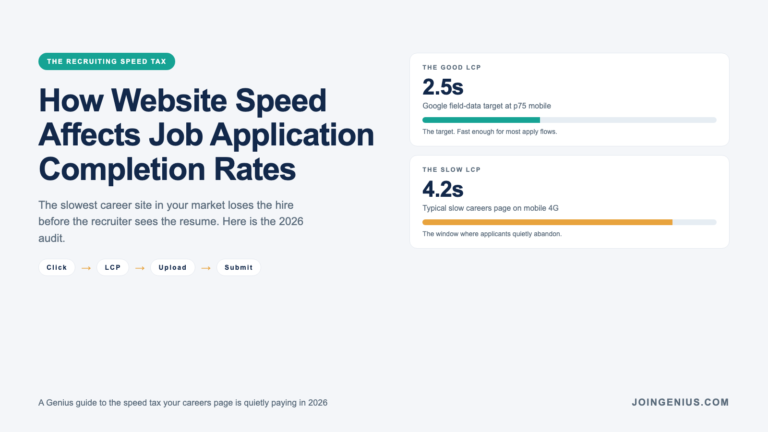
A slow career site is the quietest form of recruiting leakage. The candidate opens the apply page on their phone during a commute, the Largest Contentful Paint takes 4.2 seconds, the file-upload button renders half a second late, and they close the tab. No bounce event hits your ATS. No sourcing partner sees a decline. The hire you needed never shows up, and the function assumes the market is tight.
The function is wrong. Modern hiring workflows have made it easier than ever to put a slick-looking career site live, which is also what makes it easier than ever to ship one that quietly loses 20% of its applicants to load time. Below, we cover why career sites are especially vulnerable to speed drag and what a slow one actually costs you. We also cover how to measure the leak and what to fix before you spend another dollar on sourcing.
Why Career Sites Are Especially Vulnerable To Speed Drag
Career pages carry a specific kind of friction a product page does not. The visitor arrived through an ad or a job board. They are on their phone and the next step requires file upload or form fill. Every second of load time compounds against an audience that is already low on patience.
Mobile Is The Default, Not The Exception
Most job applications in 2026 start on a phone. A career site tuned for a desktop recruiter demo is a career site that silently penalizes the person it is trying to hire.
The Visitor Is Already Interrupted
A candidate on a career site is usually mid-day or mid-commute. They do not have the five minutes of focus you need them to spend on a slow apply flow. The attention budget is measured in seconds, and the Largest Contentful Paint takes a share of it.
File Uploads Punish Weak Networks
A resume upload on 4G or spotty wifi is a brittle moment. Add a heavy script bundle or a chatbot that blocks interaction, and the upload fails before it starts.
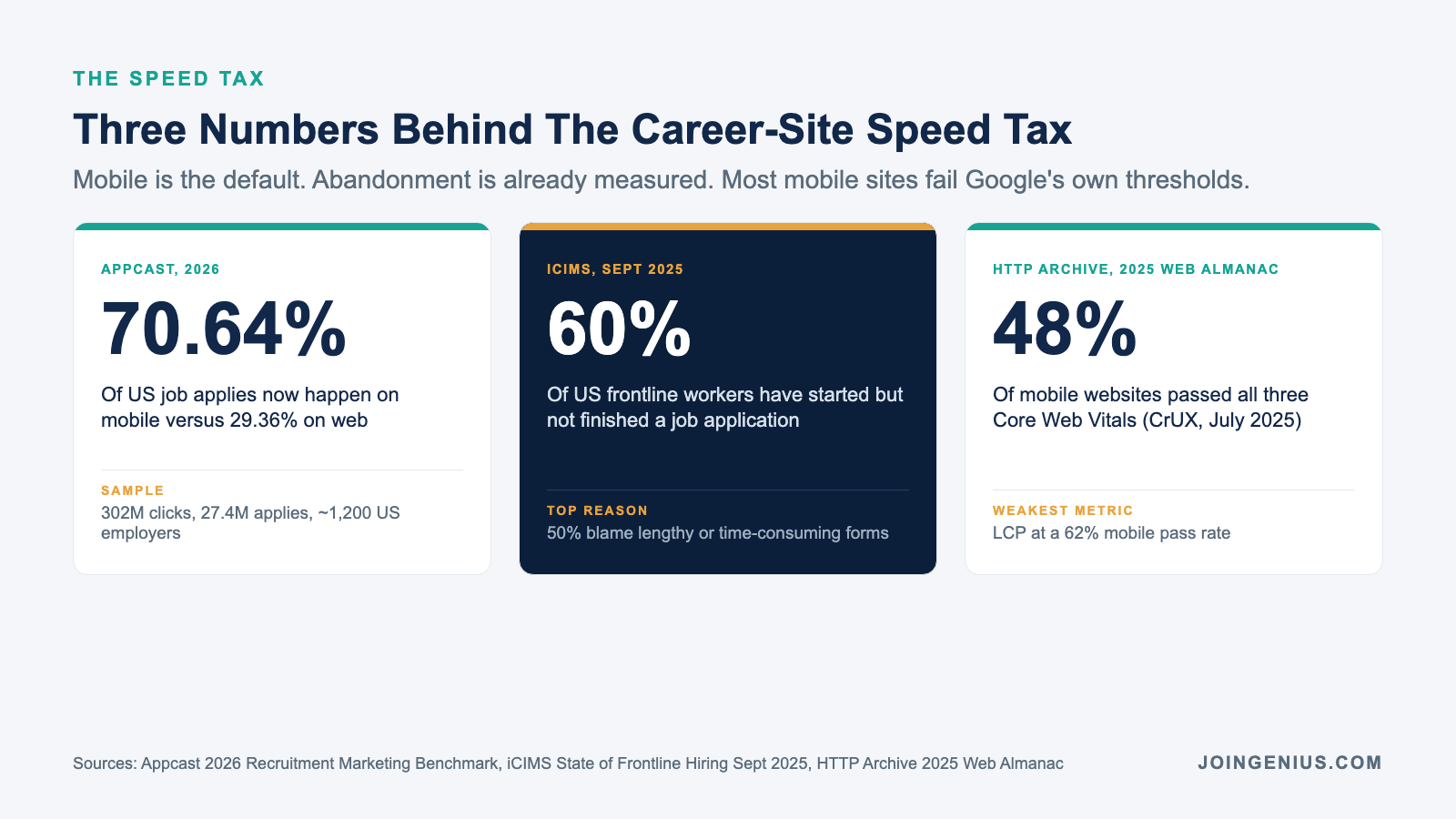
Appcast’s 2026 Recruitment Marketing Benchmark Report, drawing on 302 million clicks and 27.4 million applies from nearly 1,200 US employers across 2025, found that 70.64% of job applies now happen on mobile versus 29.36% on web. The careers page that performs poorly on a phone is the careers page losing seven out of every ten applicants it could win.
What a Slow Career Site Actually Costs You
If a career site is bleeding applicants to speed, the leak is not in a dashboard anyone currently reads. These are the four places the cost shows up.
Application Starts That Never Reach Submit
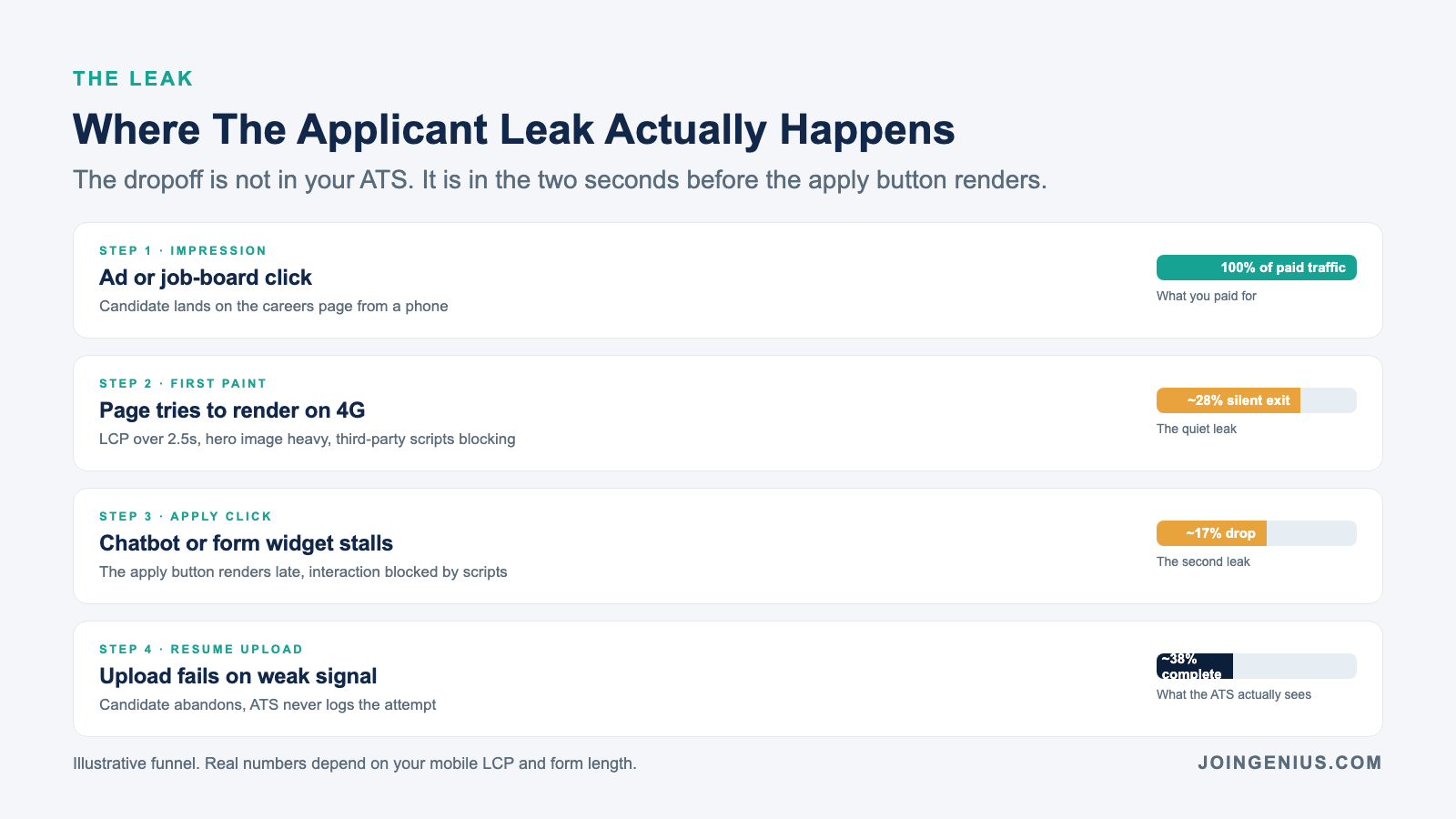
The classic funnel step. The visitor clicked apply, the page was slow, and they closed the tab before step two. Your ATS logs a start without a submission, which looks like a bad candidate rather than a bad page.
Resume Uploads That Silently Fail
A slow page competes with the upload for bandwidth. The file hangs, the user gives up, and the ATS never records the attempt. The leak is invisible to recruiting but obvious to the candidate, who then tells their network your careers page is broken.
Candidate Perception Of The Company
A careers page that loads slowly reads as “this company does not run a tight ship.” Candidates are already triangulating culture from the job description, so the technical polish of the apply flow is doing more brand work than the function thinks.
Paid Media Spend That Converts Below Benchmark
The sourcing budget on a job board or paid campaign is priced on an industry benchmark apply rate. A slow career page drags your rate below that benchmark, and the cost per hire quietly moves up quarter over quarter.
iCIMS’ September 2025 State of Frontline Hiring Report, based on a survey of 1,000 US frontline workers and 1,000 hiring managers, found that 60% of workers have started but not finished a job application, with 50% blaming lengthy or time-consuming forms as the top reason. In hospitality the abandonment rate reaches 68%. The leak is already measured. Most teams simply never ask whose fault it is.
How to Measure If Your Career Site Is Costing You Hires
A speed audit of the careers page is a 60-minute job. These are the four checks that find the leak.
Run A Lab Test From A Phone-Like Profile
Open Lighthouse or PageSpeed Insights on the apply page from a throttled mobile profile. Focus on Largest Contentful Paint and Interaction to Next Paint. Also pull the time to interactivity. If any of the three sit above the “good” threshold, you have found the leak.
Set Up Continuous Loading Time Monitoring
A one-off lab test tells you how the page performed on a Tuesday. A tool for continuous loading time monitoring tells you how it performs across every ad campaign and every third-party script a marketing team quietly adds on a Friday. The leak often opens up a week after someone changed something nobody flagged.
Audit The Third-Party Script Count
Chatbots and analytics tags accumulate on a career site faster than anywhere else on the marketing stack. A/B testing tools and candidate-matching widgets usually arrive on top of them. A single heavy script can double the LCP. Count them, kill the ones that do not earn their weight.
Watch The ATS Funnel By Device
Pull the application funnel broken out by mobile and desktop. If the mobile completion rate sits 10 points below desktop, speed is almost always the first suspect, before question design or form length.
What to Fix First on a Slow Careers Page
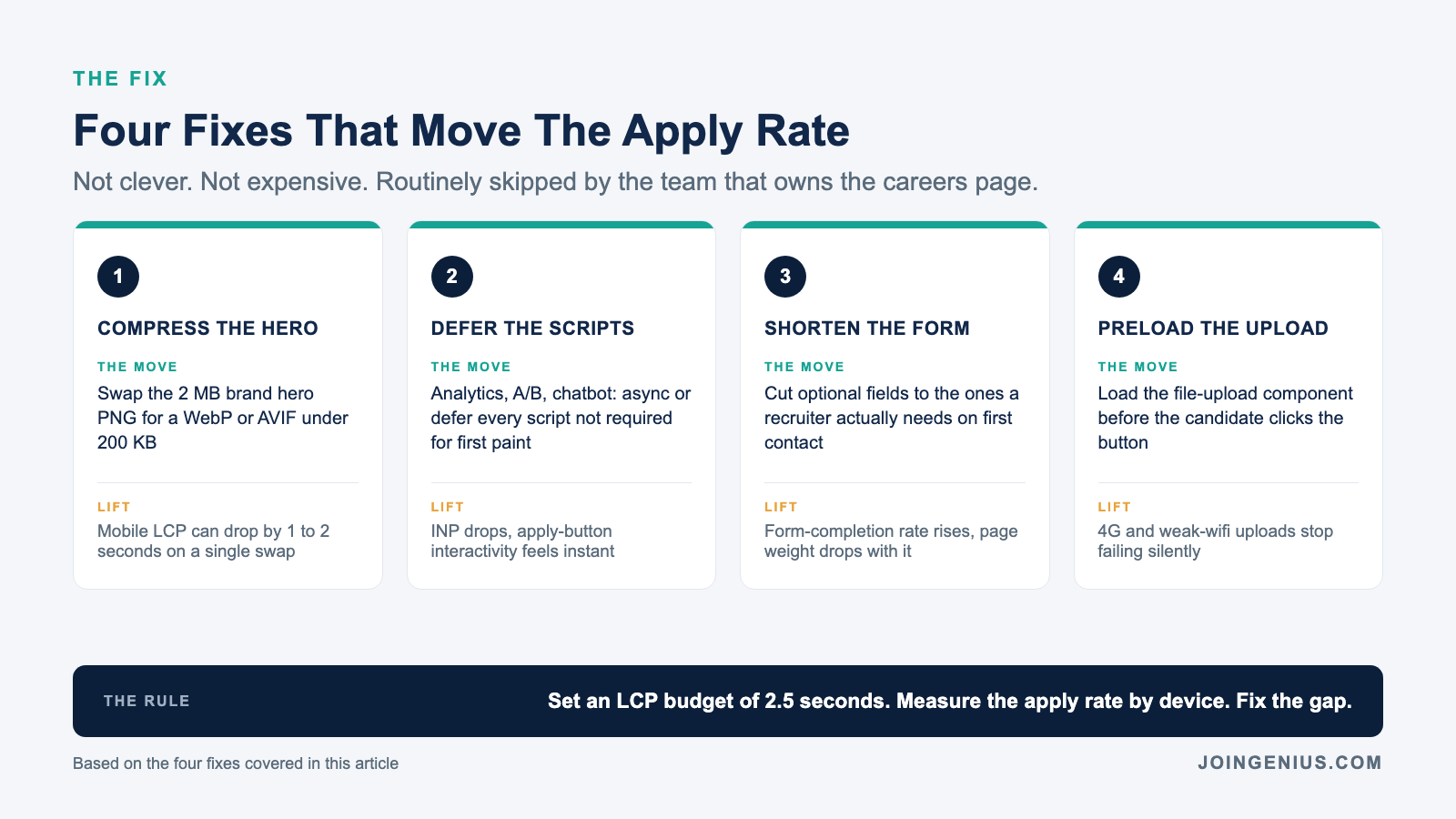
Four fixes consistently move the application completion rate inside a quarter. Cut these first.
Compress And Lazy-Load Every Image Above The Fold
The hero image on a careers page is often a 2 MB PNG from the brand team. Replace it with an optimized WebP or AVIF, lazy-load everything below the fold, and watch LCP drop by half.
Defer Non-Essential Scripts
Any analytics or chatbot script that is not required for the first paint belongs behind an async or defer attribute. How resume formatting kills strong candidates is a close cousin problem on the other side of the pipeline, and both share the same lesson, which is that the thing you did for operational convenience is costing you the candidate.
Collapse The Apply Form To The Minimum Required Fields
A long form hurts both completion and speed. Every optional field is more DOM and more JavaScript validation, plus more cognitive load for the applicant. Cut the form to the fields the recruiter actually needs on first contact.
Preload The Resume Upload Component
The file-upload widget often loads only after the user clicks the button. Preload it, and the one moment the candidate is most ready to abandon the flow (the file picker opening on 4G) feels instant instead of broken.
What to Stop Doing (It’s Pushing Candidates Out)
The moves that quietly inflate the dropoff rate are rarely the ones recruiting audits. These are the four to cut first.
Shipping A Careers Microsite With No Performance Budget
If the marketing team shipped the careers page as a microsite without a performance budget, no one on the team is accountable for the LCP. Set a budget (under 2.5 seconds LCP and under 200 ms INP) and assign the owner.
Loading A Chatbot Before The Apply Button
A chatbot that blocks the apply click for two seconds is a chatbot that is costing you applications. Load the apply flow first, chat second.
Treating Lighthouse Scores As Vanity Metrics
A Lighthouse score of 42 is not a design opinion. It is the lab-measured reality of what the candidate is about to experience. Treat it as a required KPI, not a nice-to-have.
Running Paid Media Against An Unaudited Page
Paying for traffic to a slow page is the fastest way to drag your cost per hire up. Talent acquisition analytics 101 teaches the same discipline, which is that an unmeasured step in the funnel is the step that moves last.
How to Measure the Fix Over Time
A good speed fix shows up in the data within a quarter. These are the four signals to track.
Mobile LCP At The 75th Percentile
The Google-recommended threshold for Largest Contentful Paint is 2.5 seconds at the 75th percentile of mobile sessions. Measure field data, not just lab data.
Device-Split Apply Completion Rate
The mobile apply rate divided by the desktop apply rate. The gap should close as speed improves. A persistent gap after a speed fix means the next bottleneck is form design, not load time.
Cost Per Qualified Applicant
The paid-media cost to produce a candidate who makes it to a first-round screen. A slow page inflates this number faster than any other technical issue.
A Short Career-Site Speed Scorecard
| What To Measure | Weak Signal | Strong Signal |
|---|---|---|
| Mobile LCP (p75) | Over 4 seconds | Under 2.5 seconds |
| Third-party scripts | Dozens, unaudited | A short, named list |
| Device completion gap | Mobile 10+ points below desktop | Mobile within 3 points of desktop |
| Monitoring | Lab-only, run once | Field data, continuous |
The HTTP Archive’s 2025 Web Almanac Performance chapter, based on CrUX real-user data from July 2025, reports that only 48% of mobile websites pass all three Core Web Vitals, with Largest Contentful Paint the weakest metric at a 62% mobile pass rate. If your career site is in the failing half, you are also inside the window where candidates abandon before the apply button even renders.
Conclusion
A fast career site is one of the cheapest edges a recruiting function can buy. The fix lives in a budget already paid (your website), the lift is measurable inside 90 days, and the leak it closes has been quietly costing you qualified candidates for every quarter you have not audited it. The sourcing budget you were about to raise might belong on page speed instead.
We built Genius so recruiting teams can finally staff the roles that otherwise walk away from a slow apply flow. We place the top 1% of recruiting and operations talent from the Philippines and Latin America, at around 80% less than comparable local hires. The relationship stays direct, with no monthly agency fees and a 6-month replacement guarantee on every placement. If the next recruiting hire is the one who finally runs the funnel the way the paid dashboards promise, see how we source and place the talent that actually closes the loop.