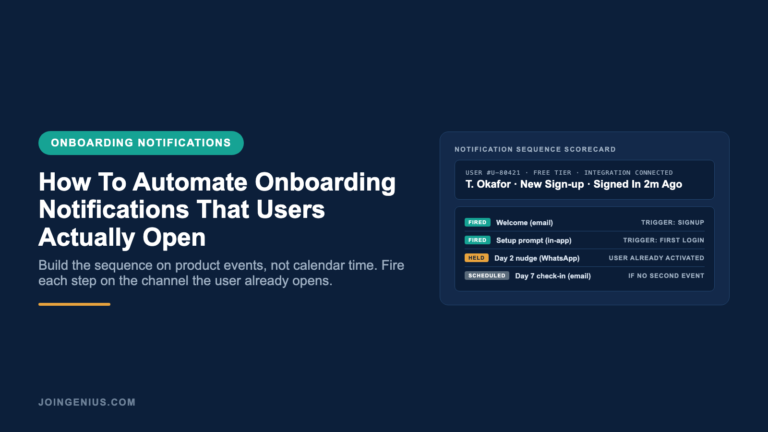
Onboarding notifications are the only messages a user actually wants when a product is new. The first week decides whether a sign-up activates or churns, which is why growth teams run a sequence of welcome, setup prompt, first-value nudge, and day-7 check-in, usually owned by customer success teams rather than by marketing.
HubSpot’s 2026 State of Marketing report shows 80 percent of marketers use AI for content creation, so the sequences are easier to draft than ever. The harder problem is reliability: making sure the right message fires at the right trigger to the right channel, without becoming spam. This guide walks the stack and the schema behind that.
Why Most Onboarding Notification Sequences Fail
The failure mode is not the tool. The failure mode is that the sequence was designed around marketing touchpoints instead of product events, so the welcome fires when the sign-up happens and then everything after that runs on a clock, not on behavior.
A user who signs up at 2 AM and connects their first integration at 2:05 AM gets the same day-2 setup email as a user who signed up and never came back. The first user is spammed, which costs one of the few trust events the product has. The second user is unsupported. Both churn for different reasons.
The pattern shows up in four places. Each failure mode is a scheduling or data choice, not a copy choice, and each one has a fix that lives in the trigger schema rather than in the subject line.
| Failure Mode | Symptom By Day 7 | Why It Happens | Fix |
|---|---|---|---|
| Calendar-timer drip | New user gets day-2 email after activating on day 1 | Sequence runs on signup date, not on product events | Tie each step to a product event or the absence of one |
| One channel for all | Sign-up converts and replies go to a dead inbox | Transactional and marketing collapsed into one tool | Split transactional notification infra from marketing automation |
| Silent failure | A trigger misfires and nobody knows for a week | No delivery monitoring on transactional sends | Pager alert on per-template failure rate above 2 percent |
| Static copy for every segment | Beta tester gets the same setup email as the free user | No user-state model feeding the merge fields | Segment variables fed from a CDP, not from onboarding form fields |
The failure modes connect through a single cause, which is that the sequence was built on calendar time instead of product time. The next section walks the data model that makes product time usable as a trigger.
The Data Model That Makes Automation Actually Work
Automation is a data problem before it is a messaging problem. The trigger schema needs three things.
The first is an event stream from the product. The second is a user state object updated by those events. The third is a predicate language that lets a marketer or a growth engineer write when something happened and when something else did not. Everything else is interface.
This is why a customer data platform is on the critical path for onboarding automation. A real customer data platform collects the product events in one place and builds the user state once and exposes both to every downstream tool.
The same setup event then powers an email sequence, a WhatsApp drip, an in-app nudge, and the day-7 review for customer success. No tool has to re-derive the user state on its own, which is where most onboarding automations go wrong in year two.
Skip this layer and the sequence works for the first segment, breaks silently for the second, and dies when the product ships its next feature that changes the activation event. Automation without a shared data model is a time bomb with a cadence.
Pick The Channel Before You Pick The Tool
Channel is the second-biggest choice after the data model, and most teams make it last. The default stack is email for everything, which worked in 2015 and is a slow leak in 2026. Open rates on cold or transactional email outside North America are a coin flip. Spam filters and inbox tabs and corporate mail scanners eat the rest.
Twilio’s 2025 State of Customer Engagement report, based on 637 business leaders and 7,640 consumers, shows 75 percent of business leaders plan to invest in Rich Communication Services. The investment signal is clear, which is that transactional and onboarding messages are moving onto channels users already open.
The right channel depends on who the user is. For global consumer products, especially those with users in India and Brazil and Southeast Asia, WhatsApp is now the default channel. For B2B SaaS where the buyer is in Slack all day, in-app and email together will outperform. For transactional moments like payment or shipping confirmation, SMS or RCS beats both.
Teams building WhatsApp into the onboarding sequence usually route it through an official Business Solution Provider. AiSensy is one of the larger players in that layer, a Meta BSP that gives a platform for WhatsApp automation across triggered journeys and templated broadcasts and webhook-driven notifications.
The free tier covers 1,000 service messages per month, so a small onboarding sequence can be built and tested before any card is swiped.
Two caveats before a team commits. The platform is India-first, with INR pricing and a logo wall of Indian brands, so a US-focused SaaS will pay per-country WhatsApp message rates and should model those before signing.
The template approval and rate limits are set by Meta, not by the BSP, which means the real limit on volume is the WhatsApp Business account tier, not the plan tier.
The Automation Stack That Fires Reliably
An onboarding stack has four moving parts. There is the data layer (CDP or warehouse), the trigger engine (orchestration or workflow tool), the channel infrastructure (email, SMS, WhatsApp, push APIs), and the observability layer that tells you when a template failed or a deliverability rate dropped.
Most teams collapse two of these into one tool and lose the ability to debug the sequence.
A trigger engine should not also be the send infrastructure, because then a failed send looks like a missed trigger. The team spends a week finding out that the issue was a rate limit at the channel rather than a logic bug in the sequence.
The stack can be assembled from best-of-breed tools, which is usually cheaper and more reliable than a single-vendor suite. A CDP for data, a workflow tool for triggers, dedicated APIs for each channel, and a lightweight observability layer that pings when any template fails above a threshold. That is a four-tool stack that runs any reasonable onboarding sequence.
The alternative is a suite that promises to do all four things from one console. Suites are faster to set up and easier to buy for, but they have a single failure mode, which is that any one broken module stalls the entire sequence until the vendor patches it.
A useful heuristic is that the stack should degrade gracefully. If the WhatsApp provider is down, the email sequence still fires.
If the CDP is slow, the trigger engine falls back to the last-known user state and marks the send as degraded rather than dropping it. The sequence that assumes every service is up is the sequence that produces a quiet failure the first time a vendor has a bad Tuesday.
How To Measure If The Sequence Is Working
Activation is the metric. Pick the one product event that defines a real user, and measure the percentage of sign-ups that hit it inside the first week. Then watch the same number across day 1 and day 30 to catch the two failure modes, instant spam and slow silence.
The measurement cadence has to match the engineering cadence that ships the sequence. Litmus’s State of Email 2026 report, based on 500 marketing professionals, shows 78 percent of teams produce and deploy a single email in three days or less. Sequence rebuilds have to ship inside that window.
Unsubscribe and reply rates are the leading edge of trouble. Unsubscribe above 0.3 percent on a transactional sequence is a sign that a marketing message slipped into a transactional channel. Reply volume above 2 percent means the sequence is routing users to customer service reps who are not staffed for it.
The last signal is funnel attribution, which looks ugly in onboarding because the sequence is firing against users who already converted. Ignore attribution here and watch the activation curve instead, because it is the only metric that connects the sequence to retention.
Teams that over-invest in attribution at the top of funnel often leak revenue here, similar to how B2B SaaS traffic that is not converting usually fails at the landing page, not at the top of the funnel.
Conclusion: The Trigger Earns The Open
Onboarding notifications are the only part of the marketing stack where the message is wanted, so the cost of a sloppy sequence is paid in churn rather than open rate.
The fix is not a new tool. The fix is a data model that tracks product events and a channel choice that matches the user and a stack that fails loudly rather than quietly.
Ship the schema first. Run the sequence on product events, not calendar time. Measure activation, not opens. That is how onboarding notifications stop reading like spam and start reading like help. Genius can help with the customer success and marketing operations hires once the sequence is firing on its own.