When an office has twelve people, communication mostly takes care of itself. Everyone hears what is going on, questions get answered across the room and decisions spread by word of mouth. At forty people, the same habits start to fail. An announcement is missed. The same question is asked three times. A decision made in a hallway never reaches the people it affects.
The fixes do not have to be expensive. Most of them are rules, habits and small tools, not new software platforms. Poor communication is also one of the common causes of weak team spirit, as this guide to low morale at work explains, so the effort pays off in more than speed.
This guide covers why communication breaks as an office grows, how to decide where each kind of message lives, how to run shorter meetings, how to write decisions down, where small time savings come from, how to make onboarding and feedback routine, and how to check that any of it works. It ends with a table of warning signs and what to do about each.
Why Communication Breaks as Offices Grow
Three things change as a team gets bigger. First, there are more channels. Chat, email, calls, documents and meetings multiply, and people are no longer sure where to look. Second, informal knowledge stops reaching everyone. What used to be overheard is now known by only part of the team. Third, managers become the link between groups, and every message that has to pass through them slows down.
None of these problems is caused by bad people. They are caused by growth, and they respond well to simple structure.
Decide Where Each Kind of Message Lives
The cheapest improvement is also the most effective: agree on where each type of message goes. Most confusion comes from people using the wrong channel, such as sending an urgent request by email or burying a decision in a chat thread.

Write a one-page guide. Urgent matters go to a call or direct message, with a reply expected in minutes. Quick questions go to team chat, with an answer in a few hours. Decisions go to one written log that everyone can see. Announcements go to a single announcement channel, which people read and do not discuss. Reference material goes to a shared document or wiki, and people search it before asking. Feedback and sensitive topics belong in one-on-one conversations, never in public chat.
Share the guide with everyone, pin it where people will see it and review it after a month. Change whatever people ignore.
Run Shorter, Better Meetings
Meetings are often where communication goes to die. Too many people attend, nobody is sure of the purpose and nothing is written down afterward.
Ask one question before any meeting: is this to decide, to align or just to share? If it is only to share, send it in writing instead. If it is to decide or align, send an agenda a day ahead, invite only the people who need to be there and end with a list of actions, each with one owner and one date.
If you record meetings, the notes can do much of the work for you. This guide to AI transcription for teams covers how to turn recordings into recaps with clear decisions and action items, how to store them so they can be searched and how to handle consent and privacy.
Write Decisions Down in One Place
A decision that lives only in someone’s memory is a decision that will be made again, differently, later.
Keep a simple decision log in a shared document. For each entry, record the date, what was decided, who owns it, the reason and who needs to know. A few lines are enough. The log answers the question “wait, why did we do it this way?” without a meeting, and it helps new hires understand the history of the office.
Make writing the entry part of the decision itself. If it is not logged, it is not final.
Keyboard Shortcuts Save a Few Seconds That Add Up Across a Whole Team
Most people use a handful of shortcuts and ignore the rest. Each one saves only a few seconds, but a team that sends, searches, switches windows and joins calls all day repeats those actions hundreds of times. Faster routine actions leave more attention for reading and replying.

The obstacle is remembering them. A keyboard shortcut tool for Mac such as KeyCue shows the menu commands of the app you are in, plus system-wide hotkeys, in one table when you press a single shortcut. Its page says it works with any Mac application and names Slack, Zoom, Trello, Mail and Microsoft Office among its examples. It also says you can create custom shortcuts or overwrite existing ones from the menu bar.
Check the limits before you roll it out. The page describes a macOS app and does not mention Windows, so a mixed office will need another approach for non-Mac users. The one-time Basic license is for private use only, and professional use needs the Business plan, a yearly subscription, so check the pricing page for the current cost. The page also does not mention a free trial or team deployment.
The numbers in the image are an illustration, not a measured result. Ten seconds saved, thirty times a day, across twenty people comes to about a hundred minutes a day. Your real figures will differ, but the point holds: small savings multiply across a team.
Make Onboarding and Feedback Habits Cheap
New hires feel poor communication first, because they do not yet know whom to ask or where things are. A little structure helps a great deal. Write a one-page “how we work” guide that covers the channel rules, the meeting habits and where to find things. Give each new person a buddy for the first month, and hold a short check-in at two weeks to ask what has been confusing.
Then build a light rhythm that keeps everyone informed without adding meetings.
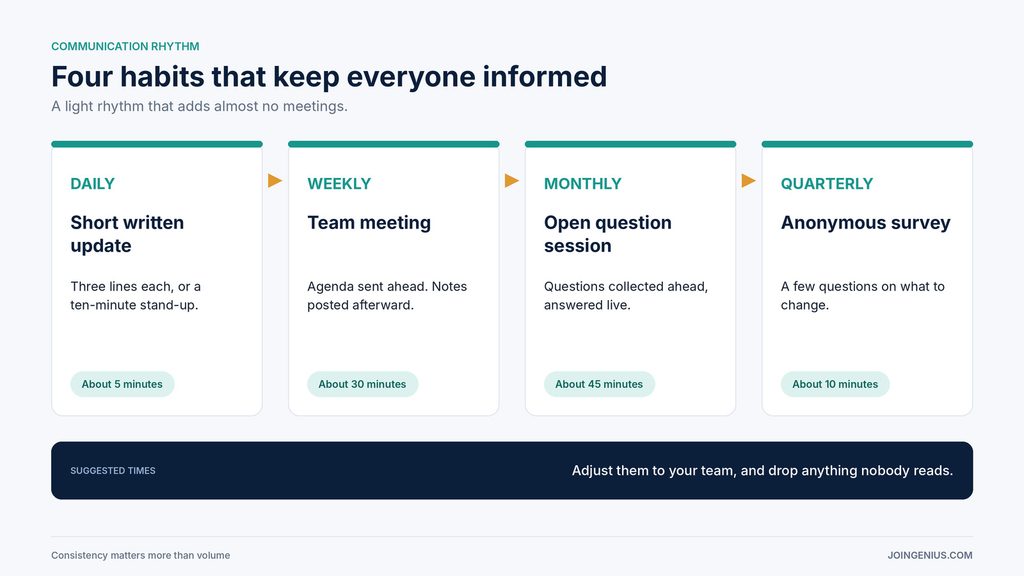
Each person posts a short written update daily, or the team holds a ten-minute stand-up. A weekly team meeting follows, with notes posted afterward. Once a month, collect questions ahead of time and answer them in an open session. Once a quarter, run a short anonymous survey to find out what people want to change. The times in the image are suggestions, so adjust them to your team.
Check Whether It Is Working
You do not need special software to know if communication is improving. Watch three things. How often do people ask questions that are already answered somewhere? How long does it take for a decision to reach everyone it affects? And do new hires say they knew where to find things in their first month?
Add one question to your quarterly survey: “Did you know what mattered most this week?” If the answers improve over time, your changes are working. If not, pick the biggest gap and fix it first.
Warning Signs Your Office Communication Is Slipping, and What to Do About Each
Some signs show up early. The table below pairs each sign with what it may mean and a practical next step.

One sign does not mean something is broken. Several together usually do. If you see more than two, start with the one that wastes the most time and fix only that this month.
Start With One Rule
Better internal communication in a growing office does not need a big budget. It needs a few agreed rules, written decisions, shorter meetings and habits that help new people find their feet. Small time savings, such as shortcuts, add up on top of that.
A practical first step is to write the one-page channel guide this week and share it with the whole team. When you are ready to look at tools, this roundup of executive assistant tools covers communication and task apps, both free and paid.